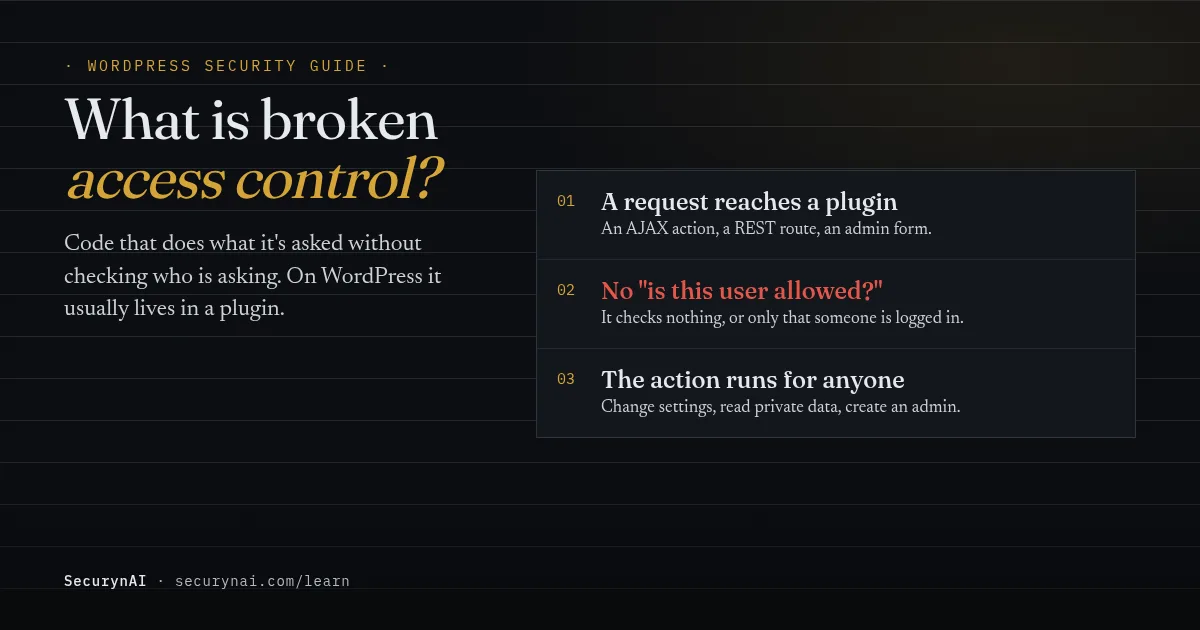
Broken access control is a flaw where software lets someone do something, or see something, that their permission level should never allow, because the code didn't check. On a WordPress site it almost always lives in a plugin: a feature built for administrators that answers anyone who asks.
If you're here because an alert named a broken access control flaw in a plugin you run, here's the safe first step. Don't panic and don't delete anything. Update that plugin, or deactivate it if no fix exists, then open your Users screen and look for administrators or role changes you don't recognise.
How broken access control works, in plain English
Every sensitive action should start with one question: is this user allowed to do this? OWASP, the web security project, puts it simply: "Access control enforces policy such that users cannot act outside of their intended permissions." Broken access control is what you get when that question is skipped or asked wrongly.
WordPress gives plugins the tools to ask it. Each role, from Subscriber up to Administrator, comes with a set of capabilities, such as manage_options for changing site settings. A plugin checks them with current_user_can(). The flaw appears when a plugin forgets, or checks the wrong thing.
Unlike SQL injection or cross-site scripting, nothing in the request is malformed. The attacker sends a normal request to a real feature. The feature just never checks who sent it.
The three shapes it takes on WordPress sites
- Anyone can do it. A feature meant for admins answers visitors who aren't logged in at all. This is the worst case, because every bot on the internet can try it.
- Any account can do it. The plugin checks that someone is logged in, but not their role. A Subscriber, or a shopper who just made an account at checkout, can use an admin feature.
- One user can reach another's data. A page shows order 1041 to its owner but never checks ownership, so changing the number shows someone else's order. Security people call this an insecure direct object reference.
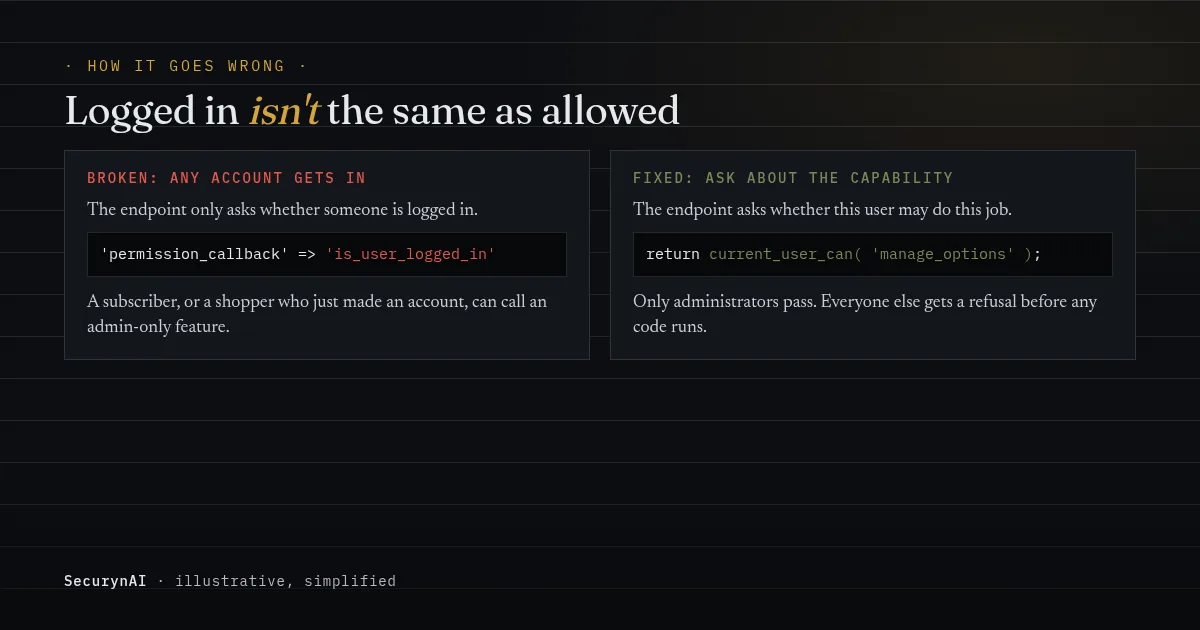
The second shape is common because of how WordPress wires things up. Its own reference says the wp_ajax_ hook "only fires for logged-in users." Being logged in is all WordPress checks there. Checking the role is the plugin's job.
Why a nonce isn't enough
Many plugins check a nonce, the one-time token WordPress puts in forms, and stop there. A nonce shows the request came from a form your site handed out. It doesn't show the user may perform the action. WordPress's nonce documentation is blunt: "Nonces should never be relied on for authentication, authorization, or access control."
Why broken access control tops the list of web risks
It's the most common serious flaw on the web, and on WordPress it's the one attackers use most. The OWASP Top 10 for 2025 keeps broken access control at number one and reports that "100% of the applications tested were found to have some form of broken access control."
WordPress shows the same pattern. Patchstack's State of WordPress Security in 2026 counted 11,334 new WordPress vulnerabilities in 2025, with 91% in plugins. Its section on attacks is headed "Broken Access Control was the most exploited vulnerability."
The same report explains why these flaws are hard to stop with a firewall: "the exploits look like normal authenticated traffic with no obvious injection patterns." We'll come back to that, because it shapes what any security plugin, ours included, can and can't do.
Real WordPress examples of broken access control
OttoKit (formerly SureTriggers), 2025: admin accounts for anyone
The OttoKit automation plugin had two access control flaws in a few weeks. The first, CVE-2025-3102, affected versions up to 1.0.78. On sites where the plugin was installed but never set up with its key, an attacker could create administrator accounts without logging in.
Patchstack's April 2025 write-up traced it to a check that compared an empty value with an empty value, so it passed. Its first recorded attack attempt came about four hours after it added the flaw to its database, and attackers tried to create admin accounts with random names.
The second, CVE-2025-27007, is listed by NVD as a privilege escalation affecting versions up to 1.0.82, scored 9.8 out of 10. Version 1.0.83 fixed it. The lesson: a plugin you installed and never configured can still be the open door.
Post SMTP, 2025: a subscriber reading the admin's email
Post SMTP, an email plugin with "over 400,000 installations," had broken access control in versions 3.2.0 and below (CVE-2025-24000). Patchstack's July 2025 advisory said its endpoints were "only validating that a user was logged in, not that they had the correct privileges."
So any Subscriber could read the site's email logs, including password reset emails. Request a reset for the admin, read the link from the log, and the admin account is yours. Version 3.3.0 fixed it by checking for the manage_options capability. On a store or membership site, "any logged-in user" can mean anyone who signs up.
"Unauthenticated" or "Subscriber+": how worried should you be?
The line in an advisory that says who can exploit the flaw matters as much as the score. A flaw only a logged-in Editor can use is a different problem from one any visitor can use. Here's how to read it for your own site.
| Advisory says | Who that is on your site | Do this |
|---|---|---|
| Unauthenticated | Anyone on the internet | Update or deactivate today |
| Subscriber+, and anyone can register | Anyone who signs up, including shoppers | Update or deactivate today |
| Subscriber+, registration closed | Only people you gave accounts to | Update this week |
| Contributor+ or Author+ | Your writers and guest authors | Update soon, review who has accounts |
| Administrator+ | People who already have full control | Routine update |
WooCommerce stores usually let shoppers create accounts at checkout or on My Account. Those customer accounts are logged-in users, so treat "Subscriber+" flaws on a store as close to "Unauthenticated." Our guide to reading a CVE explains the rest of an advisory.
Can a firewall stop broken access control?
Mostly no, and it's worth knowing why. A firewall looks for requests that look wrong: database commands in a search box, script tags in a form. A broken access control attack is a request to a real feature, formatted exactly as the plugin expects. Only the sender is wrong, and a firewall can't tell who should be allowed.
Some firewall services write a rule for one specific known flaw, blocking its exact address until you update. That can buy time. It doesn't fix the next plugin with the same mistake. Our guide on whether you need a WAF covers what each type can do.
How to protect a WordPress site from broken access control
You can't add the missing check yourself, so the work is keeping flawed code off your site and noticing fast if it's used. In order of impact:
- Keep plugins and themes updated. Almost every case above was fixed by an update that was available before most attacks. Our guide to automatic updates covers the trade-offs.
- Delete plugins you don't use, including ones you never finished setting up. OttoKit shows an unconfigured plugin can still be reachable while it's active.
- Close registration unless you need it. Fewer accounts means fewer people who can use a "Subscriber+" flaw. If you need it, keep the default role as Subscriber or WooCommerce's Customer.
- Keep administrator accounts to the people who need them. An attacker's goal is usually a new or promoted admin, so a short list makes one easy to spot.
- Find out quickly when a plugin you run has a known flaw. A vulnerability feed or alert service tells you the day it's published.
When a flaw is reported, a responsive developer usually fixes it fast. In one WordPress.org thread, an owner whose maintenance tool flagged a broken access control issue got the reply: "We are pleased to confirm that the mentioned security issue has been resolved."
Not every developer answers. In another thread, a user asking about a broken access control flaw noted that an earlier report "received no response." A third asked, "Is there a fix for this vulnerability planned?" and the thread closed with no reply. If there's no fix and no answer, replace the plugin.
If you write or commission custom code
Ask your developer to confirm three things. Every REST route has a real permission_callback: WordPress's REST API handbook says "Where possible, you should always use current_user_can." Every AJAX and form handler checks a capability, not just a nonce. And anything that loads a record by ID checks the user owns it.
OWASP's first piece of advice sums it up: "Except for public resources, deny by default." A feature should refuse until the code has proved the user may use it.
What SecurynAI does about broken access control, and what it can't
We at SecurynAI can't add a missing check to someone else's plugin, and our firewall can't spot these requests either. What we can do is tell you when a plugin you run has a known flaw, and flag the changes attackers usually make once they're in. Here's exactly what that covers.
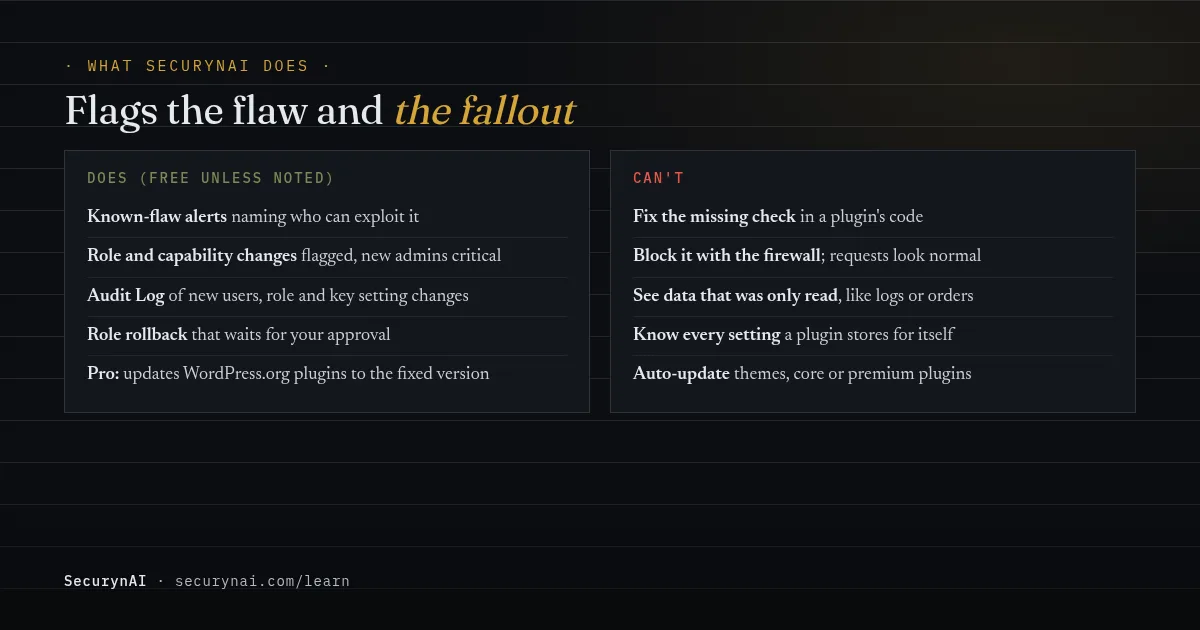
Known-flaw alerts that say who can use the flaw
The free plugin checks your plugins, themes and WordPress version against the wpvulnerability.net feed every 4 days by default (1 to 30 in Settings), and again after you update. Each alert gets a plain-words line built from the advisory, naming who can exploit it.
For a "missing authorization" flaw open to Subscribers, the built-in line reads: "Any logged-in user, even a subscriber, could reach features or data without the permission that should be required." It names the fixed version when the advisory lists one, so the table above is easy to apply.
Spotting a role or permission that changed
Most broken access control attacks end with someone holding more power than they should. The free plugin watches for that in two ways. It checks every role change as it happens, and a daily scan compares every user's roles and full set of capabilities with the last snapshot. That catches changes made straight in the database too.
- Critical: any account gaining Administrator (or Super Admin), including a brand-new one, unless it's a normal signup with your site's low default role.
- High: an account gaining Editor or WooCommerce Shop Manager, or its capabilities changing with no role change.
- Medium: any other role added or removed.
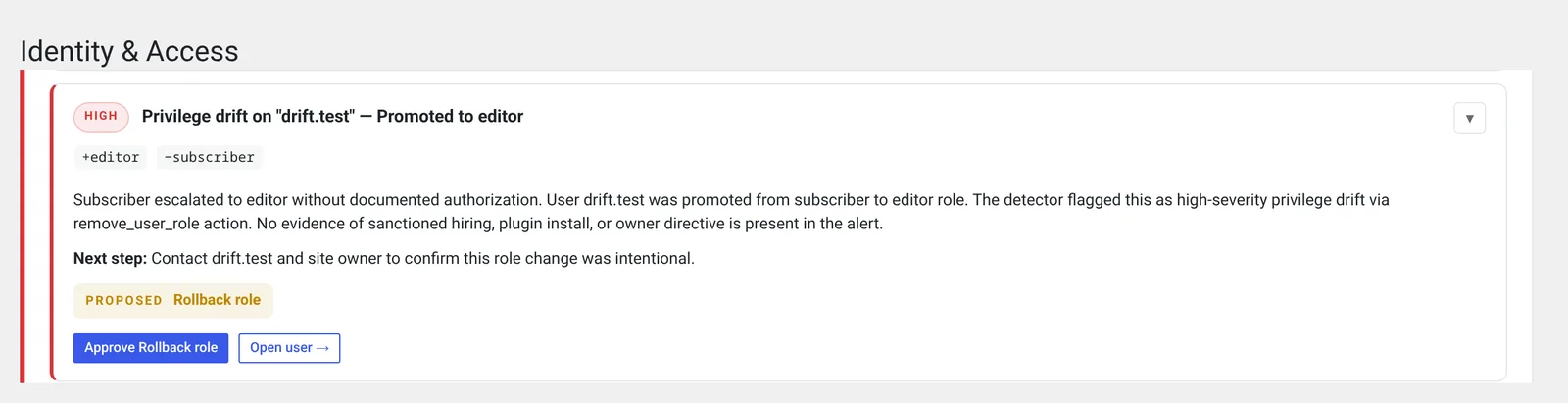
Each finding offers a "Rollback role" action on the Identity page that restores the earlier roles. Nothing changes until you approve it, and you can undo it. Email alerts for critical and high findings are off until you turn them on in Settings.
The Audit Log records the trail around it: new accounts with their roles, role changes (high when someone becomes an administrator), changed email addresses, deleted users, and changes to the "Anyone can register," default role and admin email settings. A default role that can manage settings, promote users or edit others' posts is logged as critical.
It also logs a password set through a reset link and every new application password, both high for administrators. So a Post SMTP-style takeover, which ends in a reset of the admin's password, leaves an entry you can find.
The free hardening checks also fail if your default role can do more than read, and flag open registration.
What Pro adds
On Pro ($79 per site per year), a high-risk role change goes to your approval queue with a proposed rollback, and by default one administrator approves it. Approving rolls the roles back; for a brand-new account it removes only the roles that were granted.
When a flaw lands in the Patch Queue's "Fix now" band, Pro updates a WordPress.org plugin to its fixed version without waiting, unless you set it to wait. It snapshots first and rolls back if the update fails its check. Themes, core and premium plugins show "Manual update required."
Here's what neither version does. SecurynAI can't see data that was only read, like email logs or another customer's order. It doesn't know every setting a plugin keeps for itself. And it doesn't replace backups, updates or good hosting.
Quick check: is your site exposed to broken access control?
- Are all plugins and themes on their latest versions?
- Have you deleted plugins you don't use or never set up?
- Is registration closed, or is the default role Subscriber or Customer?
- Can you name every administrator account and why it exists?
- Would you hear about a known flaw in a plugin you run within a few days?
- Would you notice if a user's role changed overnight?
Six yeses is a solid baseline. A no on the first two is the one to fix today. For the rest of the basics, our WordPress hardening checklist is the next step, and our guide to privilege drift explains role-change alerts in more depth.
Broken access control FAQ
My security plugin says a plugin has a broken access control flaw. Was I hacked?
Not necessarily. The alert means the flaw exists in the version you run, not that anyone used it. Update or remove the plugin, then check your Users screen for administrators or role changes you don't recognise. If both are fine, you've most likely closed it in time.
What's the difference between broken access control and privilege escalation?
Broken access control is the missing or weak check. Privilege escalation is one result of it: a user ends up with more power than they were given, often an administrator role. Advisories use both names, sometimes for the same flaw.
Does a WordPress nonce protect against broken access control?
No. A nonce shows a request came from a form the site handed out. It doesn't show the user is allowed to do the action, and WordPress's own documentation says nonces should never be relied on for access control. The capability check with current_user_can() does that job.
Can a firewall block broken access control attacks?
Rarely. The attack is an ordinary request to a real feature, so there's no odd pattern for a firewall rule to match. A firewall that knows a specific flaw's address can block that one, but updating the plugin is the fix.
If an unknown administrator has already appeared, our guide to a new admin user you didn't create walks through it step by step. Back up the site as it is before you change anything.
Want to know the day a plugin you run gets a known access control flaw, and hear about it if someone's role changes behind your back? The free SecurynAI plugin does both from the day you install it.
Install free →