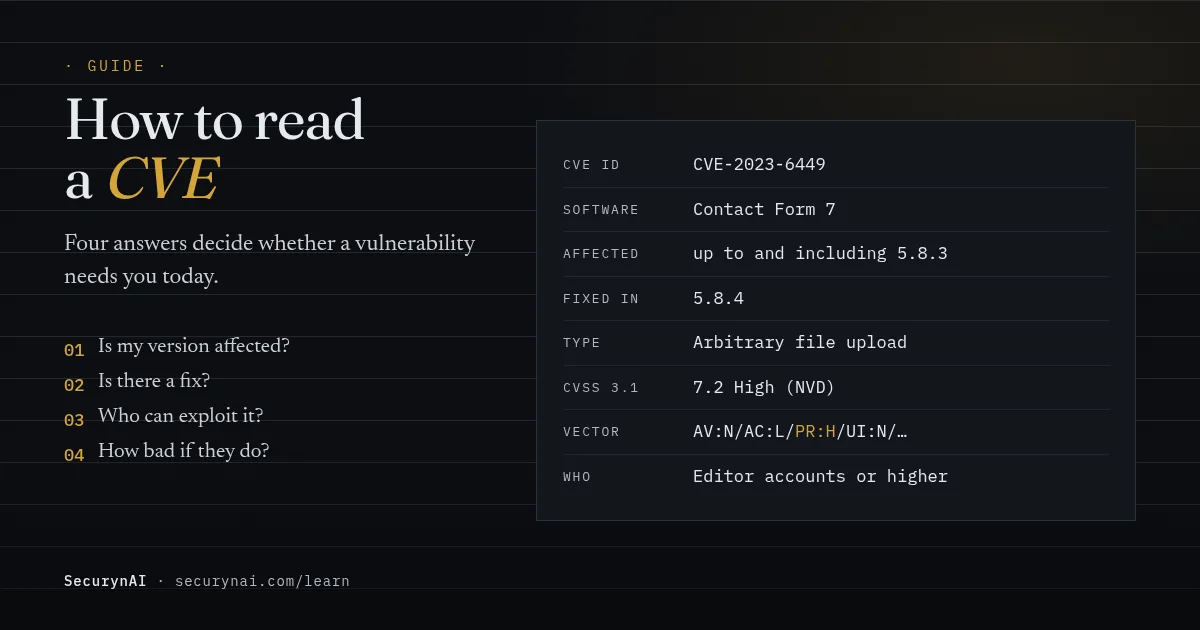
A CVE is a public ID number for one known security flaw in one piece of software. The record behind it says which versions are affected, whether a fix exists, how severe the flaw is (its CVSS score) and who could exploit it. Reading one takes about a minute once you know where to look.
Maybe you saw "CVE-2023-6449, CVSS 7.2" in a plugin changelog, a host's email or a WordPress vulnerability alert. Don't panic, and don't ignore it either. Check your installed version against the record first. If you're not on an affected version, you're done.
What is a CVE, and who writes it?
CVE stands for Common Vulnerabilities and Exposures. The ID is a case number, not a verdict. It lets everyone, from plugin authors to security tools, talk about the same bug without confusion. The useful part is the record attached to it.
CVE IDs are issued by CVE Numbering Authorities (CNAs). For WordPress, the big three are Wordfence, Patchstack and WPScan, all approved as CNAs in 2021 (Wordfence's announcement). The US government's National Vulnerability Database (NVD) then publishes each record, often with its own score added.
The four questions to ask any CVE
Skip the jargon on the first pass. These four answers decide what you do, in this order. The table uses the Contact Form 7 record, CVE-2023-6449, as the example.
| Question | Where it is in the record | CVE-2023-6449 answer |
|---|---|---|
| 1. Is my version affected? | Description, or the affected-versions list | Versions up to and including 5.8.3 |
| 2. Is there a fix? | Patched version, or the vendor's changelog | Yes, 5.8.4 |
| 3. Who can exploit it? | The words "unauthenticated" or "authenticated", and the PR field in the vector | Logged-in users with Editor access or higher |
| 4. How bad if they do? | The CVSS score, and the C, I and A fields | 7.2 High, with full impact on data and files |
Question one is the filter: a Critical CVE for a version you've already updated past doesn't affect you. Question two is usually the action. Questions three and four tell you how fast.
How to read a CVSS score
CVSS, the Common Vulnerability Scoring System, rates severity from 0 to 10. The CVSS v3.1 specification from FIRST, the group that maintains it, maps the number to these labels:
| Score | Label | A sensible default for a site owner |
|---|---|---|
| 9.0 to 10.0 | Critical | Update today. If there's no fix, deactivate the plugin. |
| 7.0 to 8.9 | High | Update within a day or two. |
| 4.0 to 6.9 | Medium | Update this week, sooner if no login is needed. |
| 0.1 to 3.9 | Low | Include it in your normal update round. |
The score measures how bad a flaw is in theory, not how likely it is to hit your site. The specification says the base score reflects a flaw's "intrinsic characteristics," and that users "should supplement the Base Score" with their own context. Your context is mostly answers to questions one and three.
Reading the vector string
Next to the score you'll see something like CVSS:3.1/AV:N/AC:L/PR:H/UI:N/S:U/C:H/I:H/A:H. It's the score's working-out: the first four pairs say who can pull it off, and the last three say what they could damage.
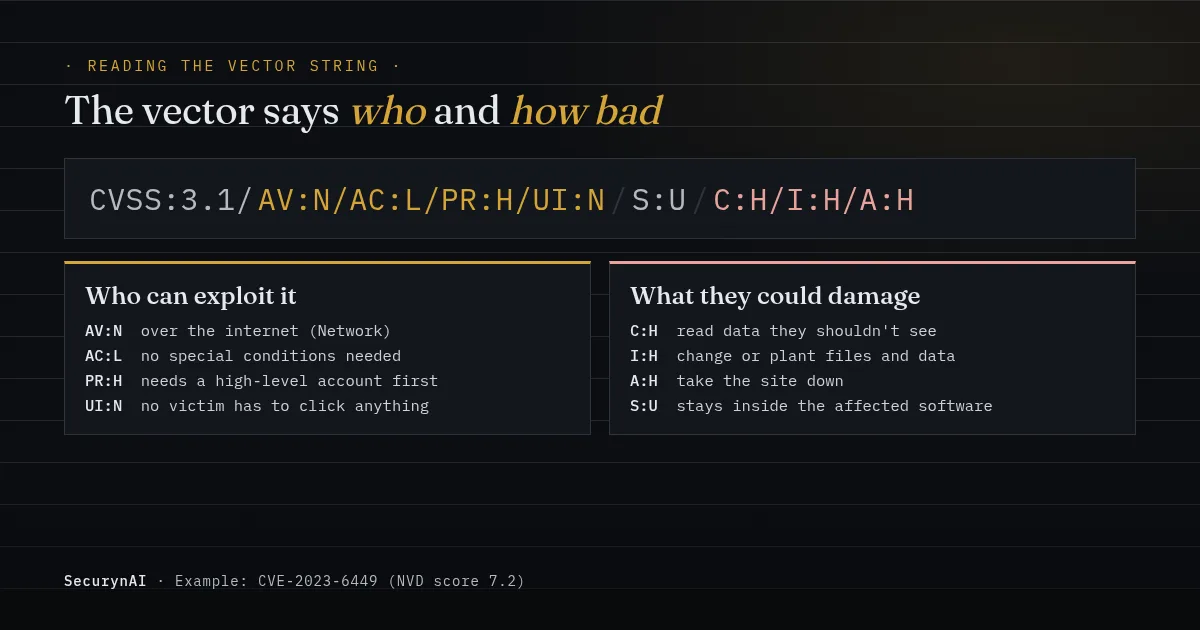
The field that does the most work on WordPress is PR (Privileges Required): N is no account at all, L a basic one such as a subscriber, H a powerful one. If you remember one combination, make it AV:N/PR:N/UI:N. That means anyone on the internet, with no account and no help from a victim.
Worked example: a "High" CVE that needs an editor account
Here's CVE-2023-6449 in full. NVD's record says Contact Form 7 "up to, and including, 5.8.3" let "authenticated attackers with editor-level capabilities or above" upload arbitrary files. It was fixed in 5.8.4. NVD scored it 7.2, High, with the vector above.
The record also says that, thanks to the plugin's server settings, "remote code cannot be executed in most cases," and the file is deleted straight away by default. So the real question is whether someone you don't fully trust holds an Editor account. On a one-person brochure site, that's rarely the case. On a membership or multi-author site, check.
Here's a detail that confuses people. The same NVD page shows a second score: 6.6, Medium, from Wordfence, which issued the CVE. The only difference is AC:H instead of AC:L. Wordfence judged the attack harder to pull off. Neither score is wrong; they're two analysts reading the same bug.
Worked example: a "Critical" CVE anyone could use
Now compare CVE-2023-32243 in Essential Addons for Elementor, versions 5.4.0 to 5.7.1. Patchstack, which found it, reported that the password reset feature changed a password without checking the reset key. The plugin had over a million active installs.
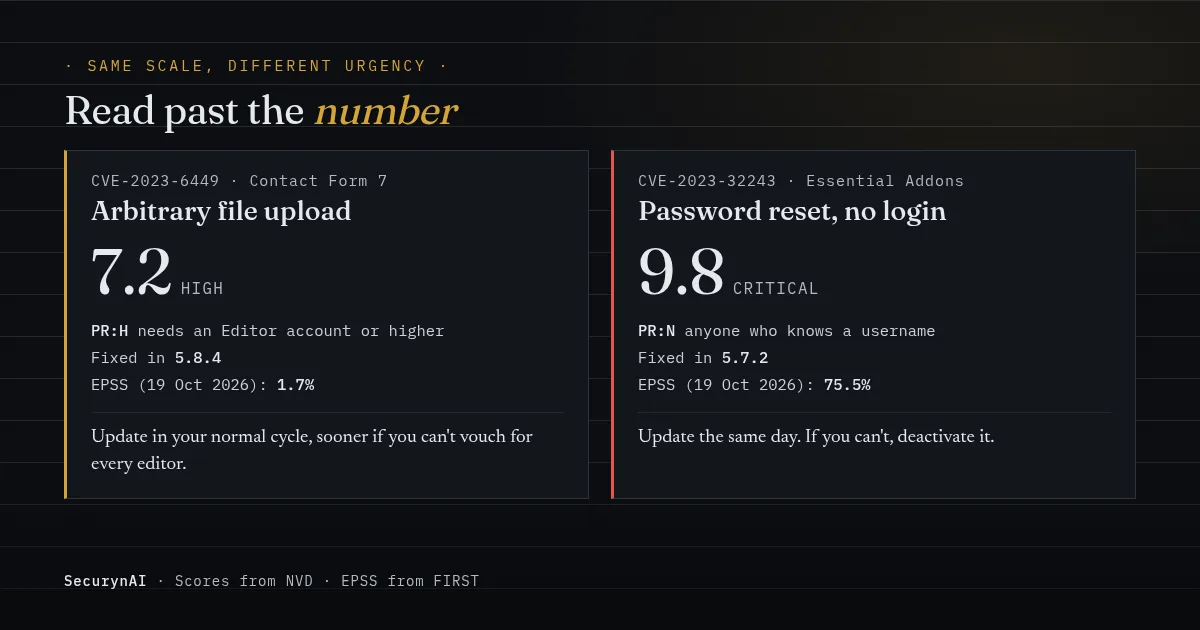
That meant anyone who knew a username, an administrator's included, could reset that user's password and log in as them. The vector is AV:N/AC:L/PR:N/UI:N, scored 9.8, Critical, by both NVD and Patchstack. It was fixed in 5.7.2. Here the number and the real danger agree: update the same day.
Why the CVSS score isn't the whole story
The score can't tell you how fast a flaw gets used, or whether a fix even exists. Patchstack's State of WordPress Security in 2026 report found 46% of 2025's WordPress vulnerabilities "did not receive a fix from the developer in time for public disclosure." For heavily exploited flaws, the weighted median time to first attack was 5 hours.
That's why some sources add a second signal. FIRST's Exploit Prediction Scoring System (EPSS) "estimates the probability that a published CVE will be exploited in the wild in the next 30 days." On 19 October 2026, the Essential Addons CVE scored about 75.5%. The Contact Form 7 one scored about 1.7%.
Databases also lag. In one WordPress.org support thread about a slider plugin, the developer wrote: "We solved the security issue 2 months ago but Wordfence has not updated the database." It was corrected after they got in touch. If a warning won't go away after an update, check the plugin's changelog before you worry.
What to do after you've read a CVE
Most of the time the answer is "update the plugin," and the CVE only tells you how soon. Take a backup first, so a bad update is easy to undo. If you have a staging copy, test there.
| What the record says | What to do |
|---|---|
| Your version isn't in the affected range | Nothing. Note it and move on. |
| Fixed version exists, no login needed (PR:N) | Update today, whatever the score. |
| Fixed version exists, needs an account (PR:L or PR:H) | Update in the next few days. Sooner if strangers can register or you can't vouch for every account at that level. |
| No fix yet | Deactivate the plugin if you can live without it, and look for an alternative. Watch the changelog. |
| You don't use the plugin | Delete it. Unused code is still code on your server. |
In one WordPress.org thread about EventON, a site owner got the same warning on "several sites" at once. The fix was already out. If you look after client sites, our playbook on managing 30+ client sites covers updating in bulk.
Worried something was exploited before you updated? Check the signs of a compromised site, and look for a new admin user you didn't create, an account showing privilege drift, or an admin login from an unusual location.
How SecurynAI reads CVEs for you
We at SecurynAI built the free plugin's vulnerability check around the four questions above. It lists every installed plugin, theme and your WordPress version, then matches each against known vulnerability data by version range. Inactive plugins are included, because their code is still on disk.
By default the data comes from the community feed at wpvulnerability.net, with no key needed. If you add a free Wordfence Intelligence API key in Settings > Vulnerability, the default Auto setting switches to Wordfence's feed. The plugin syncs every 4 days (you can pick 1 to 30) and re-checks soon after you update a plugin or theme.
Each match shows the CVE, your installed version and the CVSS score where the feed has them, plus a plain-English line built from the advisory: who could exploit it and what they could do, and the version that fixes it. The full technical text sits one click away. When you update past the affected range, the finding resolves itself.
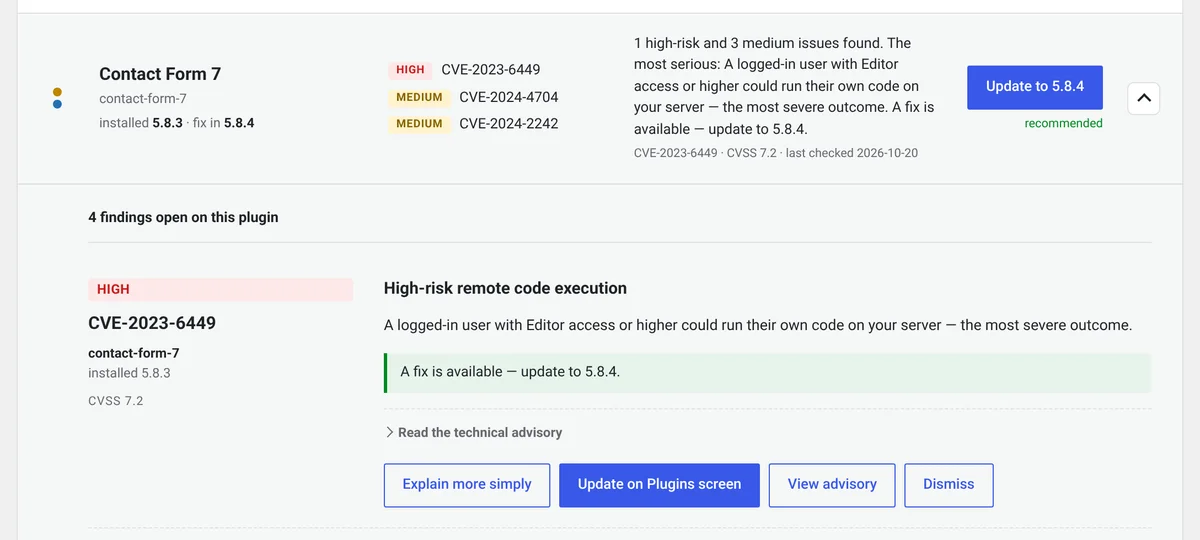
In the free plugin, these findings are report-only: we tell you what to update, and you do the updating.
On Pro ($79 per site per year), we add a Patch Queue. It sorts matches into Fix Now, Fix Soon and Monitor, weighing the CVSS score and whether the plugin is active. Pro can then apply the update through your approval rules, and restores the old files if the update fails.
None of this replaces the basics. Keep backups you've tested, and update plugins promptly. Our automatic updates guide covers which ones are safe to automate.
Quick check: would you catch the next CVE?
- Do you know every plugin and theme installed, including inactive ones?
- Would you hear about a new CVE for one of them within a few days?
- Could you restore a backup if an update went wrong?
- Have you deleted plugins you no longer use?
Four yeses means you're in good shape. Fewer is common, and quick to fix this week. Our WordPress hardening checklist is a good next step, and broken access control explains the bug type behind many plugin CVEs.
CVE and CVSS FAQ
What does it mean when a CVE says RESERVED?
The ID has been set aside, but the details aren't public yet. NVD describes RESERVED as the first state of a CVE Record, and it doesn't include reserved records in its own database. Check back later, or read the plugin's changelog for a security fix in the meantime.
Why do two sites show different CVSS scores for the same CVE?
Because different analysts scored it. NVD often lists its own score next to the one from the organisation that issued the CVE, and they can disagree on a metric or two. Look at the vector strings to see exactly where they differ.
Does a CVE matter if the plugin is deactivated?
Less than if it were active, but the code is still on your server. The simplest answer is to update it or delete it. SecurynAI's free check looks at every installed plugin, active or not, so a deactivated one still shows up.
Rather not look up every plugin by hand? The free SecurynAI plugin checks everything you have installed and tells you, in plain English, what to update first.
Install free →