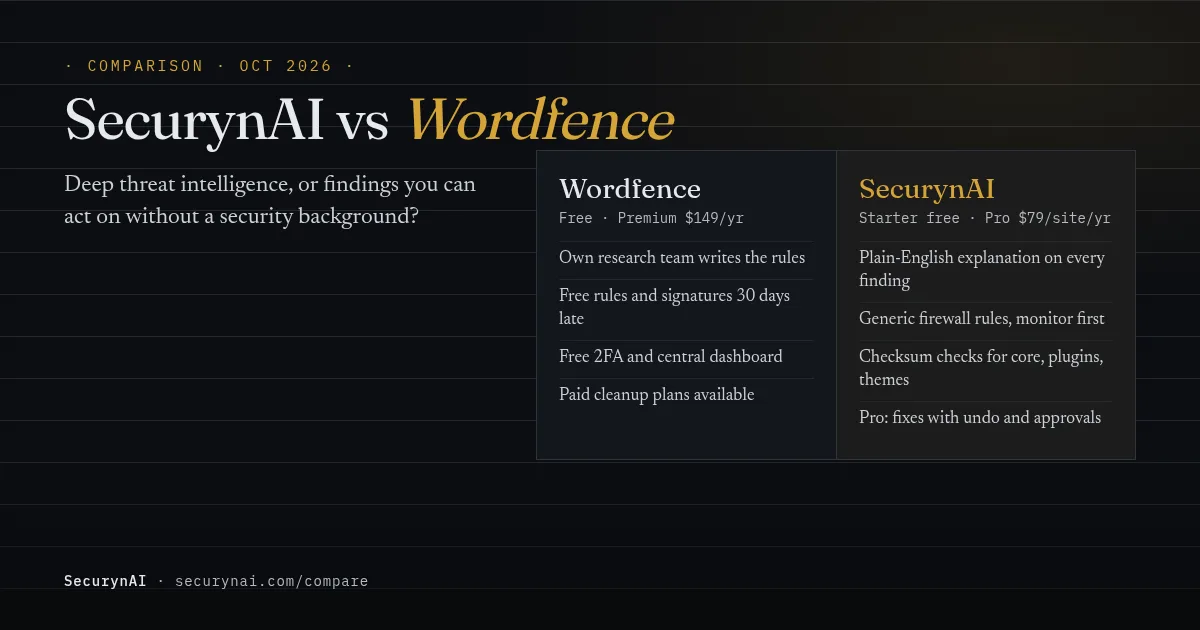
SecurynAI vs Wordfence comes down to one question: do you want the deepest threat intelligence, or findings you can act on without a security background? Wordfence is a firewall and malware scanner fed by its own research team. SecurynAI is a WordPress security plugin that blocks common attacks and explains each finding in plain English.
Most security plugin comparisons are written by a security plugin, and this one is too. So here's how we kept it fair. Every Wordfence fact comes from Wordfence's own pages, checked in October 2026. Every SecurynAI claim matches what our plugin's code does today, gaps included.
SecurynAI vs Wordfence at a glance
Both plugins cover the basics: a firewall, login protection, file checks and vulnerability alerts. They differ in where the rules come from, what the free tier holds back, and what you're expected to do with a finding. Prices are list prices per site, per year.
| What you get | Wordfence | SecurynAI |
|---|---|---|
| Price | Free; Premium $149; Care $590; Response $1,250 | Starter free; Pro $79 |
| Firewall | WordPress firewall. Free gets new rules 30 days late; Premium gets them in real time | Free built-in rule set for SQL injection, XSS, path traversal, command injection and file inclusion. Starts in monitor mode |
| Blocklist of known attackers | Premium (real-time IP blocklist) | Auto-blocks IPs that keep tripping your own rules (block mode) |
| Country blocking | Premium | No |
| Brute-force protection | Free | Free |
| Two-factor login | Free | Flags admins without it; doesn't provide it |
| File checks | Malware scanner and file change detection. Free signatures 30 days late; free scans every 3 days | Daily check of core, plugin and theme files against official checksums, executable files in uploads, and a basic malware check (13 bundled signatures plus obfuscated-code detection). Detects only; no cleanup |
| Vulnerability alerts | Free | Free, in plain English |
| Fixing issues | Repair, delete or hide flagged files yourself | Free tells you what to do. Pro applies fixes, with undo where a fix can be reversed |
| Activity history | Premium 30 days; Care 6 months; Response 1 year | Free 7 days; Pro 90 days |
| Many sites | Wordfence Central, free for unlimited sites | Per-site licence; volume pricing on request |
| Hands-on help | Care and Response include analyst support and cleanup | Plugin only; no done-for-you service plan |
Sources: Wordfence's pricing and plan comparison and Wordfence Free page, checked 20 October 2026. SecurynAI rows reflect the current plugin code.
What Wordfence does well
Wordfence's biggest strength is its research team, and you feel it on the paid plans. Wordfence writes its own firewall rules and malware signatures. Premium customers get them "the moment our threat intelligence team releases them," along with an IP blocklist that Wordfence says holds 25,000 to 60,000 active malicious addresses.
It's also the most proven option. The WordPress.org listing shows 5+ million active installs and a 4.7 rating from over 5,000 reviews. The free plan is generous: firewall, malware scanner, brute-force protection, two-factor login and vulnerability alerts. And Wordfence Central lets you manage every site from one screen at no cost.
Real users say much the same. In an October 2026 WordPress.org review, one owner wrote that the free version "blocks junk traffic, has a decent scanner, and 2FA works fine." They added one caveat: it "can slow things down a little on cheap shared hosting if you don't tweak the settings."
If you'd rather hand security to a person, Wordfence sells that too. Care ($590) adds setup, monitoring and incident cleanup. Response ($1,250) adds a 1-hour response time around the clock. SecurynAI has nothing equivalent; we make a plugin, not a service plan.
Wordfence free vs Premium: what the 30-day delay means
On Wordfence Free, new firewall rules and malware signatures arrive 30 days after Premium gets them. Wordfence states this plainly on its pricing page. For many hobby sites that's an acceptable trade. For a store or a client site that earns money, it's worth weighing.
Here's why the timing matters. Patchstack's State of WordPress Security in 2026 report counted 11,334 new WordPress vulnerabilities in 2025. It found 46% "did not receive a fix from the developer in time for public disclosure," and the weighted median time to first exploit was 5 hours for heavily exploited flaws.
In fairness, SecurynAI's free firewall doesn't get per-vulnerability rules at all, delayed or otherwise. It uses a fixed set of patterns for common attack types. If you want a firewall that's patched for brand-new plugin flaws as they appear, that's what Wordfence Premium sells. Our guide to whether you need a WAF covers the options, including your host's.
Your best defence against a new flaw is still the boring one: update the plugin when the fix lands. Our plain-English guide to reading a CVE shows how to tell which updates can't wait.
Where SecurynAI is different: findings you can act on
The hard part of any security plugin isn't detecting a change. It's knowing what the change means. That's the gap we at SecurynAI built the plugin around, and you can see the need for it on Wordfence's own support forum.
In an April 2026 thread, a site owner asked whether a warning on a known plugin's file was safe to ignore. In another thread, someone who had just cleaned a hacked site asked: "does that mean it's still infected?" Wordfence's support team answered both helpfully, by asking them to compare the file differences themselves.
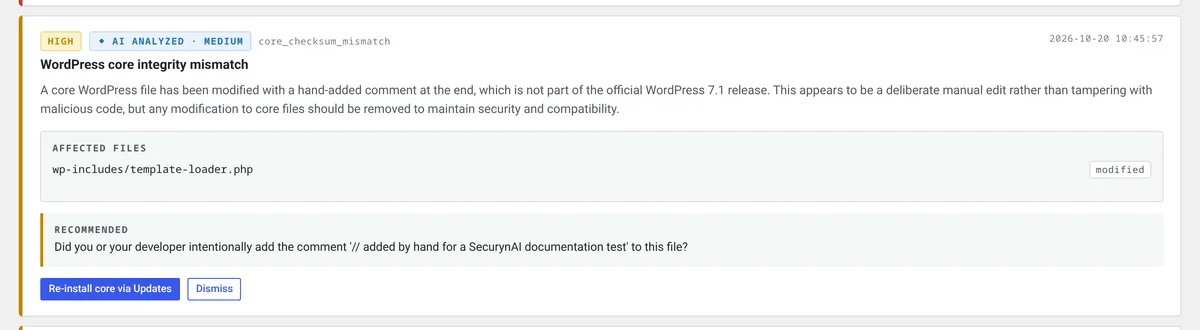
SecurynAI tries to give that answer up front. Every finding comes with a built-in plain-English explanation of what happened, how serious it is and what to do next. The core file check compares each file against the official checksums for the WordPress version you actually have installed, so a normal update can't trigger it.
The same daily scan checks every PHP file under wp-content against a bundled set of malware signatures, 13 at the time of writing. It also flags clearly obfuscated code, such as a decoder fed straight into eval. A match raises a critical or high finding that names the file and shows the code it matched.
That's a far smaller net than Wordfence's. Its signatures come from a research team and reach Premium in real time, while ours ship with the plugin, with no live feed. We skip looser obfuscation checks because paid plugins often use that code legitimately. And SecurynAI only detects malware; it doesn't clean or quarantine files.
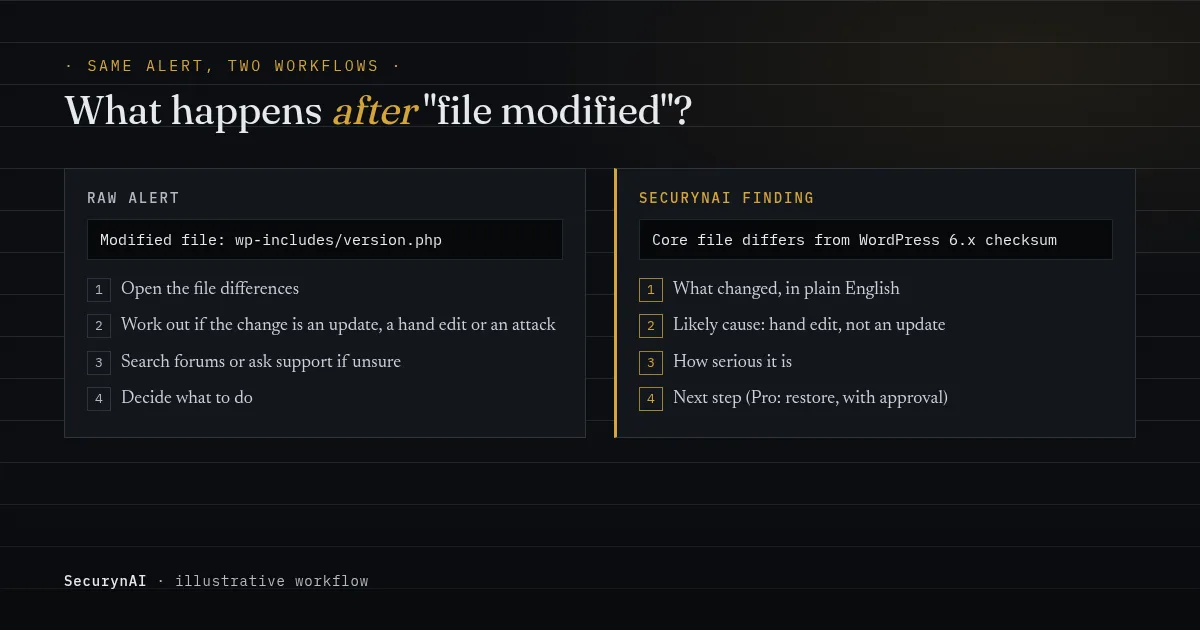
If you add your own AI key, the explanations get more specific. Using OpenAI, Anthropic or Google Gemini, SecurynAI writes a fuller explanation of each finding, and the requests go from your site to your own provider account. Without a key, you still get the built-in explanations.
What SecurynAI Pro adds
The free plugin is report-only: we tell you what to fix, and you fix it. SecurynAI Pro ($79 per site per year) can apply many fixes in one click, with undo where a fix can be safely reversed. Risky fixes can wait in an approval queue for a person to sign off.
Pro also groups related findings into one attack chain, so a lockout and a successful login for the same username from another IP read as one incident, not two separate alerts.
How SecurynAI's free firewall and login protection work
SecurynAI's firewall starts in monitor mode, so it logs suspicious requests before it blocks anything. That lets you check it won't break a form or plugin on your site. When you're happy, one switch on the Firewall page turns on block mode.
In block mode, a request that matches a rule gets a 403 page. An IP that trips the rules 10 times in 15 minutes is blocked for 15 minutes, and XML-RPC is capped at 30 requests a minute per IP. Login protection works in either mode: 20 failed logins in 15 minutes means a 30-minute lockout.
What it doesn't do is just as important. There's no country blocking, no shared blocklist of known attackers, no malware cleanup and no two-factor login. SecurynAI flags any administrator without two-factor set up. For the second factor itself, add a dedicated plugin such as Two Factor. Our login page guide walks through the rest.
What SecurynAI vs Wordfence costs for 1, 5 or 10 sites
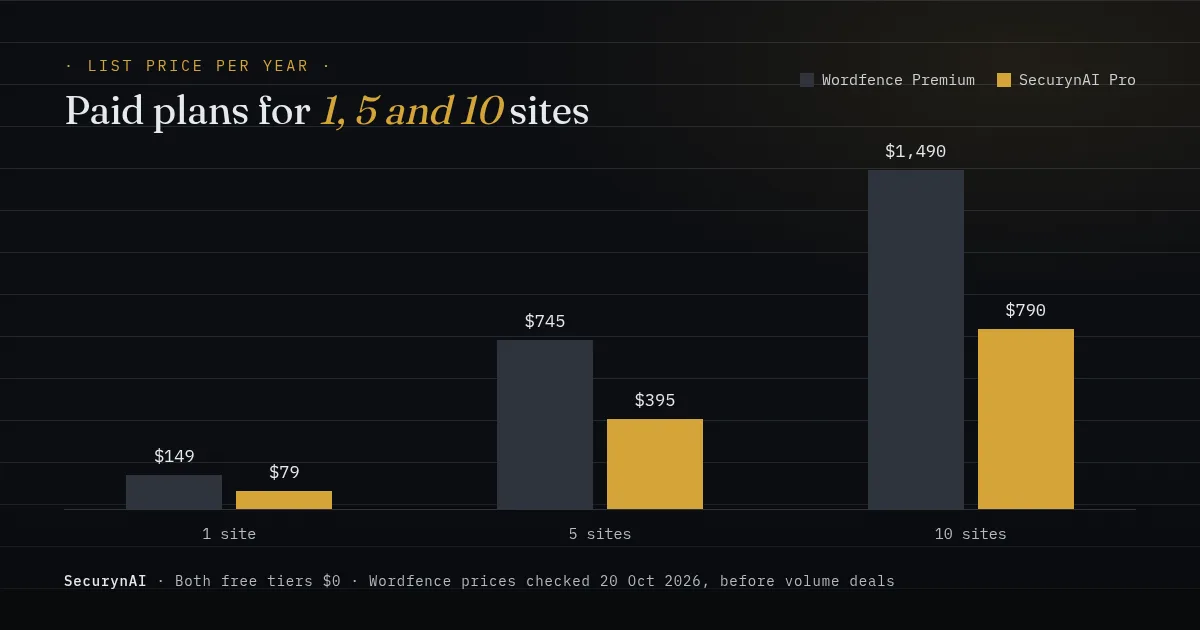
Both free tiers cost nothing, forever. The paid plans are both priced per site, per year. Wordfence says "each installation of the Wordfence plugin requires a unique Wordfence license key," with staging and development copies covered by the production licence.
| Sites | Wordfence Premium | SecurynAI Pro |
|---|---|---|
| 1 site | $149 a year | $79 a year |
| 5 sites | $745 a year | $395 a year |
| 10 sites | $1,490 a year | $790 a year |
These are list prices before any volume deal. The two plans also buy different things. Wordfence Premium buys faster threat intelligence; SecurynAI Pro buys automated fixes, approvals and grouped incidents. Compare on what you'd actually use, not on the total.
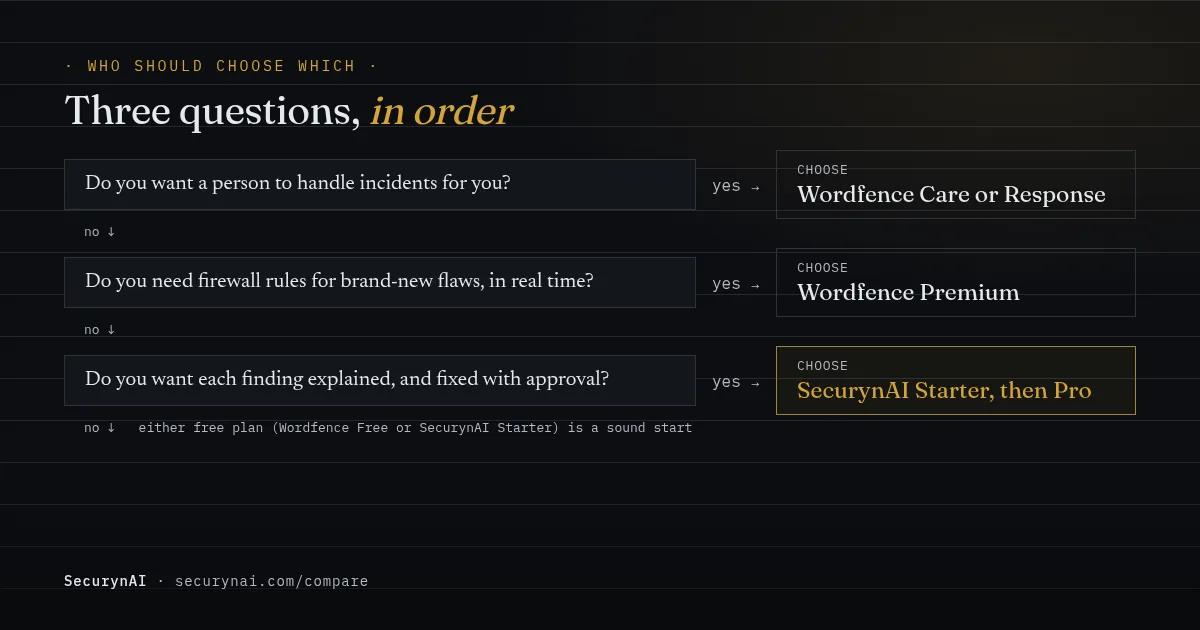
Who should choose Wordfence, and who should choose SecurynAI?
There's no single winner here; it depends on who's looking after the site. Here's how we'd call it for the three readers we hear from most.
Solo site owner
If you're comfortable reading a file diff, Wordfence Free is a strong, proven default. If alerts make you nervous because you can't tell what they mean, start with SecurynAI Starter, and add a two-factor plugin. Either free plan beats running nothing.
WooCommerce or other revenue-earning store
A 30-day delay on new rules matters more when a hack costs you sales. Wordfence Premium is the pick if real-time firewall rules are your priority. SecurynAI Pro suits a store owner who wants findings fixed quickly, with undo, and doesn't have a developer on call.
Agency or freelancer with client sites
Wordfence Central, free for unlimited sites, is a real advantage for watching many sites in one place. Alert volume is the common complaint. In one WordPress.org thread, an agency user said that without an hourly cap they "would get a monstrous number of emails."
SecurynAI fits agencies that want findings they can forward to a client as-is, and an approval step before anything changes on a client site. For volume pricing, get in touch. Our playbook on managing 30+ client sites covers the workflow either way.
Can you run SecurynAI and Wordfence together?
We don't recommend running two firewalls and two scanners on the same live site. Every request gets checked twice, and you'll get two sets of alerts about the same event. If you're comparing, try SecurynAI on a staging copy first.
There is one way the two work together. SecurynAI checks your plugins and themes against the free wpvulnerability.net feed by default. Paste a free Wordfence Intelligence API key into our settings, and it switches to Wordfence's vulnerability feed instead. It's Wordfence's data, explained our way, and we credit it as such.
Whichever you choose, neither replaces backups and prompt updates. Our WordPress hardening checklist covers the basics both plugins assume you've done.
SecurynAI vs Wordfence FAQ
Is Wordfence free good enough?
For many small sites, yes. You get the firewall, the malware scanner, brute-force protection and two-factor login at no cost. The trade-off is that new firewall rules and malware signatures reach the free version 30 days after Premium, and scheduled scans run every 3 days.
Does SecurynAI scan for malware?
Yes, in a basic way. The free daily file scan checks PHP files under wp-content against 13 bundled malware signatures and flags obfuscated code fed straight into eval. It only detects; it doesn't clean files. Wordfence's signature set is much larger, comes from its research team, and updates in real time on Premium.
Does SecurynAI have two-factor authentication?
No. SecurynAI checks whether each administrator has two-factor login set up and flags the ones who don't, but it doesn't provide the second factor itself. Pair it with a dedicated plugin such as the free Two Factor plugin from WordPress.org contributors.
Is Wordfence Premium priced per site?
Yes. Wordfence says each installation needs its own license key, at $149 a year for Premium. A Premium license for a production site also covers its staging and development copies, and a multisite network needs only one key.
Can SecurynAI use Wordfence's vulnerability data?
Yes. By default SecurynAI checks your plugins and themes against the free wpvulnerability.net feed. If you paste in a free Wordfence Intelligence API key, it switches to Wordfence's feed instead. It's the same data, read in plain English.
Still weighing it up? See exactly what's in SecurynAI Starter and what Pro adds, side by side, before you install anything.
Compare Starter and Pro →