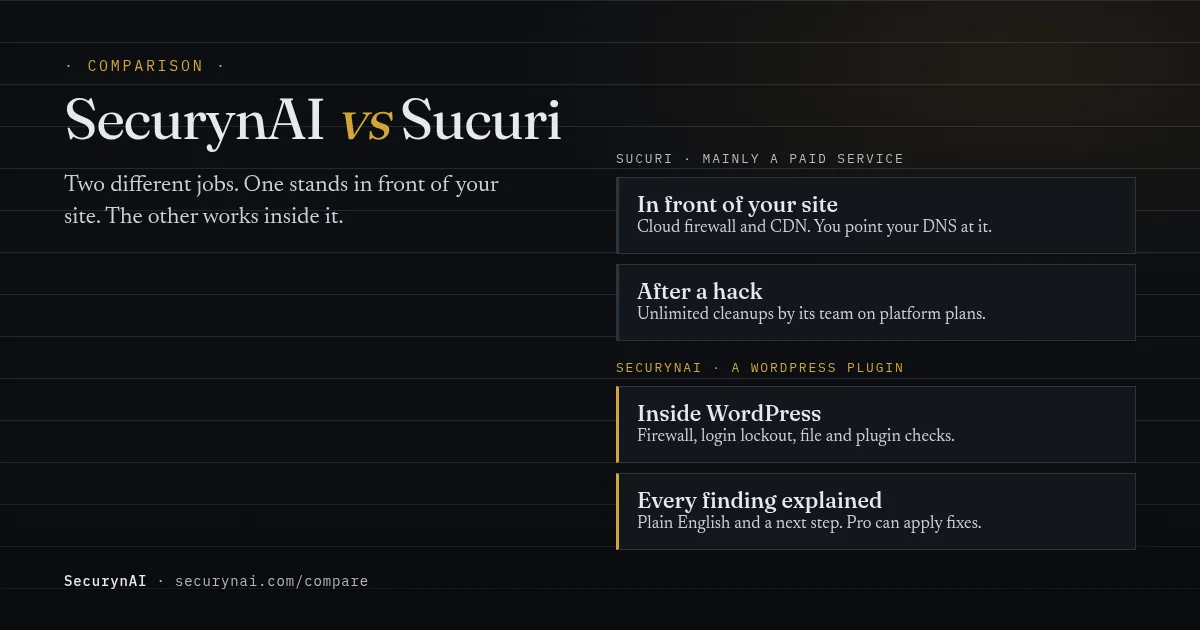
SecurynAI vs Sucuri comes down to where the protection lives. Sucuri is mainly a paid cloud service: a firewall and CDN in front of your site, plus a team that cleans up hacks. SecurynAI is a WordPress security plugin that runs inside your site, blocks common attacks, checks your files and plugins, and explains each finding in plain English.
Most security plugin comparisons are written by a security plugin, and this one is too. So here's how we kept it fair. Every Sucuri fact below comes from Sucuri's own pricing page, docs or WordPress.org listing, checked on 20 October 2026. Every SecurynAI fact matches what our plugin's code does today.
What's the real difference between SecurynAI and Sucuri?
Sucuri filters traffic before it reaches your server. SecurynAI works once a request reaches WordPress. To use the Sucuri Website Firewall, you change your DNS A record to point at Sucuri's firewall instead of your host. Then "all your site's traffic will be redirected to us, so we can filter malicious traffic," in Sucuri's words.
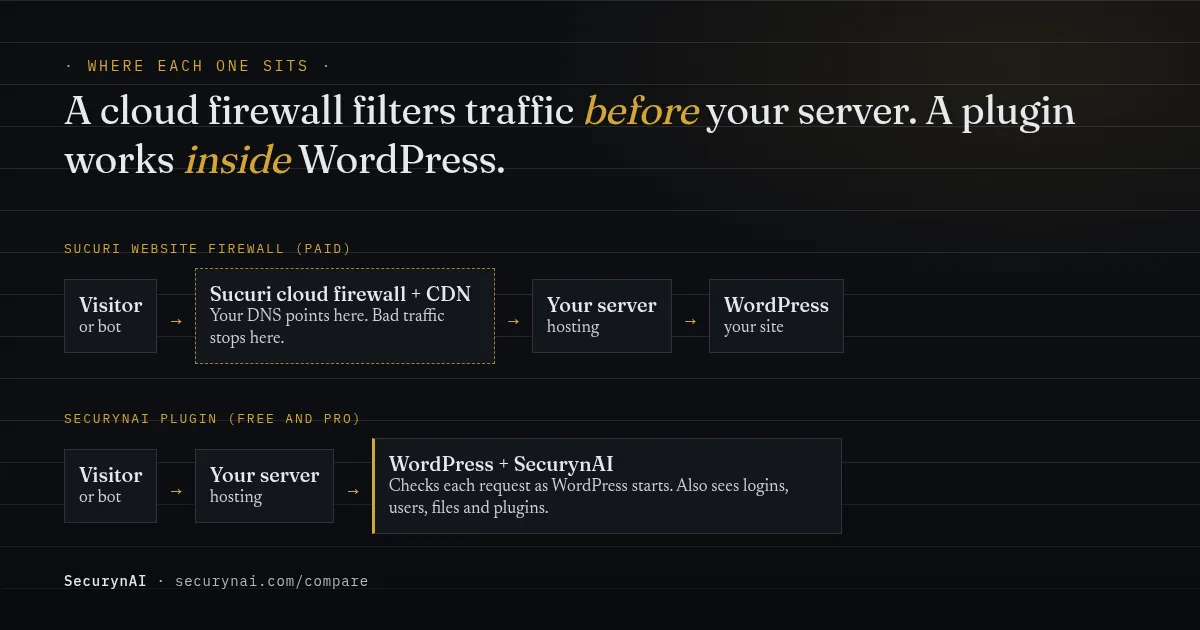
SecurynAI is a plugin, not a cloud firewall or CDN. It checks each request as WordPress starts up. That means it can't soak up a flood of traffic the way a network can. But it can see things a network can't: who logged in, which user just became an admin, and which file changed on disk.
Sucuri also makes a free plugin, Sucuri Security, with 600,000+ active installs. It's a separate thing from the paid firewall. Its listing is clear that the firewall "is not included as a free option of the plugin."
SecurynAI vs Sucuri at a glance
The short version: Sucuri sells protection at the network edge and human cleanup. SecurynAI sells understanding and fixing from inside WordPress. Sucuri details come from its plans and pricing page and plugin listing.
| What you're comparing | Sucuri | SecurynAI |
|---|---|---|
| What it is | Paid cloud service, plus a free plugin | WordPress plugin, free and Pro |
| Firewall | Paid, cloud, via DNS | Free, in the plugin |
| CDN and DDoS mitigation | Paid plans | No |
| Hack cleanup by a team | Unlimited, platform plans | No |
| File change checks | Free plugin | Free, daily |
| Malware scan | Remote free, server-side paid | Free, server-side, detect only |
| Plugin and core vulnerability alerts | Needs firewall key | Free |
| Plain-English explanation per finding | Cleanup report, paid | Free |
| Fixes applied inside WordPress | Post-hack tools, free plugin | Pro, with undo |
| Works on non-WordPress sites | Yes | No |
A table can't show everything. Sucuri's free plugin also offers activity auditing, blocklist monitoring and hardening, and its paid plans add SSL support and backups of cleaned files. If Sucuri's plans change, we'll update this page.
What Sucuri does well
If you want someone else to clean up a hack, Sucuri is built for exactly that. Every platform plan includes "unlimited manual cleanups" with "no hidden fees." Sucuri says it backs up before making changes, logs every file it touches, and sends a report of what it found. That's a real safety net SecurynAI doesn't offer.
Its listed malware removal SLA is 30 hours on Basic, 12 on Pro and 6 on Business. Sucuri is upfront that this is a ticket response estimate, and resolution "may vary based on complexity and volume of tickets in our queue." Plans also include blocklist monitoring and removal, which matters if Google has flagged your site.
The cloud firewall has strengths a plugin can't match. Sucuri lists layer 3, 4 and 7 DDoS mitigation, virtual patching for outdated software, and an Anycast CDN. Because bad traffic stops before your server, your hosting doesn't burn resources on it. It also works on any CMS, not just WordPress.
And Sucuri sees a lot of hacked sites. Its SiteCheck Malware Trends Report 2024 covered 70.8 million remote scans. It found 1,176,701 infected websites, an overall infection rate of 1.66%, with malware and malicious redirects making up 74.7% of infections.
Where SecurynAI works differently
We at SecurynAI built the plugin for the moment after an alert, when you need to know what it means and what to do. Every finding comes with a plain-English explanation and a next step. Those explanations are built in. If you add your own AI key, you get fuller ones, written for your exact finding.
The free plugin covers the basics from inside WordPress:
- A firewall that checks requests for SQL injection, cross-site scripting, remote code execution, path traversal and file-inclusion patterns.
- Login lockout: by default, 20 failed logins in 15 minutes, from one IP or against one username, blocks that IP for 30 minutes.
- A daily check of WordPress core files, and of plugins from WordPress.org, against their official checksums, plus alerts for PHP files in your uploads folder.
- A server-side malware scan, run with the daily file check, that flags PHP files under wp-content matching known malware signatures or clearly obfuscated code, like a decoder fed straight into eval. It reports the file and matched snippet, and only detects.
- Vulnerability alerts for every installed plugin, theme and WordPress version, with no key needed.
- A hardening checklist and a 7-day activity log.
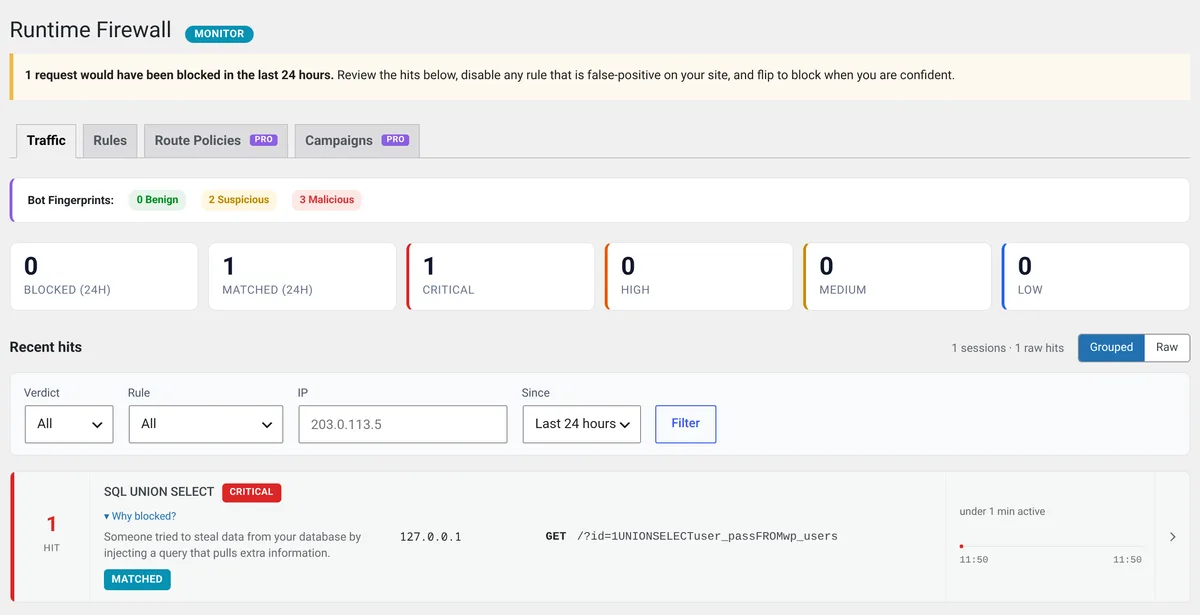
One honest catch: the free firewall starts in Monitor mode, which logs matches but doesn't block them. You switch it to Block on the Firewall page once you've checked it isn't flagging your own traffic. Login lockout works in either mode.
Vulnerability alerts matter more than they used to. Patchstack's State of WordPress Security in 2026 report found 46% of 2025's WordPress vulnerabilities didn't get a developer fix in time for public disclosure. For heavily exploited flaws, the weighted median time to first attack was 5 hours.
On SecurynAI Pro ($79 per site per year), we add the fixing. Pro can apply many fixes in one click, and many can be undone. A few can't by design, such as ending a session or restoring a core file. Your approval rules decide which fixes run on their own and which wait for a person.
Pro also groups related signals, like a lockout and a login from somewhere new on the same account, into one incident. Our guide to attack chains explains why that's easier to act on than ten separate alerts. And Pro keeps a 90-day activity archive.
What each one costs per site, per year
Both start free. After that, you're paying for different things, so the numbers aren't like-for-like. Sucuri's platform price buys the cloud firewall plus cleanups. SecurynAI Pro buys automated fixes and deeper monitoring inside WordPress.
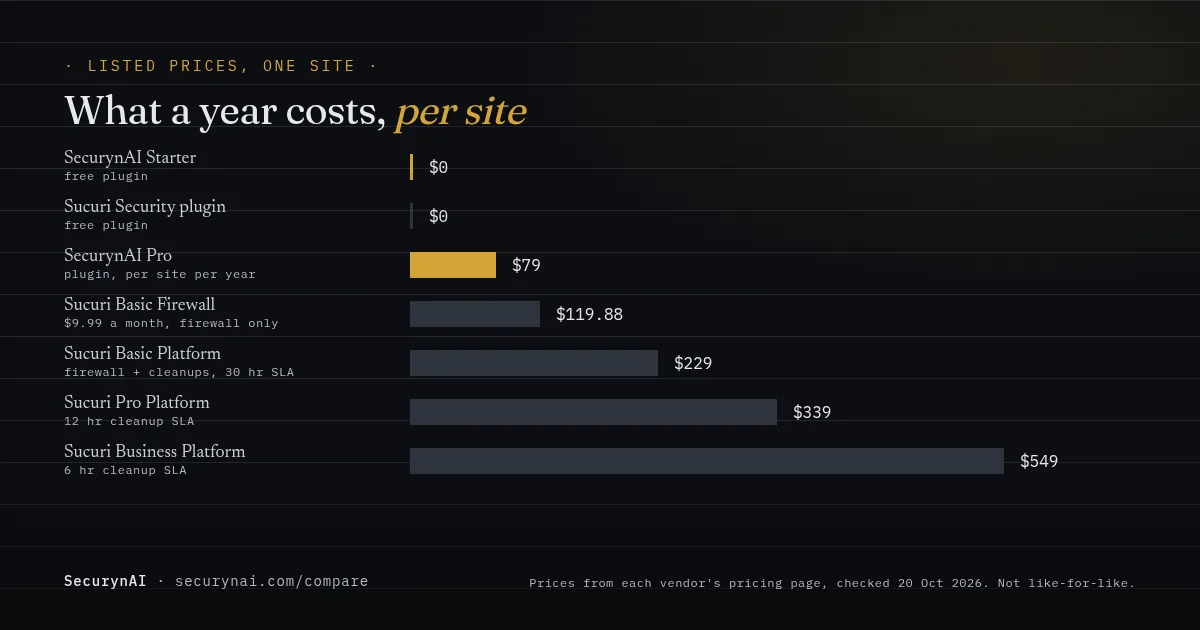
Sucuri's platform plans each cover one site. Its Junior Dev plan covers 5 sites for $999.98 a year, and bigger multi-site plans are priced on request. SecurynAI Pro is per site, and agencies can ask us about bulk licensing on the pricing page.
The trade-offs worth knowing before you choose
A cloud firewall means a DNS change
Routing your site through Sucuri is powerful, but your DNS now matters more. In one WordPress.org support thread, a site owner said their site had been down for 24 hours with a "DNS isn't configured" error. Sucuri's reply traced it to the wrong host IP set alongside Cloudflare. It was fixable, but it shows the moving part.
Sucuri's free scan only sees what a visitor sees
The free plugin's malware scan uses SiteCheck, Sucuri's remote scanner. In a 2024 support reply, Sucuri said it "only has access to what's visible on the browser level" and "will not detect anything on the server-side." The paid platform adds a server-side scanner that runs every 24 hours.
Another user asked why the free plugin missed an infected theme file. Sucuri's answer was the same: "Remote scanners have limited access and results are not guaranteed." That's a fair limit of any remote scan, and Sucuri says so plainly.
SecurynAI's free scan works the other way round. It runs on your server with the daily file check, reading every PHP file under wp-content and matching it against 13 malware signatures bundled with the plugin (no live feed). It only detects: there's no cleanup or quarantine, which Sucuri's paid team does handle.
A plugin can't stop a flood
SecurynAI runs on your server, so heavy traffic still reaches it. If DDoS attacks or huge bot waves are your real problem, a network firewall or your host's protection is the right layer. Our guide on whether you need a WAF covers when that's worth paying for.
Can you run SecurynAI and Sucuri together?
Yes, and for some sites it's a sensible pairing. Sucuri's firewall handles traffic at the edge. SecurynAI watches logins, users, files and plugins inside WordPress, and explains what it finds. They don't do the same job twice.
One setup step matters. Behind Sucuri's firewall, your server sees Sucuri's IP for every visitor unless it's told otherwise. If SecurynAI sees that too, its lockouts and firewall logs point at Sucuri, not the attacker. There are two ways to fix it.
Either restore the real visitor IP on your server, as Sucuri's same-IP troubleshooting page shows, or turn on Trust proxy headers in SecurynAI > Settings. Only turn it on when your site really sits behind a proxy like Sucuri. Otherwise, visitors can fake those headers.
Who should choose Sucuri, and who should choose SecurynAI?
Pick by the job you need done most, not by the logo. Here's how we'd decide for the three readers we hear from most.
| If you are | Lean towards | Why |
|---|---|---|
| A solo site owner who never wants to touch a hack | Sucuri platform | You're paying for someone else to clean up, with a set response time. |
| A solo site owner who wants to understand alerts | SecurynAI free | Firewall, login lockout and plain-English findings at no cost. Add Pro if you want fixes applied for you. |
| A WooCommerce store with traffic spikes or bot floods | Sucuri's firewall, maybe both | The CDN and DDoS layer protects checkout uptime. SecurynAI can still watch admins, logins and files inside. |
| A WooCommerce store on solid hosting | SecurynAI | Most store risk is plugins, logins and admin accounts, which a plugin sees directly. |
| An agency looking after many client sites | SecurynAI, plus Sucuri for at-risk clients | Plain-English findings you can forward to clients, Pro fixes with undo, and bulk licensing. Keep Sucuri for clients who want a cleanup guarantee. |
| Already hacked, right now | A cleanup service first | Get the site clean, then decide on prevention. |
If you're cleaning up yourself, start with our guide to removing WordPress malware or restoring from a backup after a hack. Agencies weighing whether to absorb cleanups or outsource them should read the real cost of a hack cleanup.
Whichever you pick, neither replaces the basics. Keep backups you've actually restored from, and update plugins promptly. Our WordPress hardening checklist covers the rest, and how to read a CVE helps you judge which updates can't wait.
SecurynAI vs Sucuri FAQ
Does the free Sucuri Security plugin include the firewall?
No. Sucuri's WordPress.org page says the Website Firewall is not included as a free option of the plugin. The firewall is a paid cloud service, and the plugin's core, PHP and plugin vulnerability scans only work once you add a Firewall API key.
Will SecurynAI clean up a hacked site for me?
No. SecurynAI is a plugin, not a cleanup service. It can flag likely malware, show what changed and, on Pro, restore a changed WordPress core file from the official copy, but nobody from our team logs in and cleans your site. If you want that, a Sucuri platform plan or your host's cleanup service is the right call.
Does the free SecurynAI plugin scan for malware?
Yes, as part of the daily file scan. It reads the PHP files under wp-content on your server and checks them against 13 bundled malware signatures, plus clearly obfuscated code. Matches show up as findings with the file and snippet. It only detects, and doesn't clean or quarantine files.
Which is cheaper for one site?
Both have a free plugin. Paid, SecurynAI Pro is $79 per site per year. Sucuri's firewall-only plan is $9.99 a month, and its platform plans with unlimited cleanups run $229 to $549 per site per year. They buy different things, so compare what you need, not just the number.
Do I need Sucuri's firewall if my host already has one?
Maybe not. Ask your host what its firewall filters and whether it covers WordPress-specific attacks. A cloud firewall earns its cost most on sites that get floods of traffic or need the CDN. Our guide on whether you need a WAF walks through the decision.
Still deciding? See exactly what the free plugin covers and what Pro adds, side by side, before you install anything.
Compare Free and Pro →