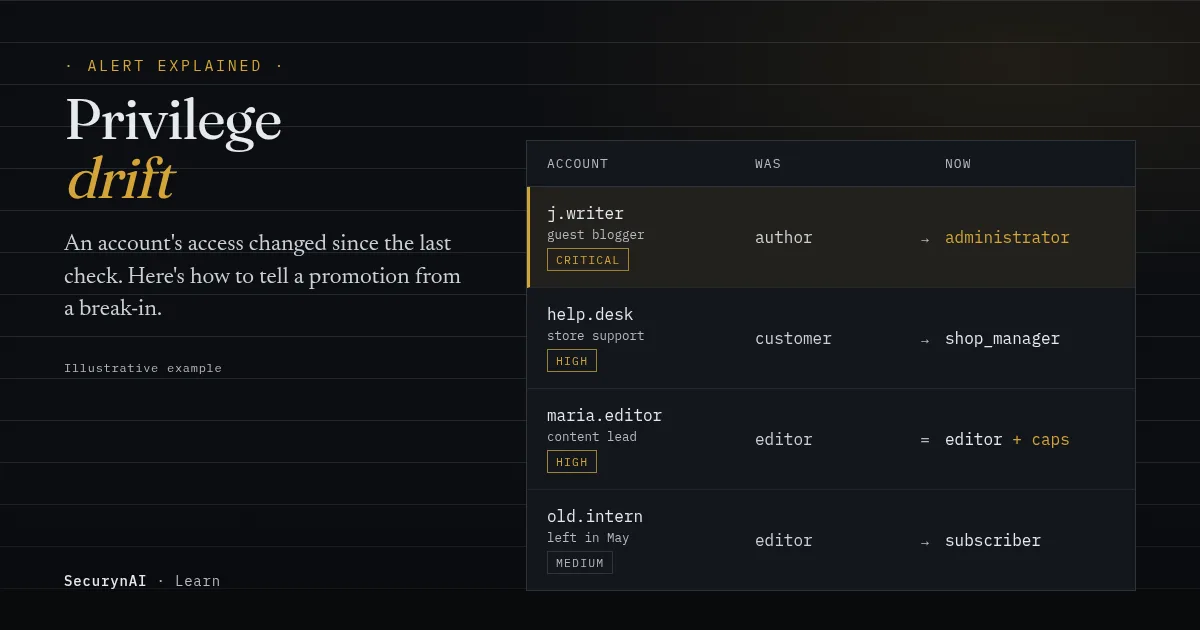
Privilege drift is when a WordPress account's role or permissions change from what they were the last time anyone checked. A writer becomes an administrator. A support login gets store-manager access. Or the role name stays the same while the account quietly gains new powers.
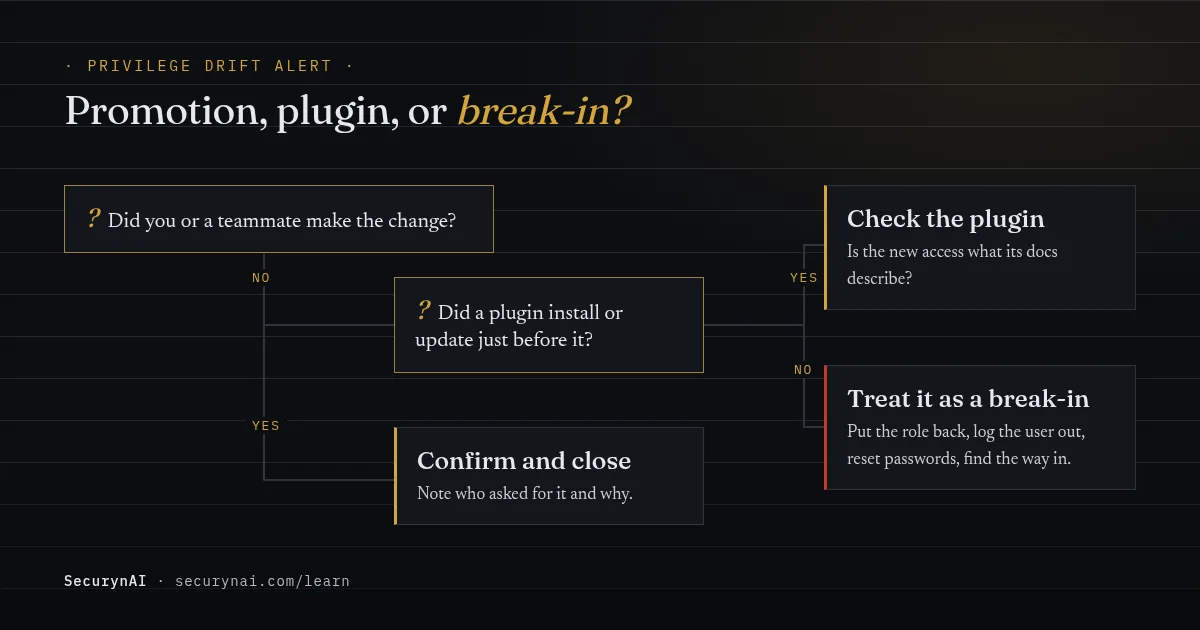
You got an alert saying a WordPress user role changed. Don't delete anything yet. First, find out which account changed, what it changed to, and whether you or a teammate did it. That one question sorts most of these alerts in a minute.
Is a privilege drift alert serious?
It depends on what the account gained. A promotion to administrator you can't explain is one of the clearest signs of a break-in you'll ever get. A demotion, or a plugin adding a role it documents, is usually routine.
Here's why the admin case matters. An administrator has, in WordPress's own words, "access to all the administration features within a single site" (Roles and Capabilities). That includes installing plugins and editing theme code. Attackers who get in through a small account try to reach that level fast.
Plugin flaws are the usual route. Patchstack's State of WordPress Security in 2026 report counted 11,334 new WordPress vulnerabilities in 2025, with 91% in plugins. It names broken access control as the most exploited type, and three of its top ten exploited flaws were privilege escalation bugs.
Those bugs get used at scale. In July 2023, Wordfence reported a campaign against WooCommerce Payments that peaked at about 1.3 million attacks on 157,000 sites in one day. The flaw let attackers with no account act as an administrator.
When it's probably fine
- You or a teammate changed the role on purpose, and you can say why.
- A plugin was installed or updated right before, and its docs say it adds roles or permissions.
- It's a demotion you planned, like an offboarded contractor.
When to act today
- Nobody on your side made the change, and the account now has administrator or editor access.
- You don't recognise the account at all. Follow the new admin user you didn't create guide.
- It follows an admin login from an unusual location on the same account.
- Your New User Default Role setting is no longer what you set.
Why do WordPress user roles change without you?
There are three common causes. Most alerts come from the first two, but you can only rule out the third by checking.
1. A person with admin access changed it
That might be you, a colleague or a developer. On client sites this is very common: someone promotes a user "just for today" and forgets. It's still worth an alert, because it's exactly the access nobody remembers to take back.
2. A plugin changed it
WordPress lets code add or remove capabilities and create whole new roles, using functions like add_cap() and add_role(), as the Roles and Capabilities documentation explains. Role-editor plugins write those changes to the database, and they stay there.
That cuts both ways. In a User Role Editor support thread, a site owner wrote that they had "accidentally change[d] the Administrator capabilities." In a WordPress.org thread, another owner uninstalled a role plugin and found they were no longer an administrator.
3. An attacker changed it
Sometimes the attacker edits a user. Sometimes they edit a setting instead. Server administrator Marius Burkard described a cleanup where the attacker had turned on open registration and set the default role to Administrator. "From this moment everyone who registered an account on the website was granted administrator rights immediately."
Another example is CVE-2023-32243 in Essential Addons for Elementor, versions 5.4.0 to 5.7.1. Patchstack found it let anyone who knew a username reset that user's password, an administrator's included, with no login. It was fixed in 5.7.2.
How to check a WordPress user role change
Look first, change things later. In the dashboard, go to Users and filter by Administrator, then open Settings > General and check Membership and New User Default Role. If you have SSH and WP-CLI, these commands only read.
1. List every administrator
wp user list --role=administrator --fields=ID,user_login,user_email,user_registeredCan you name every person on that list, and say why they need full control? A recent user_registered date on an admin you don't know is the strongest signal here.
2. Look for permissions given outside the role
wp user list-caps 12 --origin=userThis uses the --origin option to show permissions attached to the user directly, rather than through their role. Anything like manage_options or edit_users on a writer's account needs an explanation.
3. Check the registration settings
wp option get users_can_register
wp option get default_role
A 1 means anyone can sign up. That's fine for many sites. But administrator as the default role is never something you want, so fix that before anything else.
What to do if nobody can explain the change
Treat it as a break-in, not a curiosity. Back up the site first if you can, then work through these in order.
- Put the role back. In Users, or with
wp user set-role 12 author, using the role the account had before. - Log the account out everywhere. Run
wp user session destroy 12 --all, then reset its password. - Reset other admin passwords too. Whoever made the change may have used a different account.
- Check what the account did with its new access. New users, new plugins and edited theme files are the usual signs. A hidden file may be waiting, so read our guide to finding a webshell.
- Find the way in. Update every plugin and theme, and remove ones you don't use. Our attack chain guide shows how one small change links to the rest.
If you look after client sites, tell the client what changed and what you did, in plain words. Our playbook on offboarding a client site securely covers the leftover accounts that often start this.
How SecurynAI spots privilege drift
We at SecurynAI built this check because WordPress tells plugins when a role changes but doesn't keep a record you can review. The free plugin records a baseline of every user's role and permissions, then flags changes as they happen and in a daily re-check.
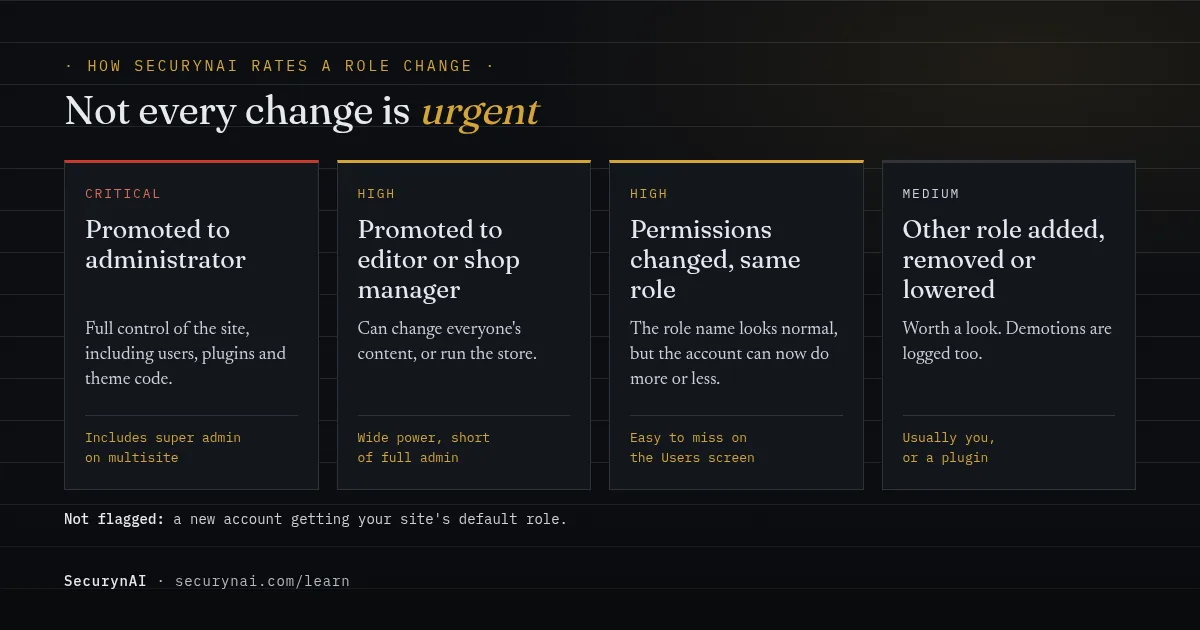
The live check catches role changes made through WordPress. The daily check compares each account against its last snapshot, so it also catches changes made directly in the database. A new account that simply receives your site's default role isn't flagged. Demotions are logged as medium severity.
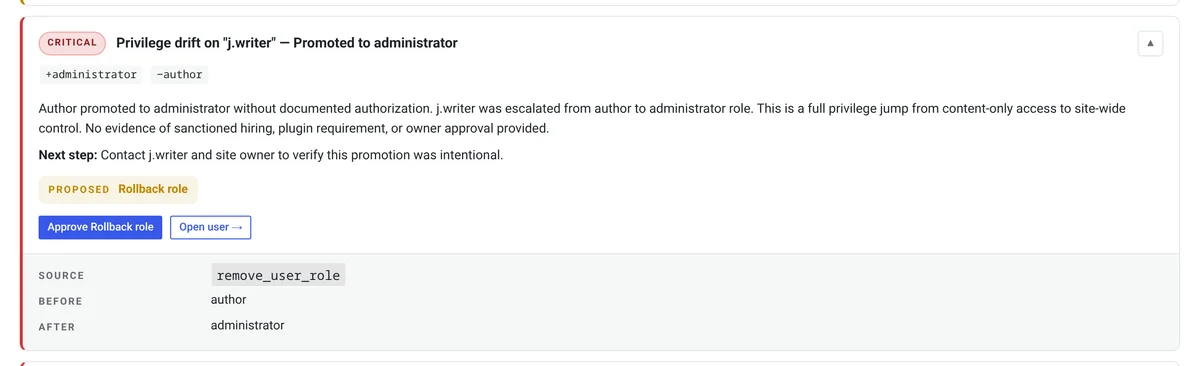
Each finding sits on the Identity screen. It shows the roles added and removed, a plain-English explanation and a next step. The free plugin can also offer a Rollback role fix. Nothing changes until you click approve, and a Revert button puts it back if you got it wrong.
On Pro ($79 per site per year), we add a risk score. It compares the change with that user's own role history, so a role they've held before scores low. High-risk changes send the rollback to your approval queue, where one admin approves it before anything changes.
None of this replaces the basics. Keep plugins updated, give people the lowest role that works, and remove access the day a project ends.
Quick check: who can change your site?
- Can you name the person behind every administrator account?
- Does every editor and shop manager still need that access?
- Is your New User Default Role set to Subscriber, or your lowest role?
- Would you know, within a day, if someone's role changed?
- Do you remove access when a contractor's project ends?
Five yeses means you're in good shape. Two to four is common and quick to fix this week. Fewer is a normal starting point. Our WordPress hardening checklist and the guide to dormant admin accounts are good next steps, and broken access control explains the bugs behind most escalations.
Privilege drift FAQ
Is privilege drift the same as privilege escalation?
Not quite. Privilege escalation is an attack: someone gets more access than they should. Privilege drift is the change you can see afterwards, whatever caused it. Most drift is innocent, but escalation always shows up as drift.
Can a plugin change WordPress user roles on its own?
Yes. WordPress lets plugins add or remove capabilities and create new roles, and role-editor plugins save their changes in the database. Removing the plugin doesn't always undo what it changed, so check the plugin's documentation if the timing matches.
Why was I alerted when I promoted someone myself?
Because the alert can't know who intended the change. It only sees that access changed. Confirm it was you, and you're done. The one change SecurynAI skips is a brand-new account getting your site's default role.
Does WordPress record who changed a user's role?
Not in a screen you can look at. WordPress fires a set_user_role hook when a role changes, but it doesn't keep a history. You need an activity log or a security plugin that listens for that hook to know when it happened.
Want to know the day someone's access changes, instead of finding out weeks later? The free SecurynAI plugin starts watching roles from the moment you install it.
Install free →