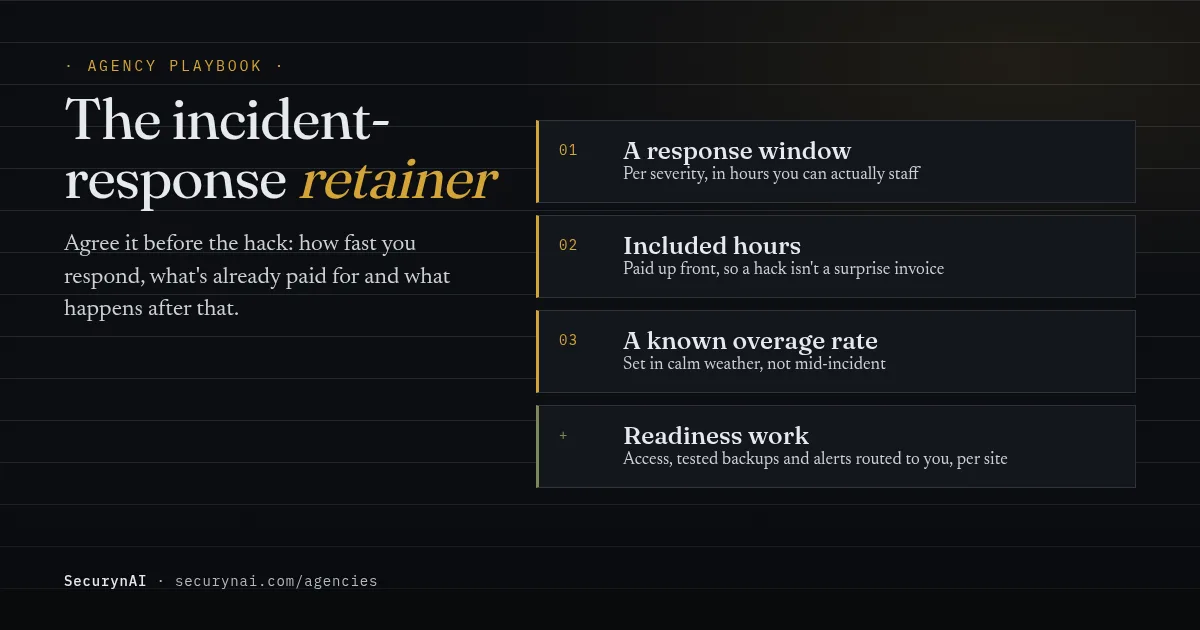
An incident response retainer is a paid, pre-agreed promise: if a client's WordPress site is hacked or at serious risk, your agency starts work within a stated window, with a set number of hours already paid for and a known rate after that. It sits beside the maintenance plan. It doesn't replace it.
Here's an illustrative Friday. At 4:40pm a client forwards a screenshot of a browser warning with one line: "Is this us?" Without a retainer, three things now get negotiated at the worst possible moment. How fast you'll start, who pays, and what "fixed" means. This playbook gives you terms, a template and a runbook, so the answers exist first.
What is an incident response retainer, and how is it different from maintenance?
Maintenance is work you do every month. A retainer is readiness you sell every year. Updates, backups and monitoring lower the odds of a hack. The retainer covers the case where something still gets through. Most agencies quietly do that work for free, or bill it awkwardly afterwards.
| Maintenance plan | Incident response retainer | Ad hoc emergency work | |
|---|---|---|---|
| What it pays for | Routine upkeep | Being ready, plus included hours | Hours worked, after the fact |
| Response time | Your normal queue | Written window per severity | "As soon as we can" |
| Price known in advance? | Yes | Yes, up to the included hours | No |
| When it's agreed | At signup | At signup or renewal | Mid-incident |
The last row is the real problem with ad hoc work. Developers have argued about this for years. In a Web Designer Forum thread asking "am I obliged to fix it free of charge?", one reply summed it up: "it's really down to your brief/agreement with the client."
When there's no agreement, the agency usually absorbs the cost. In a 2020 Adobe community discussion on charging hacked clients, one long-time developer said they'd stepped back from the work because they "spent too much unpaid time" on problems outside their control. A retainer turns that unpaid time into a line item.
Why the response window matters more than the price
Clients buy the retainer for speed and certainty, so the window is the heart of the terms. Attackers move fast once a flaw is public. Patchstack's State of WordPress Security in 2026 report found that about half of high-impact vulnerabilities were exploited within 24 hours, and put the weighted median time to first exploit at 5 hours.
The same report says 46% of the 11,334 vulnerabilities found in 2025 had no fix from the developer in time for public disclosure. So some incidents start before any update exists. That's exactly the case a retainer is for: there's nothing to patch yet, and someone has to decide what to do on the site today.
What specialist vendors promise
It helps to know the market's reference points, checked on the vendors' own pages in October 2026. Wordfence Response ($1,250 per site per year) offers 24/7/365 incident response with a 1-hour response time. Sucuri's platform plans list malware-removal response times of 30, 12 or 6 hours by tier.
Sucuri adds an honest caveat: "Ticket response time is an estimate and resolution time may vary." Copy that honesty. You don't need to match a 1-hour, round-the-clock promise. You need to promise only what your team can staff, and say plainly whether your window counts working hours or every hour.
Define what counts as an incident before anyone needs one
Vague scope is how retainer hours disappear. If "incident" isn't defined, every "is this normal?" email becomes one. Write down a few levels, an example of each, and the first-response time for each. Here's a starting point to adapt.
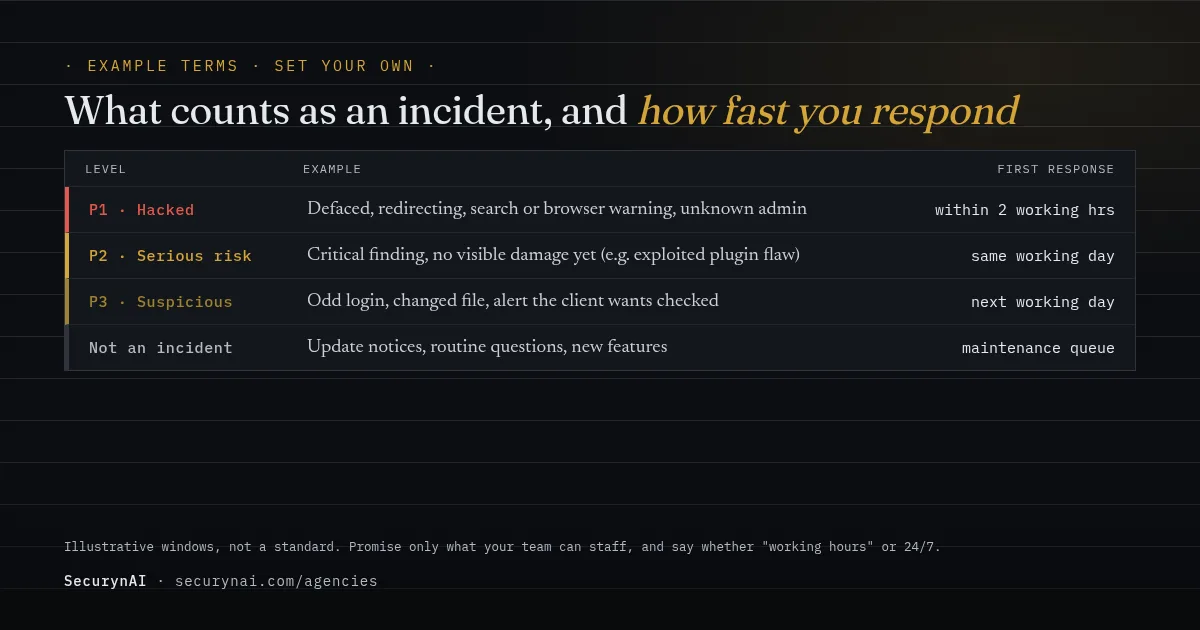
The "not an incident" row matters as much as P1. Update notices, routine questions and new features belong in the maintenance plan. If they come out of retainer hours, the client feels short-changed when a real hack arrives and the hours are gone.
First response means a person has looked and replied with a next step. It doesn't mean fixed. Say that in the terms, because a client reading "within 2 hours" will otherwise assume the site is clean by then.
Included hours, overage and rollover: an incident response retainer template
Every retainer needs the same handful of answers, written before the first incident. Copy this terms sheet, fill the brackets from your own numbers, and have it checked by whoever reviews your contracts. It's general information, not legal advice.
Sites covered:       [site URLs], hosted at [host]
Term:                12 months from [start date]
Annual fee:          [your price], billed [annually/monthly]

Response windows (first response, not resolution):
  P1 Hacked          within [2] working hours
  P2 Serious risk    same working day
  P3 Suspicious      next working day
  Working hours:     [Mon-Fri, 9-6, timezone] / [24/7]
  How to report:     [email / phone], not social media DMs

Included:            [N] hours of incident work per year
                     (triage, containment, cleanup or restore,
                     patching the way in, a written summary)
Overage:             [rate] per hour, billed in [30-min] blocks
Unused hours:        [expire at renewal / roll over once]

Not included:        site rebuilds after total data loss,
                     third-party costs (hosting, paid tools),
                     legal, regulatory or insurance advice,
                     damage from changes made by others
                     without telling us

Before cover starts: onboarding audit; any existing
                     compromise is quoted separately
Client agrees to:    keep our admin and hosting access live,
                     tell us before adding admins or plugins,
                     name one decision-maker for incidents
Not insurance:       this covers our response only, not
                     lost revenue, fines or legal costs
Leave the price out of this page on purpose. Our pricing playbook walks through a per-site worksheet, and the real cost of a hack cleanup gives you the hours a typical job takes, which is how you size N.
Size the included hours from real jobs
Start with your own history. How many hours did your last few cleanups take, from first email to closing summary? If you don't track it yet, start conservative and review after a year. Eric Karkovack put the risk plainly on Speckyboy: "A hack can quickly exhaust maintenance contracts that include a specific number of hours."
Don't inherit someone else's hack
The "before cover starts" line protects you most. Run an onboarding security audit before the retainer begins. If a site is already compromised, that's a separate, quoted cleanup. Otherwise the first incident you handle may have started before you were hired.
The readiness work that makes a retainer deliverable
A 2-hour promise is only real if the first hour isn't spent asking for passwords. Do this once per site when the retainer starts, and check it at each renewal. Most of it is the same baseline we recommend for managing 30+ client sites.
- Access that works at 6pm. Your own admin login, hosting or SFTP access, and a way to reach whoever controls DNS. Test them, don't assume.
- A backup you've restored. Know where it lives, how far back it goes, and that it restores. Our guide to restoring from backup after a hack covers what to check.
- Alerts that reach your team. Security emails should go to an inbox you read, not only the client's admin address.
- Logs kept long enough. Many plugins keep a week of activity by default. Thirty days or more gives you room to trace how someone got in.
- A known list of administrators. Every admin is a person you can name, so an unknown one stands out.
- One named decision-maker on the client side who can say yes to taking the site offline.
What the first week of an incident looks like
Write the runbook now, so the retainer delivers the same response whoever is on call. The shape below follows the prepare, respond, recover pattern in NIST SP 800-61 Rev. 3 (April 2025), cut down to what a small agency team actually does on a WordPress site.
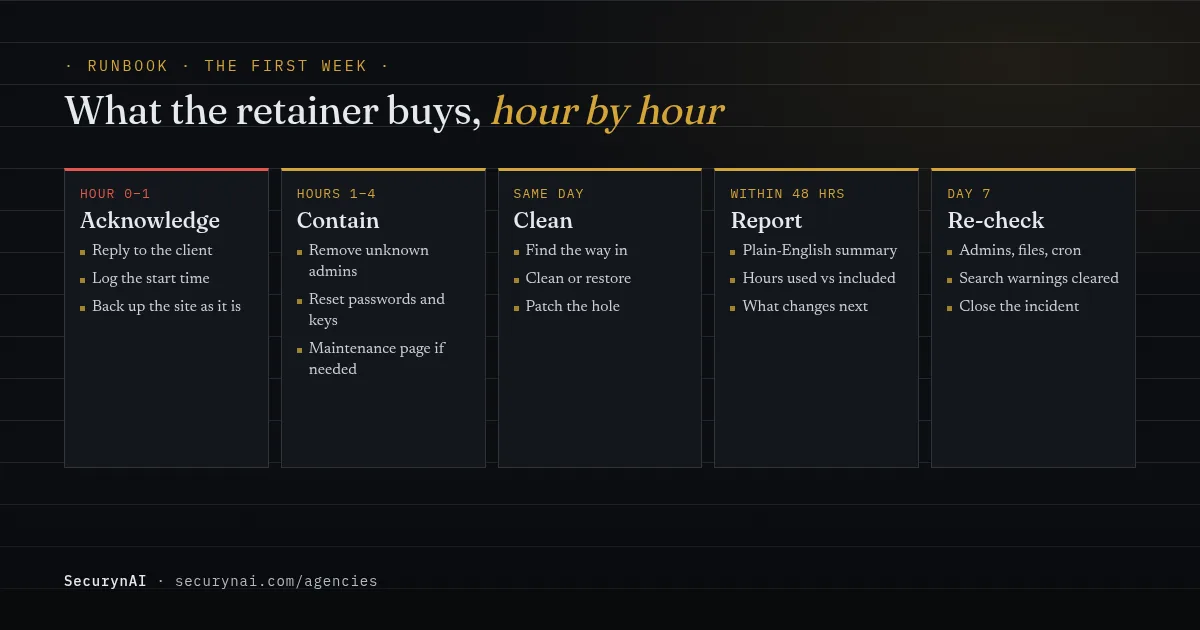
Back up the site exactly as it is before you delete or restore anything. That copy is your evidence of how they got in, and your way back if a cleanup step breaks something. Then close access before you clean files: unknown admins, passwords, application passwords and keys.
Order matters more than people expect. A site owner in a 2026 WordPress.org support thread had removed files, database rows, cron events and a hidden admin, and was still reinfected. Their finding: "the user account appeared two hours before any file reappeared." Something was recreating access first.
Reinfection is common enough to plan for. Another owner in the WordPress.org forums said their sites had been "hacked over and over again", security plugin and all. That's why the runbook ends with a day-7 re-check of admins, files and scheduled tasks, not with the first clean scan.
For the cleanup itself, our guides on removing WordPress malware and a new admin user you didn't create cover the steps. For the client email, use the templates in explaining a hack to a client.
When to offer a retainer, and what to do when a client says no
Retainers sell best when the risk has just become real. That's right after a client's own incident, or right after you've cleaned up a site for someone else in their industry. Make the offer part of your post-incident summary, not a cold pitch weeks later. Renewals and new-client onboarding are the other natural moments.
Some clients will decline, and that's a fair decision for a small brochure site. Decide your policy for them now: a standard emergency rate, worked as capacity allows. Apply it the same way every time. Otherwise your retainer clients end up paying for free emergency work for everyone else.
Where SecurynAI fits in an incident response retainer
We at SecurynAI want to be clear on scope first. SecurynAI is a plugin that runs on each site. There's no central multi-site console and no managed cleanup service. What it does is shorten the time between "something changed" and "your on-call person knows", and keep a record you can use afterwards.
On every site, with the free plugin
- Email alerts for serious findings. In Settings > General, switch on Email serious findings (off by default) and put your agency address in Send alerts to. Only new critical and high findings are emailed, and findings from one scan arrive as one email. The subject names the site and host, so on-call knows which client it is.
- Longer activity history. Keep activity for can be set from 1 to 365 days (7 by default). Set 30 or more on retainer sites. Settings changes are logged with who made them, so you can see who switched the firewall to Monitor. Export CSV downloads the filtered log for the post-incident summary.
- A daily file scan. Core, plugin and theme files are checked against official checksums. Every PHP file under wp-content is also checked against 13 bundled malware signatures, with no live feed. It flags only high-confidence obfuscated code, and detects without cleaning anything.
- Vulnerability alerts for installed plugins, themes and core, explained in plain English.
- A runtime firewall that starts in Monitor mode. It logs matches without blocking until you switch the site to Block. Login lockout works in either mode.
What Pro adds for the response itself
Pro ($79 per site per year) groups related findings into incidents. Fixes that need approval wait in a queue: critical ones are emailed straight away, the rest in a daily digest, and both go to your alert address when one is set. An optional daily summary, off by default, lists fixes applied, reverted or failed, with one-click revert links.
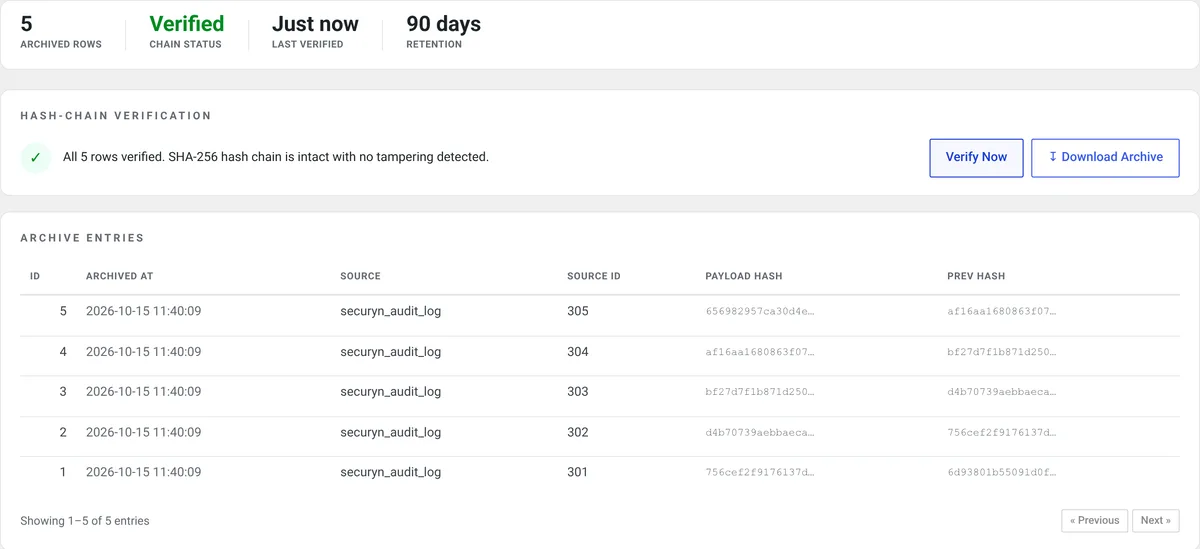
Pro's Patch Queue can update a vulnerable plugin when it comes from wordpress.org and a fixed version exists. Themes, core and premium plugins show "Manual update required". Pro also keeps a 90-day audit archive with an integrity check, and its compliance export bundles the last 90 days of incidents and decisions, which helps when you write the client summary.
None of this replaces backups, updates, good hosting or the hours your team puts in. It gives the retainer a faster start and a cleaner paper trail.
Quick check: are you ready to sell an incident response retainer?
- Have you written down what counts as an incident, with examples?
- Does each level have a first-response time your team can staff?
- Do you know how many hours your last three cleanups took?
- Can you log in to every retainer site and its hosting tonight?
- Do security alerts from those sites reach an inbox your team reads?
- Is there a written policy for clients who don't have a retainer?
Five or six yeses means you can put a retainer in front of clients this month. Three or four is common, and the terms sheet above closes most of the gap. Fewer is a normal starting point. Begin with the definitions and the access checks, then price it.
Incident response retainer FAQ
Is an incident-response retainer the same as cyber insurance?
No. A retainer is a promise about your agency's own response: how fast you start and how many hours are already paid for. It doesn't cover the client's lost sales, legal costs or fines. Say so in the terms, and suggest the client asks their insurer about cover if that matters to them.
Should unused retainer hours roll over?
Either works, as long as the terms say which. Many agencies let unused hours expire at renewal, because the fee pays for being ready, not just for hours worked. If clients push back, a middle ground is converting unused hours into a security review or other maintenance work at the end of the year.
Should a retainer cover a site that's already hacked when we take it on?
Not automatically. Audit the site before the retainer starts, and quote any cleanup you find as a separate job. Otherwise the first incident you handle may be one that started before you were hired, and it will use up the year's hours in week one.
Does SecurynAI handle incidents for us?
No. SecurynAI is a plugin on each site, not a managed cleanup service, and there's no central console. It finds issues, explains them and emails your team when the free alert setting is on. Pro can apply some fixes with undo and keeps a 90-day audit archive. The response work is still yours. Bulk licensing is on request.
Putting retainers in place across your client sites? Start with the free plugin on the sites you cover, route alerts to your team, then talk to us about bulk licensing. A real person replies.
See agency options →