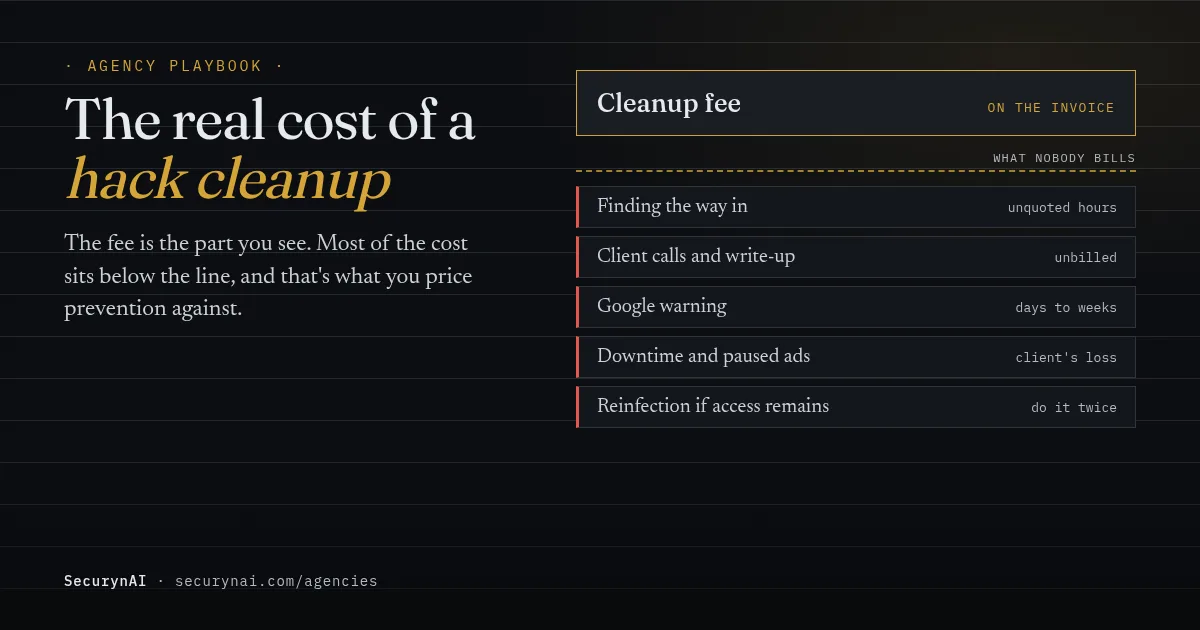
The real cost of a WordPress hack cleanup is the cleanup fee plus everything around it: the hours you don't bill, the days a site carries a Google warning, and the repeat infection if one back door was missed. For most agencies, those extras cost more than the fix itself. That gap is your best argument for pricing prevention.
Picture a common moment (illustrative, not a real client). A client who turned down your security add-on emails on a Friday: their store shows a red warning. You'll clean it. The question this playbook answers is what that weekend actually cost you, and how to price things so the next conversation goes differently.
What does a WordPress hack cleanup cost in 2026?
Most of the big security vendors no longer sell cleanup on its own. They sell it inside an annual plan. That tells you something useful: the people who do cleanups all day have decided prevention and cleanup belong in one price. Here's what they charge, from their own pages, checked 20 October 2026.
| Vendor plan | Price per site | What it says about cleanup |
|---|---|---|
| Sucuri Basic Platform | $229 a year | Unlimited manual cleanups; 30-hour malware removal target |
| Sucuri Pro Platform | $339 a year | Unlimited manual cleanups; 12-hour target |
| Sucuri Business Platform | $549 a year | Unlimited manual cleanups; 6-hour target |
| Wordfence Care | $590 a year | "Full malware cleanup and forensic investigation at no extra charge" |
| Wordfence Response | $1,250 a year | Same, with 24/7 incident response and a 1-hour response time |
Sources: Sucuri plans and pricing and Wordfence pricing, both checked 20 October 2026. Sucuri says its removal times are estimates and "resolution time may vary based on complexity."
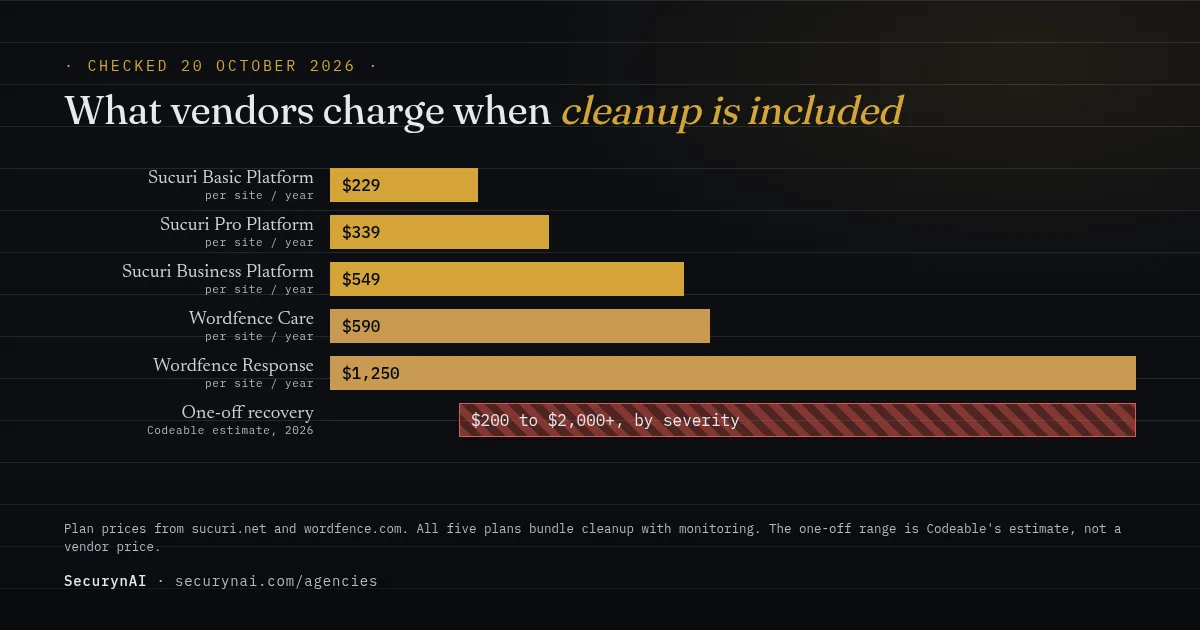
If you'd rather price a one-off job, there's a rough market range too. Codeable's 2026 maintenance pricing guide says recovering a hacked WordPress site "typically runs $200–$2,000+, depending on severity." It also puts agency rates at roughly $100 to $250 an hour. Those are Codeable's estimates, not a survey, so treat them as a sanity check.
The spread is huge because the fee depends on what you find, not on the site's size. One injected file is an hour. A site with a hidden admin account, a scheduled task that rebuilds the malware and a stolen hosting password is days.
Where the hidden costs of a hack cleanup sit
The cleanup fee is the one line on the invoice. Most of the cost never makes it there. When you work out what an incident really took, these are the items that usually go uncounted.
Investigation you can't quote in advance
Finding the way in takes longer than removing the malware. Until you know which plugin, password or account let the attacker in, a cleanup is only a pause. That detective work is real time, and most agencies quote a flat fee before they know how much of it there will be.
Search warnings that outlast the fix
Google's Security Issues report help page says flagged sites "can appear with a warning label in search results," and Chrome can show a full-page warning. After you clean up and request a review, Google says it "can take from a few days to a few weeks to complete." The client loses visitors for that whole stretch.
Search-related hacks are common, too. Sucuri's SiteCheck Malware Trends Report 2024 ran 70.8 million remote scans and found 1,176,701 infected websites. SEO spam made up 38.4% of those infections. That's the kind of hack where the clean-up work keeps going in Search Console long after the files are fixed.
Knock-on problems in other accounts
A flagged site can trip other services. In a WordPress.org support thread, an owner wrote: "My Google Ads have been disapproved because of a 'Compromised Site'." One reply estimated it "may take a professional up to 3 to 5 business days" to clear. That's paid traffic switched off on top of everything else.
Client calls and the written summary
Every incident needs at least one call and one plain-English write-up: what happened, what you did and what changes now. That time rarely lands on an invoice. Our playbook on explaining a hack to a client has a template that keeps it to one sitting.
Why hacked sites get reinfected after cleanup
The most expensive cleanup is the one you do twice. Reinfection usually means the visible malware went, but the attacker's way back in stayed. You pay for the second round in time and in the client's trust.
It happens a lot. In a 2026 WordPress.org thread, an owner had "removed all listed files, database rows, cron events and the hidden admin account," rotated every password, and still found the site "reinfected this morning." In another thread, Wordfence's support team told a frustrated owner "there may be a file somewhere recreating the issue."
So a cleanup quote should cover the whole job, not just the visible part. At a minimum, a full cleanup checks these:
- Every administrator account, including any you can't name. See a new admin user you didn't create.
- Scheduled tasks that rebuild files. See rogue cron jobs.
- Passwords for WordPress, hosting, FTP or SFTP, and the database.
- Core, plugin and theme files against clean copies, plus any PHP files in uploads.
- The plugin or theme that let them in, updated or removed.
Back up the site as it is before you delete anything, even infected. You may need it to find the way in. Our guides to removing WordPress malware and restoring from a backup after a hack walk through the order.
A hack cleanup cost worksheet you can copy
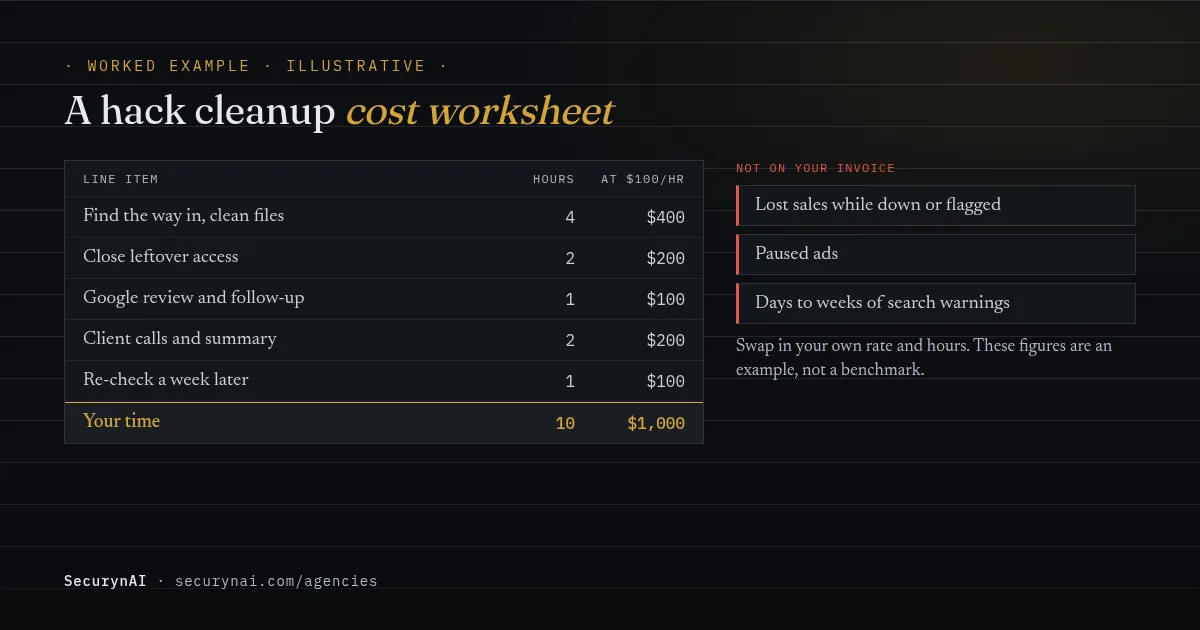
Put your own numbers into this once, and you'll never quote a cleanup from gut feel again. The figures below are a worked example with stated assumptions, not a benchmark. We used a $100 hourly rate, the low end of Codeable's agency range, and a middling incident.
| Line item | Example hours | Example cost at $100/hr |
|---|---|---|
| Find the way in and clean files | 4 | $400 |
| Close leftover access (admins, cron, passwords) | 2 | $200 |
| Google review request and follow-up | 1 | $100 |
| Client calls and written summary | 2 | $200 |
| Re-check a week later | 1 | $100 |
| Your time | 10 | $1,000 |
Then list what the client loses, which never appears on your invoice: lost sales while the site is down or flagged, paused ads, and a few days to a few weeks of search warnings. Write those down too. You'll use them in the pricing conversation.
How to price prevention instead of selling fear
Lead with the cost comparison, not the threat. Clients tune out "you could be hacked any day," and they're right to, because every vendor says it. A worksheet with your own hours in it is harder to wave away.
There is a real risk to price, though. Patchstack's State of WordPress Security in 2026 report counted 11,334 new WordPress vulnerabilities in 2025, 91% of them in plugins. It found 46% weren't fixed in time for public disclosure, and the weighted median time to first exploit was 5 hours. Fast updates and monitoring are what that number buys.
Three ways agencies package it
- Cleanup included, with a cap. Like Sucuri and Wordfence Care, roll cleanup into the plan, but cover a set number of incidents a year. Price it so prevention keeps you well under the cap.
- Prevention plan, cleanup quoted separately. Codeable's guide describes a basic tier where "malware cleanup is quoted separately." Simple, but the client still gets a surprise bill.
- A separate incident retainer. A small monthly fee buys a guaranteed response. Our incident-response retainer playbook covers how to scope it.
Here's an illustrative bit of maths. Say your security add-on is $50 a month (an example figure, not a benchmark). The 10-hour incident above costs the same as 20 months of it. For pricing the add-on itself, see what to charge for security monitoring.
What to tell the client
"The last cleanup we did took about 10 hours of our time,
plus a week of Google warnings on the site. Our security
add-on is $[X] a month. It covers updates, monitoring and
[N] cleanups a year if something still gets through. It's
not a guarantee nothing will happen. It's a fixed cost
instead of a surprise one."
Say what the plan can't do, too. No plan stops every hack, and a client who was told it would feels misled the first time something happens. Our guide to security in your maintenance plan covers the wording.
Where SecurynAI fits in a prevention plan
We at SecurynAI make a WordPress plugin, not a cleanup service. Each client site runs its own copy, and there's no central dashboard for many sites. What it gives you is per-site detection and plain-English findings, so problems show up earlier and cheaper. Here's what each tier does today.
Free (Starter)
- A firewall that starts in Monitor mode. It logs attack patterns without blocking them until you switch it to Block. Login lockout works in either mode.
- A daily file scan. It checks core, plugin and theme files against clean copies, and every PHP file under wp-content against 13 bundled malware signatures plus clearly obfuscated code. It detects only; it doesn't clean.
- Vulnerability alerts for installed plugins and themes, a hardening checklist that tells you what to fix, and a 7-day activity log.
Pro ($79 per site per year)
- Patch Queue with Fix Now. It ranks vulnerable plugins and can update wordpress.org plugins that have a fixed version. Themes, core and premium plugins show "Manual update required."
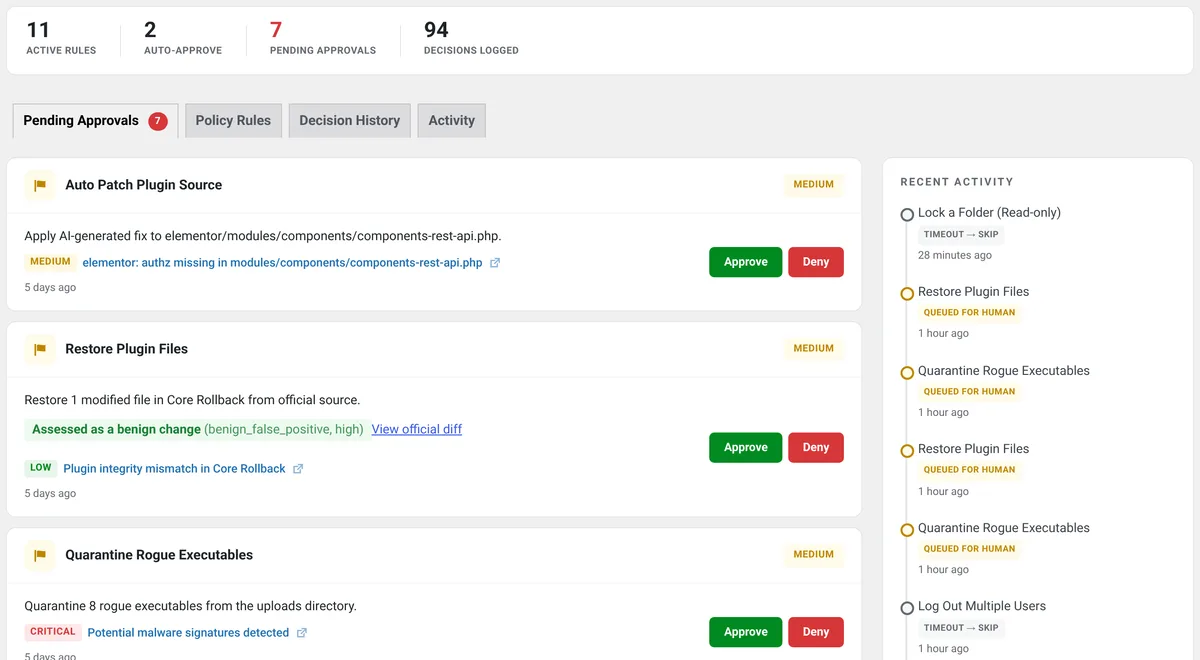
- An approval queue. Your policy rules decide which fixes run alone and which wait for a person. Critical approvals are emailed straight away, and pending ones go out in a daily digest.
- A 90-day audit archive and a compliance export, useful when a client asks what happened and when.
Managing many client sites? Agencies can ask for volume pricing through our contact page; there's no published agency price. SecurynAI doesn't replace backups, updates or a good host, and it won't clean a hacked site for you.
Quick check: are you pricing hack cleanups properly?
- Do you know how many hours your last cleanup really took, calls included?
- Does your plan say how many cleanups a year it covers?
- Does every quote include closing leftover access, not just removing files?
- Would you hear about a vulnerable plugin on a client site within a day?
- Do you have tested backups for every client site?
Five yeses means your pricing matches your real costs. Two to four is common and fixable this month. Fewer is a normal starting point; begin with the worksheet above and our WordPress hardening checklist.
WordPress hack cleanup cost FAQ
How much should I charge to clean a hacked WordPress site?
Charge for the whole job, not just the file cleanup. Add up finding the way in, cleaning, closing leftover access, the Google review and the client calls, then multiply by your normal rate. Codeable's 2026 pricing guide puts hacked-site recovery at $200 to $2,000 or more, depending on severity.
Should hack cleanup be included in a WordPress maintenance plan?
It can be, if the plan also pays for the prevention that keeps cleanups rare. Sucuri and Wordfence Care both bundle cleanup into an annual fee. If you include it, cap how many incidents a year the plan covers, and say what happens after that.
Can a security plugin clean a hacked WordPress site?
Some can remove known malware files, but none can tell you for certain that every back door is gone. SecurynAI only detects: it flags changed core and plugin files and known malware patterns, and leaves the cleanup to you. Plan on a person checking accounts, scheduled tasks and passwords either way.
How long does a Google hacked-site warning last?
Until you clean the site and Google reviews it. You request the review in Search Console, and Google says a malware review can take from a few days to a few weeks. Warnings in search results and in Chrome can stay up until then. Our "Deceptive site ahead" guide covers the steps.
Building security into your client plans? See what SecurynAI Starter covers for free and what Pro adds per site, then ask us about volume pricing if you look after many sites.
Compare Starter and Pro →