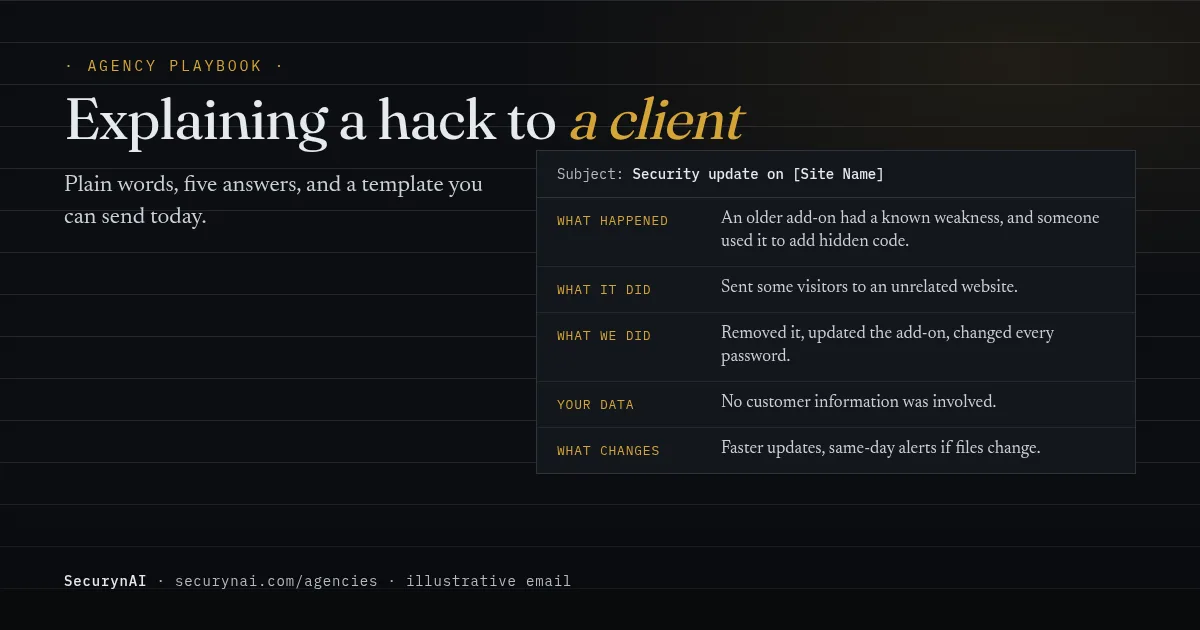
To explain a WordPress hack to a client, send a short, plain-English account that answers five questions: what happened, what it did, what you fixed, whether their data or customers were affected, and what changes next. Skip the CVE numbers and file paths. Put the answer to "is my business OK?" near the top.
Picture it (an illustrative scene, not a real client). Your monitoring flagged a changed file on a client's site this morning, and you've cleaned most of it up. Now there's a blank email and a client who doesn't know what a plugin is. This playbook, and the free hacked-site email template below, is for that moment.
Why do hack explanations to clients go wrong?
Most bad client updates fail in one of four ways, and none of them is about the hack itself. The cleanup can be perfect and the relationship still takes the hit.
- Too technical. "A webshell was uploaded via an unauthenticated file-upload flaw." Accurate, and useless to someone who wants to know if they can still take orders.
- Too vague. "All sorted, nothing to worry about." It reads as dismissive, or as if you're hiding something.
- Too early with guesses. Saying "no data was touched" before you've checked, then taking it back, does more damage than the hack.
- Defensive. Leading with whose fault it was. The client hasn't asked yet, and you've made it the topic.
The good news: people judge the response, not just the incident. In RAND's 2016 survey of 2,038 US adults, only 11 percent of those who had received a breach notice stopped dealing with the company afterwards, and 77 percent were highly satisfied with how it responded.
That's consumers and big brands, not you and a client, so treat it as a direction, not a forecast. And what people say is harsher: in Vercara's 2024 survey of 1,000 US adults, 70% said they would stop shopping with a brand after a security incident. The gap between those two numbers is the response.
When should you tell a client their site was hacked?
Tell them the same day you confirm it, even if you don't have every answer yet. Then send the full explanation once you do. Two messages beat one late, perfect one, because silence is what clients remember.
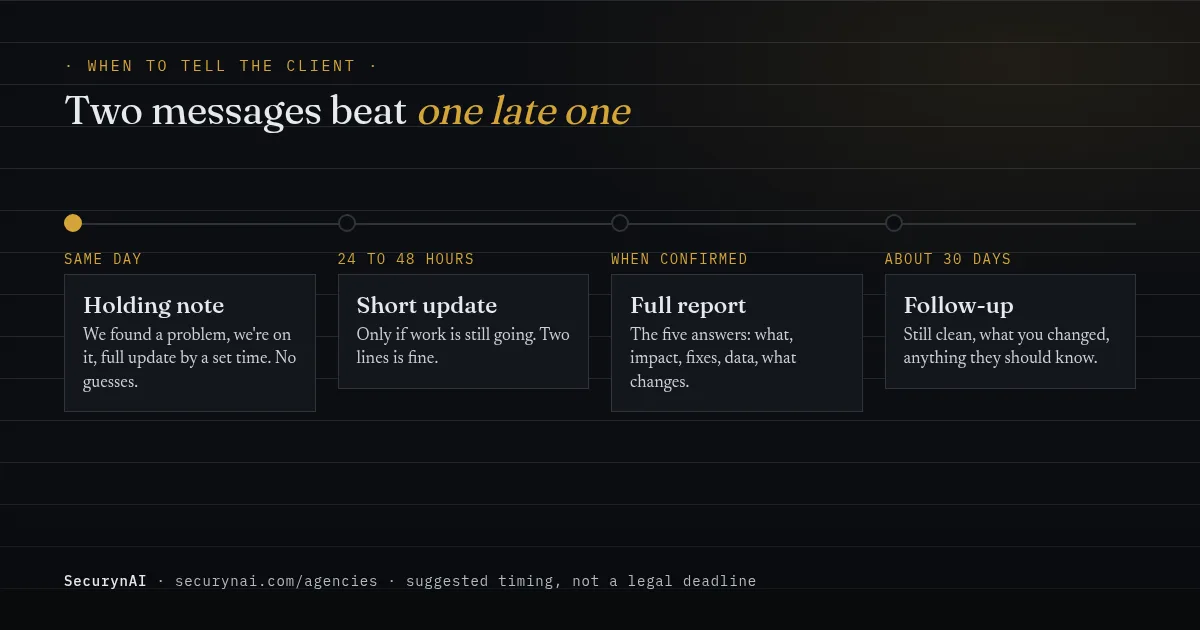
The holding note says three things: we found a problem, we're on it, and you'll get a full update by a specific time. It doesn't guess at the cause or the impact. If the work runs past that time, send a two-line update anyway, even if it only says you're still checking.
There can also be a legal reason not to wait. Under GDPR Article 33(2), a processor (which can include an agency hosting or running the site) must tell the client "without undue delay" about a personal data breach. The client may then have 72 hours to tell the regulator.
Rules differ by country and US state. Our guides to GDPR and WordPress data breaches and US state breach notification laws cover the details. This is general information, not legal advice.
The five questions every client hack explanation must answer
If your email answers these five questions in plain words, it's done. Everything else is optional. Put them in this order, because it follows what the client is worried about.
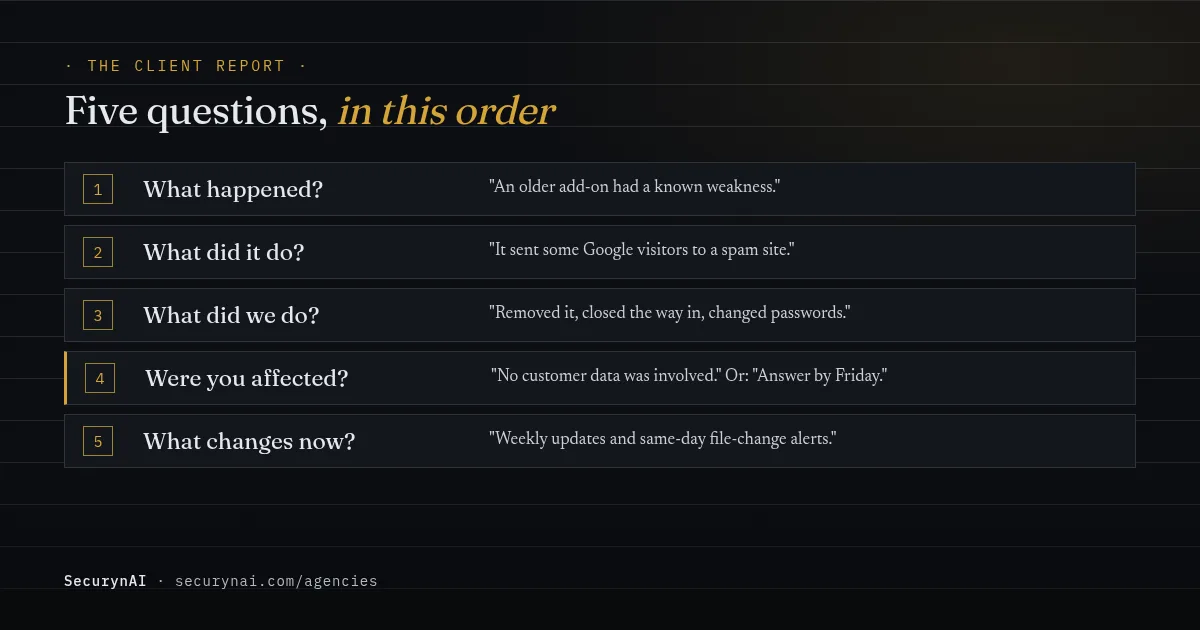
- What happened? One sentence. "An older plugin had a known weakness, and someone used it to add hidden code to your site."
- What did it do? In business terms. "It sent some visitors from Google to a spam site." Not "it injected a conditional redirect."
- What did we do? A short list: found it, removed it, closed the way in, checked for anything else, changed passwords.
- Were you or your customers affected? A direct yes, no, or "we're still checking, answer by Friday." Never leave this out.
- What changes now? One or two concrete changes that make this kind of problem less likely, or caught sooner.
Translating the jargon
Keep the technical version for your notes. Here's how common findings sound to a client.
| Technical version | What to tell the client |
|---|---|
| Unpatched plugin vulnerability | An add-on had a known weakness, and a fix existed that hadn't been installed yet. |
| Webshell / backdoor | A hidden file that let someone get back in without logging in. |
| Malicious redirect | Some visitors were sent to another website instead of yours. |
| SEO spam injection | Hidden spam pages or links were added to show up in Google under your name. |
| Rogue admin account | Someone created their own login with full control of the site. |
| Credential rotation | We changed all the passwords and logins, so any old ones are now useless. |
Before you write: get the facts straight
You can't explain what you haven't worked out, so check these before the full report goes out. Back up the site, as it is now, before you delete anything. Even a hacked copy is evidence of what happened.
Real threads show why. In a Wordfence support thread, a developer cleaning a client site asked: "WHAT can I DELETE that is not required to remove these dodgy people?" The reply: compare against the original public files, change every password, and take a full backup first.
- What was found, and where. Files, accounts, settings, scheduled tasks.
- The likely way in. An out-of-date plugin is the usual answer. Patchstack's State of WordPress Security in 2026 counted 11,334 new WordPress vulnerabilities in 2025, 91% of them in plugins.
- What the attacker could reach. Does the site store orders, form entries or customer accounts?
- What you've done, and what's still open.
- Whether other sites are involved. If you share hosting or logins across clients, check them all.
That last point matters more for agencies than anyone. One web designer reported on WordPress.org the same rogue user and fake plugin turning up on "atleast 20- 25 websites." If that's you, every affected client gets their own honest email, not a group note.
Expect the "but I thought it was up to date" moment, too. In a MalCare support thread, a developer described a new client's site hacked through a plugin from 2017: "She did not know this since she simply though that everything was up to date." Explain it without blame.
For the cleanup itself, see our guides to removing WordPress malware and restoring from a backup after a hack.
Free hacked-site email templates for clients
Copy these, fill in the brackets, and cut anything that doesn't apply. The first goes out the day you confirm the problem. The second goes out once you have real answers. Both are written to be forwarded to a business owner's partner or boss without a translator.
Template 1: the same-day holding note
SubjectSecurity issue on [Site Name]: we're on it
Hi [Client Name],
A quick heads-up: today we found a security problem on [Site Name]. We're already working on it, and the site is [still running normally / temporarily showing a maintenance page while we fix it].
We don't have the full picture yet, so I won't guess. You'll get a full update from me by [day and time], including whether any of your or your customers' information was involved.
There's nothing you need to do right now. If you notice anything odd on the site, or hear from a customer, just forward it to me.
[Your name]
Template 2: the full client report
SubjectSecurity update on [Site Name]: what happened and what we did
Hi [Client Name],
Here's the full update on the security issue I mentioned on [date].
The short version: [e.g. "The site is clean, the way in is closed, and no customer information was involved."]
What happened: [One plain sentence, e.g. "An older add-on on your site had a known weakness, and someone used it to add hidden code."]
What it did: [e.g. "It sent some visitors arriving from Google to an unrelated website. It did not change your products, orders or customer accounts."]
What we did:
- Took a backup of the site as we found it, for our records
- Removed the hidden code and [any extra logins or files]
- Updated [the add-on] and checked the rest of the site for anything similar
- Changed the site, hosting and database passwords
- [Anything else, e.g. asked Google to re-check the site]
Were you or your customers affected? [Direct answer. If yes, say what data, how many people if known, and what we suggest next.]
Is there anything you need to do? [e.g. "Please change your own login password the next time you sign in." or "Nothing at all."]
What changes from here: [One or two concrete changes, e.g. "Updates to add-ons are now applied within a week, and we're alerted the same day if site files change."]
I'm happy to go through any of this on a call. If you'd like the technical notes for your own records or your IT person, just ask.
[Your name]
Keep the technical notes yourself: timestamps, file paths, plugin versions, IP addresses and what you changed. If you resell security as a regular service, our client security report template covers the monthly version of this email, and the Agency Ops hub has the rest of the client-side process.
What not to say in a hacked-site email
Promise what you control, and nothing you don't. No plugin, host or agency can promise a site won't be hacked again, and clients remember broken promises far longer than incidents.
| Avoid | Say instead |
|---|---|
| "The site is 100% secure now." | "We've closed the way in we found, and we're watching the site closely." |
| "No data was taken." (before you've checked) | "We're checking whether any data was involved. You'll have an answer by [day]." |
| "Someone was clearly targeting you." | "Most attacks like this are automated: bots scan lots of sites for the same weak add-on." |
| "The plugin developer's fault." | "A plugin had a known flaw. A fix existed; it hadn't been installed yet." |
| CVE numbers, file paths, log excerpts | "I've kept the technical details if you or your IT person want them." |
About that third row: you rarely know who did it, and it doesn't change what the client needs to do. Patchstack's 2026 report puts the weighted median time from disclosure to first attack at five hours for heavily exploited flaws. Speed like that comes from bots scanning for weak plugins, not from someone picking your client.
How SecurynAI helps you explain what happened
We at SecurynAI built the plugin around one idea: every alert should make sense to the person who has to act on it. That makes the client email easier, but it doesn't write it for you. Here's what you get, site by site.
- Plain-English findings (Free). With your own OpenAI, Anthropic or Google Gemini key, each finding gets a one-line summary, what it could lead to, and next steps, written for a non-technical site owner. Without a key, you get a shorter built-in explanation.
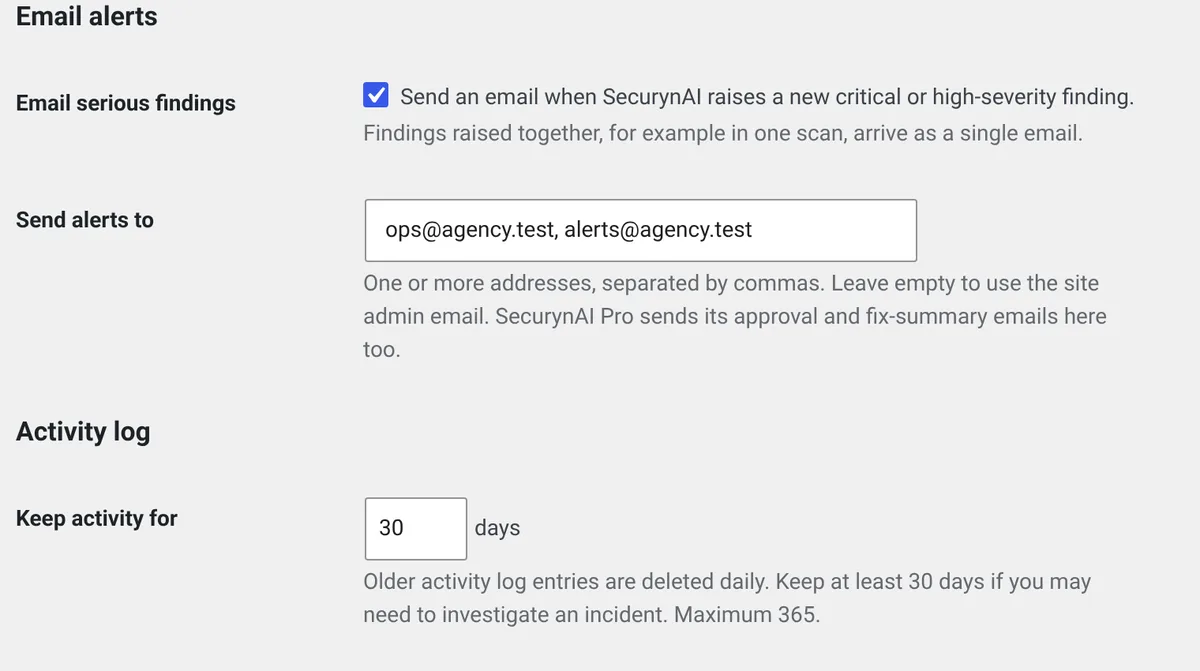
- An Audit Log (Free). It records logins, failed logins, user and role changes, plugin and theme changes, and post and media changes. It keeps 7 days by default, so set "Keep activity for N days" in Settings > General to 30 or more on client sites (a Pro hardening fix sets 90).
- Email alerts for serious findings (Free, off by default). Switch on "Email serious findings" in Settings > General and put your agency address in "Send alerts to". Only critical and high-severity findings are emailed, and findings raised together arrive as one email, so you hear first without a flooded inbox.
- Incidents with a timeline (Pro, $79 per site per year). Pro groups related alerts into one incident, with events in time order and a summary (written by AI if you've added a key). That's the raw material for "what happened".
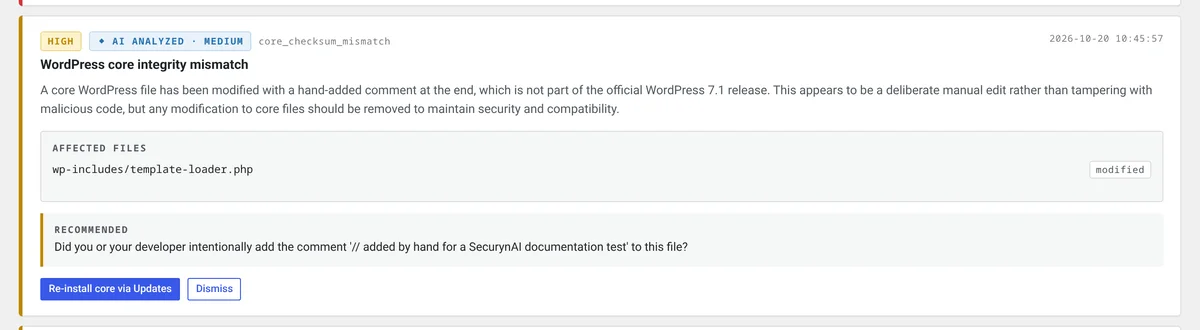
Two honest limits. There's no client-facing report and no central console for many sites: each site runs its own copy of the plugin, and you write the email. And check an AI explanation before you forward any of it. Our guide to fact-checking AI security explanations shows what to look for.
None of this replaces backups, updates or a good host. If you'd like a process around all of this, our incident-response retainer playbook and the rest of our agency playbooks pick up where this one stops.
Quick check: could you explain a hack tomorrow?
- Do you know which client sites store customer data or take payments?
- Do you have the client's preferred contact, and a backup contact, for urgent news?
- Do you keep a backup you could restore, and have you tried it?
- Would you know what changed on a site in the last 7 days?
- Does your contract or plan say what a cleanup includes, and what it costs?
Five yeses means you're ready. Two to four is common, and each gap is an afternoon's work. Fewer is a normal starting point. Our playbooks on security in your maintenance plan and the real cost of a hack cleanup cover the last question.
Explaining a hack to a client: FAQ
Do I have to tell a client their site was hacked if no data was taken?
Tell them anyway. It's their business and their site, and they may hear about it from Google, their host or a customer first. A short, calm note that says nothing sensitive was involved costs you far less than being found out later.
What if the hack happened while I was maintaining the site?
Say so plainly, and focus on what you've changed. Clients forgive incidents more readily than surprises. If your contract or maintenance plan covers cleanup, say what's included; if it doesn't, raise cost after the site is safe, not in the first message.
How much technical detail should the email include?
Enough for the client to understand what happened and decide what they need to do, and no more. Keep file paths, plugin versions and CVE numbers in an appendix or your own records. Offer to share the technical notes if they or their IT person want them.
Should my client tell their own customers?
Only if customer data may have been exposed, and that decision is the client's, ideally with legal advice. Your job is to give them clear facts: what data the site holds, whether it was reachable, and what the logs show. Breach notice rules depend on where the affected people live.
Tired of translating raw security alerts before you can even start the client email? The free SecurynAI plugin explains each finding in plain English, on every site you install it on.
Install free →