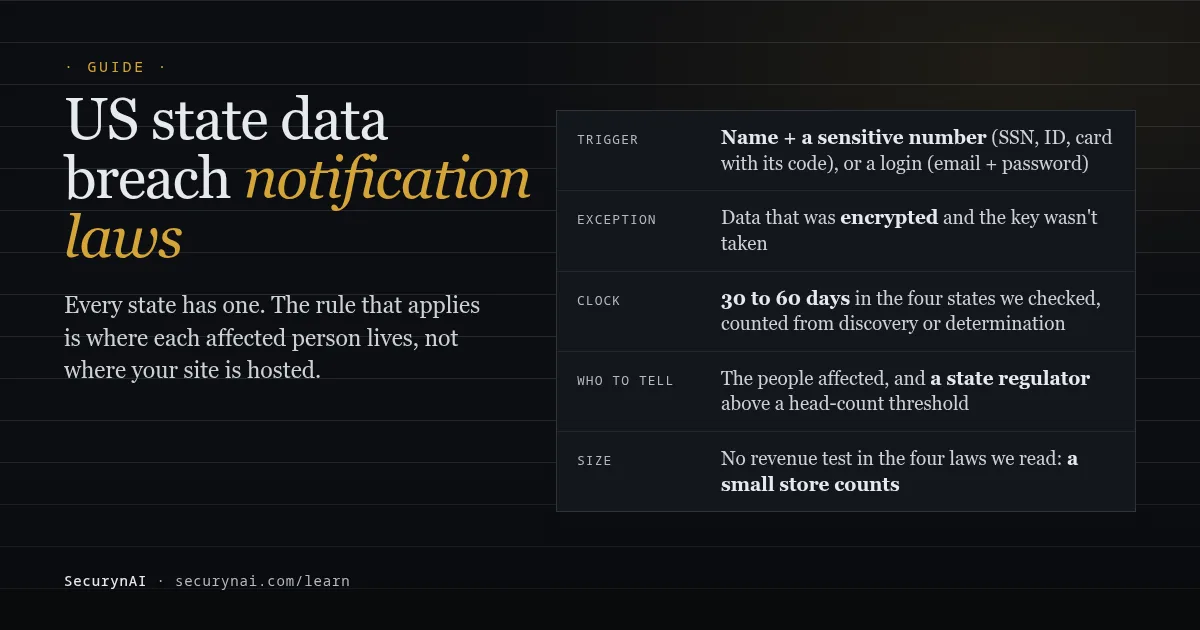
A US state data breach notification law is a state statute that makes a business tell people, and sometimes a state regulator, when certain personal information about them was taken or accessed without permission. The Federal Trade Commission's breach response guide notes that every state, plus DC, Puerto Rico and the US Virgin Islands, has one.
For a WordPress or WooCommerce site, data breach notification usually comes down to three questions: what data did the site hold, which states do the affected people live in, and when did you find out. This guide covers all three, with four real statutes as examples.
Do state breach notification laws apply to a small WordPress site?
Usually, yes. These laws follow the customer, not the size of your business. Washington's law, for example, covers "any person or business that conducts business in this state" and holds personal information about a resident. There's no revenue test and no minimum number of records in the four laws we read for this guide.
So the question isn't "are we big enough?" It's "did we hold covered data about someone in that state?" A store in Ohio that ships to Florida, Texas and California has customers covered by all three of those laws, plus Ohio's, each with its own definitions, deadline and regulator.
What data triggers a breach notice?
Not all personal data counts. Most state laws are triggered by a name combined with a sensitive number, or by login details that open an account. The exact list is set state by state, but the core repeats.
- Name plus a sensitive number: a Social Security number, a driver's license or state ID number, or a card or account number together with the code or password needed to use it.
- Health and other categories: Florida's section 501.171 also lists medical information, health insurance numbers, biometric data and geolocation. California's list includes medical and health insurance information too.
- Login details: California, Florida and Washington all cover a username or email address combined with a password or security answer that opens an online account.
Two exceptions matter. Data that was encrypted or otherwise made unusable is generally excluded, as long as the key wasn't taken with it. And a name with an email address alone isn't covered in these four states.
Where that data sits on a WordPress site
Most small sites hold less covered data than owners fear. Here's where it tends to hide.
| Where | What's there | Covered data? |
|---|---|---|
| User accounts | Usernames, emails, and password hashes (WordPress has used bcrypt since 6.8) | Hashes aren't the password itself. Whether that's enough is a question for your lawyer. |
| WooCommerce orders | Names, addresses, emails, phone numbers | Usually not on their own. Card numbers normally stay with the payment gateway. |
| Form entries | Whatever your forms ask for | Yes, if a form collects ID numbers, health details or similar |
| Email logs | Copies of sent mail, including password-reset links | Can be, because a reset link opens an account |
| Exports and backups | Whole tables, in a file | Whatever the tables held |
Card data is the common worry. When one owner of a hacked store asked in a WooCommerce Stripe support thread whether there was "any risk for my customers credit card informations", support replied that the plugin "does not save user's payment info in the site's database", only tokens.
Email logs are the one people forget. In a Post SMTP support thread from January 2024, an owner described both admin accounts getting password-reset emails, then losing access, and traced it through the server logs to the plugin's email-log endpoints.
Another owner in a second thread reported "two websites compromised, because this plugin leaked mail data." A log of sent mail can be a list of keys to your accounts.
US state breach notification laws in four states
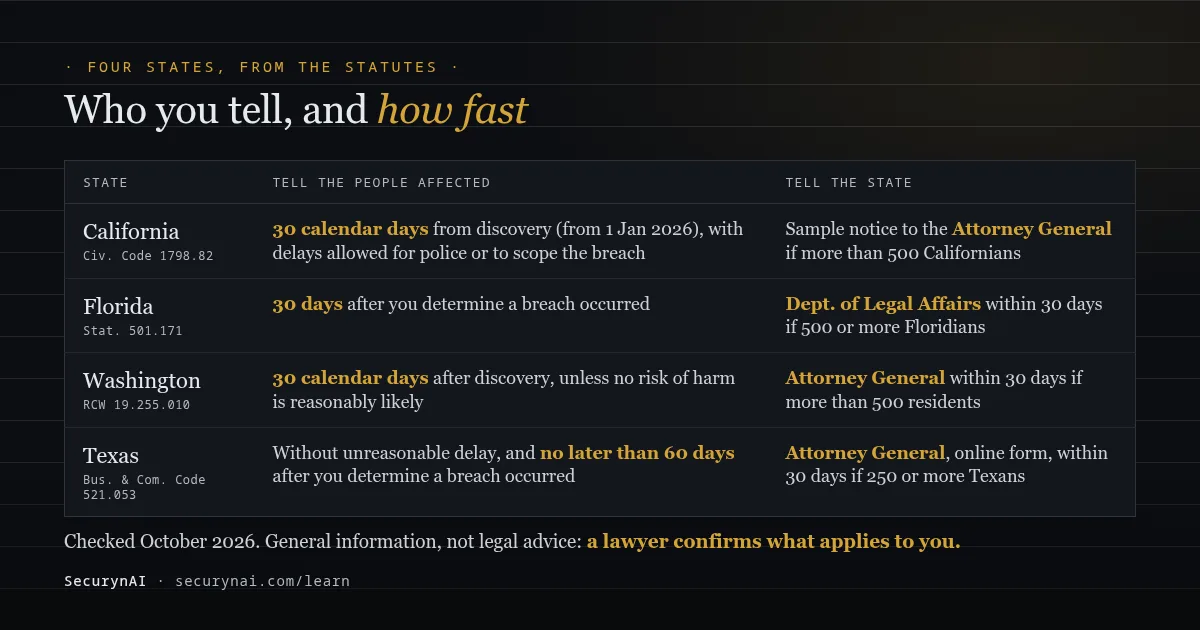
Deadlines and regulator thresholds differ, so read the statute for each state involved. Here are four we checked in October 2026, straight from the statute text or the state's own legislature and attorney general pages.
California (Civil Code 1798.82)
Since 1 January 2026, notices to Californians are due within 30 calendar days of discovering or being told of the breach. SB 446 replaced the old "most expedient time possible" wording. A delay is still allowed for law enforcement, or to work out the scope and secure the system.
If more than 500 Californians are notified for one breach, a sample copy of the notice goes to the Attorney General, through the state's online reporting page. California notices must be titled "Notice of Data Breach" and written in plain language.
Florida (Statute 501.171)
Notices to Floridians are due "no later than 30 days after the determination of a breach or reason to believe a breach occurred." If 500 or more Floridians are affected, the Department of Legal Affairs must be told on the same 30-day clock.
Florida counts unauthorised access as a breach, not just acquisition. It allows you to skip notifying people only if, after consulting law enforcement, you reasonably decide no identity theft or financial harm is likely. That decision must be written down and kept for 5 years. Penalties for late notice reach $500,000 per breach.
Washington (RCW 19.255.010)
Washington requires notice within 30 calendar days of discovery. Its statute says notice isn't required if the breach "is not reasonably likely to subject consumers to a risk of harm." If more than 500 Washington residents are notified, the Attorney General must be told within 30 days of discovery.
Texas (Business and Commerce Code 521.053)
Texans must be notified without unreasonable delay and no later than 60 days after you determine the breach occurred. If 250 or more Texans are affected, the Attorney General must be told within 30 days, using the online form. The Texas AG publishes a list of the breaches reported to it.
The rules that repeat almost everywhere
Once you know the shape, the differences are details to check, not surprises. These points came up in all or most of the laws we read.
- The resident's state decides. Not where your business or your hosting is.
- The clock starts at discovery or determination. Not when the attacker got in, which you may never know exactly.
- Encrypted data is usually exempt. If the key went too, it isn't.
- Regulators get told above a head count. 250 in Texas, more than 500 in California and Washington, 500 or more in Florida.
- Whoever maintains the data tells the owner. California requires it "immediately following discovery"; Florida gives a third-party agent 10 days.
That last point matters if you run sites for clients. If you host or maintain a client's store and find a breach, the client is usually the business that has to notify customers, but you may have a duty to tell the client fast. Our guide to explaining a hack to a client covers how to have that conversation.
You'll also notice how often notices say little. The Identity Theft Resource Center's 2025 Annual Data Breach Report tracked a record 3,322 data compromises, and found that 70% of breach notices didn't say how the attack happened.
What to do in the first days if your site may have leaked personal data
Your first job is to protect the evidence and the facts, not to rewrite the site. The order below keeps your options open for whoever decides on notices.
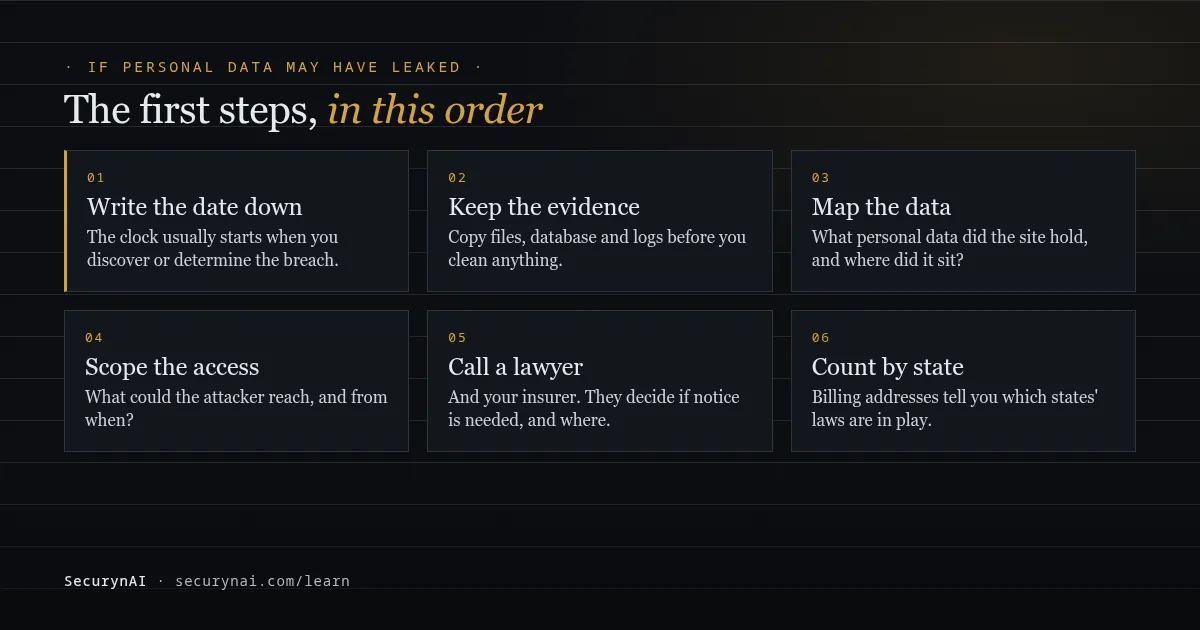
- Write down the date and time you found out. Note who found it and how. Deadlines are counted from this point in most states.
- Copy everything before you clean. Take a full copy of files, the database and server logs, and keep it somewhere off the site. The FTC's guide is direct about it: "Don't destroy any forensic evidence in the course of your investigation and remediation."
- List what personal data the site held. Use the table above: accounts, orders, forms, email logs, exports and backups.
- Work out what the attacker could reach. An admin login, a database dump and a single defaced page are very different breaches.
- Call a lawyer, and your insurer if you have cyber cover. They decide whether notice is needed and in which states.
- Count affected people by state. Billing and shipping addresses in your orders are usually the quickest way.
Then clean up. Our guides to removing WordPress malware and restoring from a backup after a hack walk through it. Back up first, even if the backup is of a hacked site: it's evidence.
Most breaches start somewhere ordinary. Verizon's 2026 Data Breach Investigations Report found that 31% of breaches now start with software vulnerabilities, ahead of stolen passwords. On a WordPress site, that usually means an outdated plugin.
What SecurynAI records for a breach, and what it can't tell you
At SecurynAI, we'd rather you knew the limits before you need them. A security plugin can help you spot a breach sooner and show what changed. It can't tell you whether you must notify anyone, and it doesn't send notices.
On the free plugin
- Audit Log: logins, failed logins, password resets, new users and role changes, plugin and theme changes, content edits and SecurynAI setting changes, each with the user, IP address and browser string. You can export it as CSV with the current filters.
- Findings with dates: changed core and plugin files, malware signatures, new admins, a changed site address. Each finding records when it was raised, which helps you build a timeline.
- Earlier warning: opt-in email alerts for critical and high findings, sent to the addresses you choose. They're off until you switch them on in Settings › General.
- Firewall: it starts in Monitor mode, logging attack attempts without blocking until you switch it to Block. Firewall hits are kept for 14 days by default.
Check one setting today: "Keep activity for" under Settings › General. It defaults to 90 days and goes up to 365. The same period applies to login attempts, ended sessions and role history. A site that saved a shorter value keeps it, and breaches are often found weeks later.
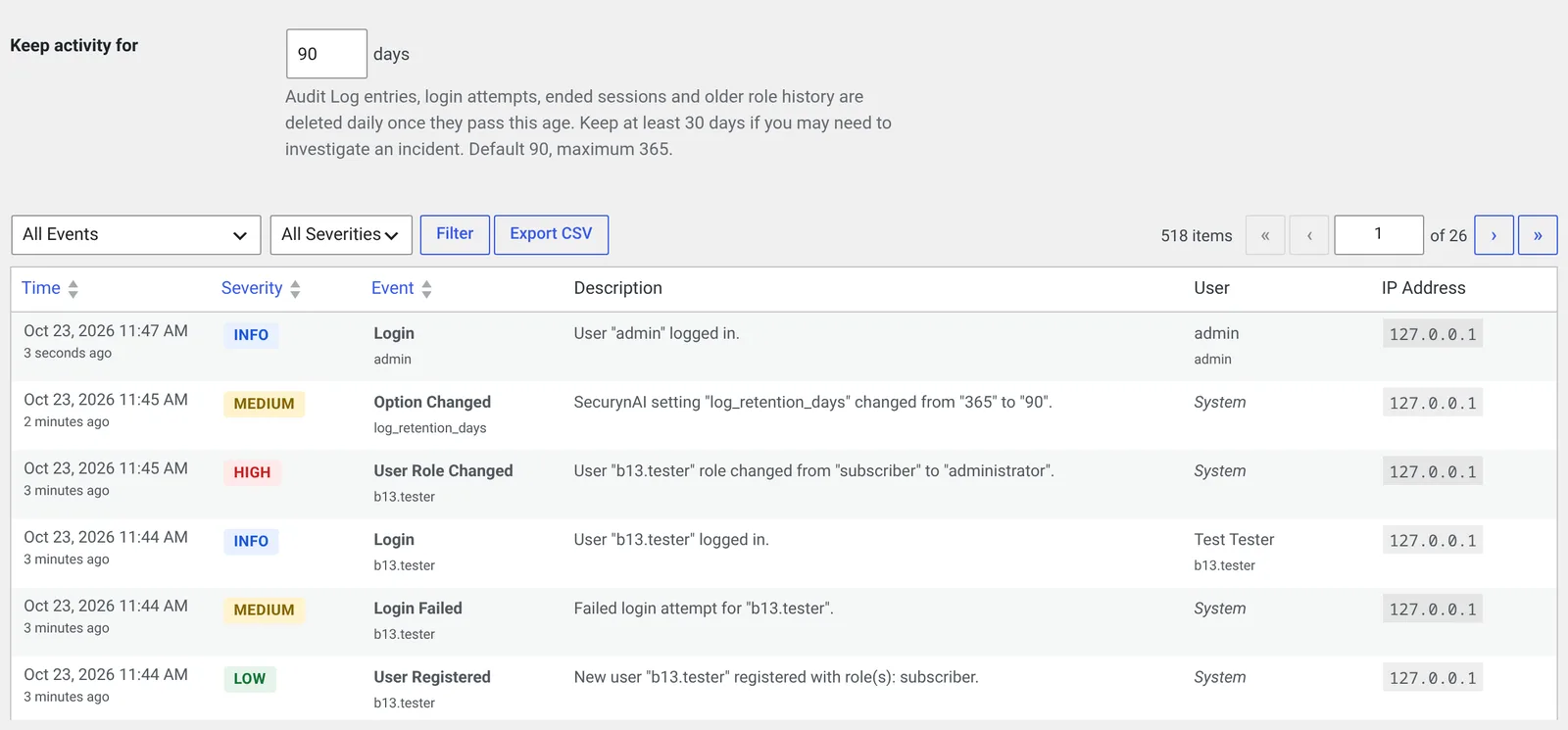
An erasure request doesn't wipe the evidence. When WordPress's Erase Personal Data tool runs, SecurynAI erases the person's login behaviour profile but keeps their Audit Log entries, login attempts, sessions and role history, marked as retained, until the retention period ends. Ask your lawyer to confirm that legal basis for your site.
On Pro ($79 per site per year)
Before the free plugin clears out old Audit Log rows, Pro copies them into a hash-chained archive kept for 90 days, so an edited row shows up as a broken chain.
Pro also adds a compliance export: a ZIP of JSON evidence mapped to SOC 2, GDPR, PCI DSS or ISO 27001. There's no mapping for US state breach laws, and it's evidence for your records, not a certification.
What neither version does
Neither version records which database rows were read or exported, so neither can say whose data was taken. Neither tracks where customers live, decides if a breach is notifiable or contacts anyone. SecurynAI doesn't replace backups, updates or legal advice.
If you use AI explanations, finding text goes to your AI provider with email addresses masked. Usernames and IP addresses are still sent.
A breach-readiness checklist for your WordPress site
Ten minutes now saves a frantic week later. None of this needs a paid tool.
| Check | Why it matters |
|---|---|
| List every place the site stores personal data, including forms, email logs and exports. | You can't scope a breach of data you didn't know you had. |
| Stop collecting what you don't need, such as ID numbers or health details in a contact form. | Data you never stored can't trigger a notice. |
| Turn off or shorten email logging, and clear old logs. | Old reset links and order emails pile up there. |
| Keep site and server logs for at least 90 days. | Breaches are often found weeks after they start. |
| Keep an off-site backup you've restored at least once. | It's both your recovery and your evidence. |
| Write down who you'd call: lawyer, host, insurer, payment provider. | Thirty days goes quickly when you're finding numbers. |
If you also have EU or UK visitors, the rules are different and faster: see our guide to GDPR breach notification on WordPress. For California's privacy law, see CCPA and WordPress, and for health data, HIPAA and WordPress.
Data breach notification FAQ
Do state breach notification laws apply to a small WordPress site?
Often, yes. The four laws we read (California, Florida, Texas and Washington) have no revenue or size test: they apply to a business that holds the covered data about a resident. A one-person store with customers in those states is inside the rule.
If only email addresses leaked, do I have to notify anyone?
Usually not under these four laws, because a name or email on its own isn't covered. An email address together with a password that opens an online account is covered in California, Florida and Washington. GDPR rules for EU visitors are wider, so check those separately.
How long do I have to send breach notices?
It depends on each affected person's state. California, Florida and Washington allow 30 days, and Texas 60, counted from when you discover or determine the breach. Some laws allow a delay for law enforcement or to work out the scope, so write down the date you found out.
Do hashed WordPress passwords count as leaked passwords?
WordPress stores password hashes, not the passwords, and these laws generally exempt encrypted or secured data. Whether a hash counts depends on the state's wording and on what else was taken, so this is one to ask a lawyer. Resetting passwords is sensible either way.
Want a dated record of logins, account changes and file changes on your site before you ever need one? The free SecurynAI plugin starts its Audit Log as soon as you install it.
Install free →