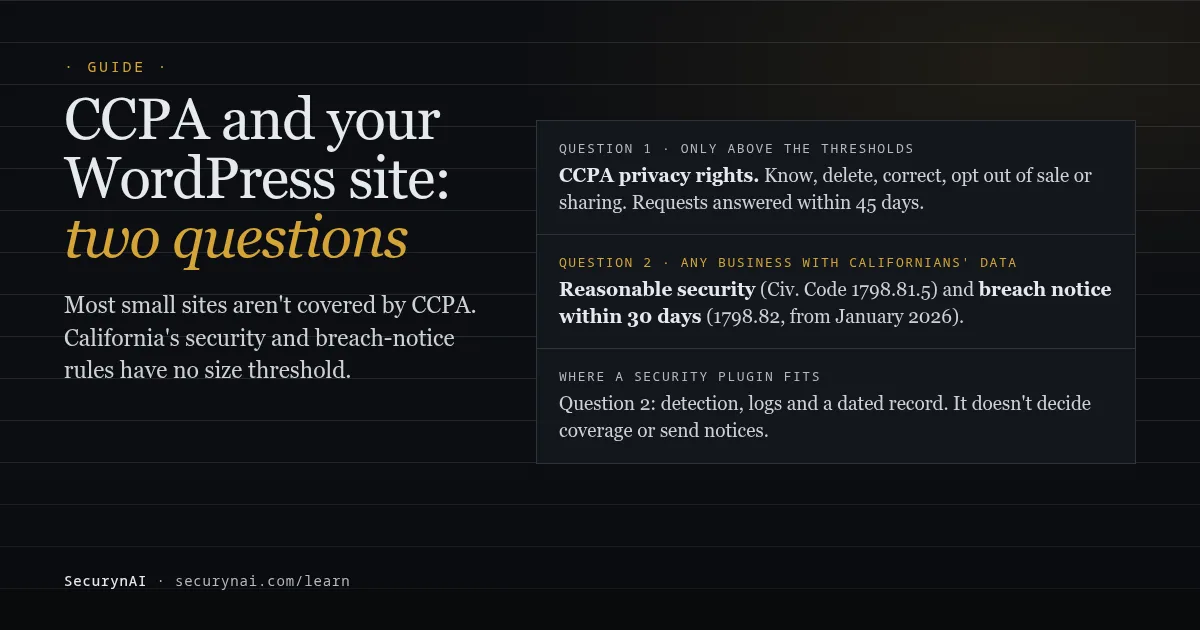
The CCPA (California Consumer Privacy Act, as amended by the CPRA) gives California residents rights over the personal information that larger for-profit businesses hold about them. For CCPA WordPress compliance, the first question isn't about plugins or cookie banners. It's whether your business crosses one of three CCPA thresholds. Most small sites and stores don't.
That's only half the picture, though. Two older California rules apply to any business holding Californians' personal information, whatever its size: keep it reasonably secure, and notify people if it leaks. This guide separates the two, shows what changes on a WordPress or WooCommerce site in each case, and where a security plugin actually fits.
Does CCPA apply to your WordPress site? Check the three thresholds
CCPA covers a for-profit business that does business in California and meets at least one of three thresholds. They're set out in Civil Code section 1798.140(d). The revenue figure is adjusted for inflation every two years, and the current number comes from the agency's January 2025 adjustment.
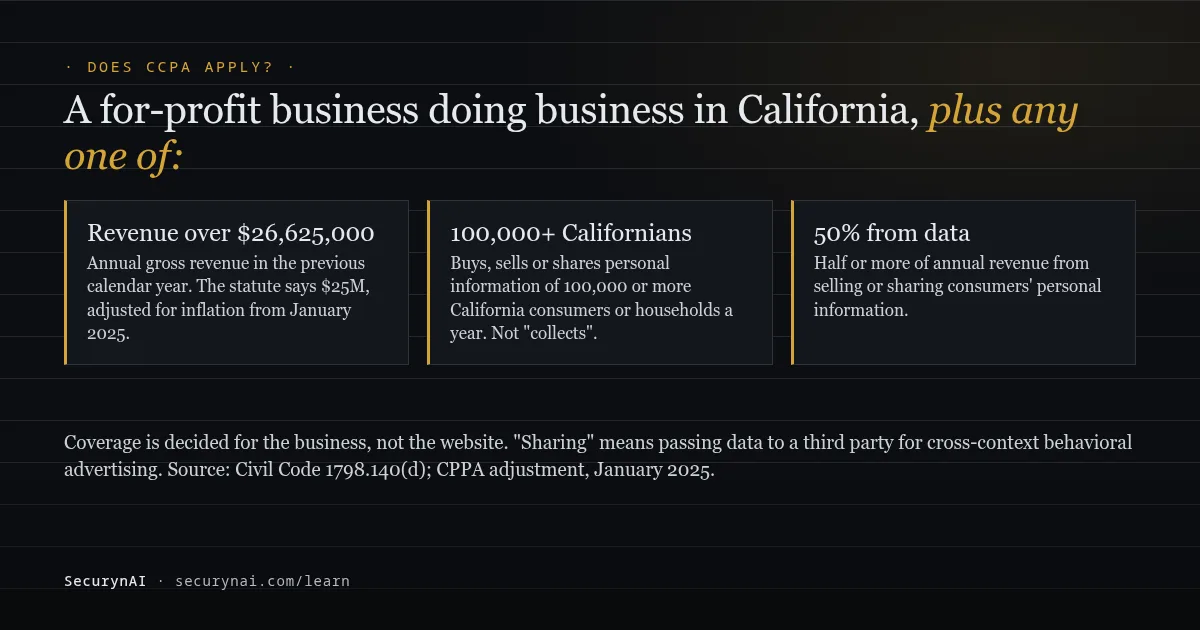
- Revenue: more than $26,625,000 in annual gross revenue in the previous calendar year (the statute's $25 million, as adjusted).
- Volume: alone or with others, buys, sells or shares the personal information of 100,000 or more consumers or households each year. "Consumer" means a California resident.
- Data revenue: makes 50% or more of annual revenue from selling or sharing consumers' personal information.
Notice the verb in the second one. It's buys, sells or shares, not "collects". Plenty of older blog posts still quote a 50,000-person collection test. That was the original 2018 law, and the CPRA amendments changed it.
"Sharing" has a specific meaning: passing personal information to a third party for cross-context behavioral advertising, paid or not. If your site runs ad pixels or retargeting tags, ask a lawyer whether that counts toward the 100,000. It depends on how the tags are set up, which a blog post can't check.
Coverage is decided for the business, not the website. A small site owned by a large company, or by a company that shares a covered business's branding and control, can be covered.
The California rules that apply even if CCPA doesn't
California's reasonable-security and breach notice laws don't use the CCPA thresholds at all. They sit in an older part of the Civil Code, on customer records, and they cover far more businesses. If you sell to Californians or keep their accounts, these are probably your real obligations.
The first is section 1798.81.5. A business that owns, licenses or maintains personal information about a California resident must keep "reasonable security procedures and practices appropriate to the nature of the information." The law doesn't list the controls. For a WordPress site, that means the ordinary basics: updates, strong admin access, monitoring and backups.
The 30-day breach notice clock (since January 2026)
The second is section 1798.82, amended by SB 446 from 1 January 2026. Any individual or business that does business in California and owns or licenses computerized personal information must notify affected residents within 30 calendar days of discovering the breach.
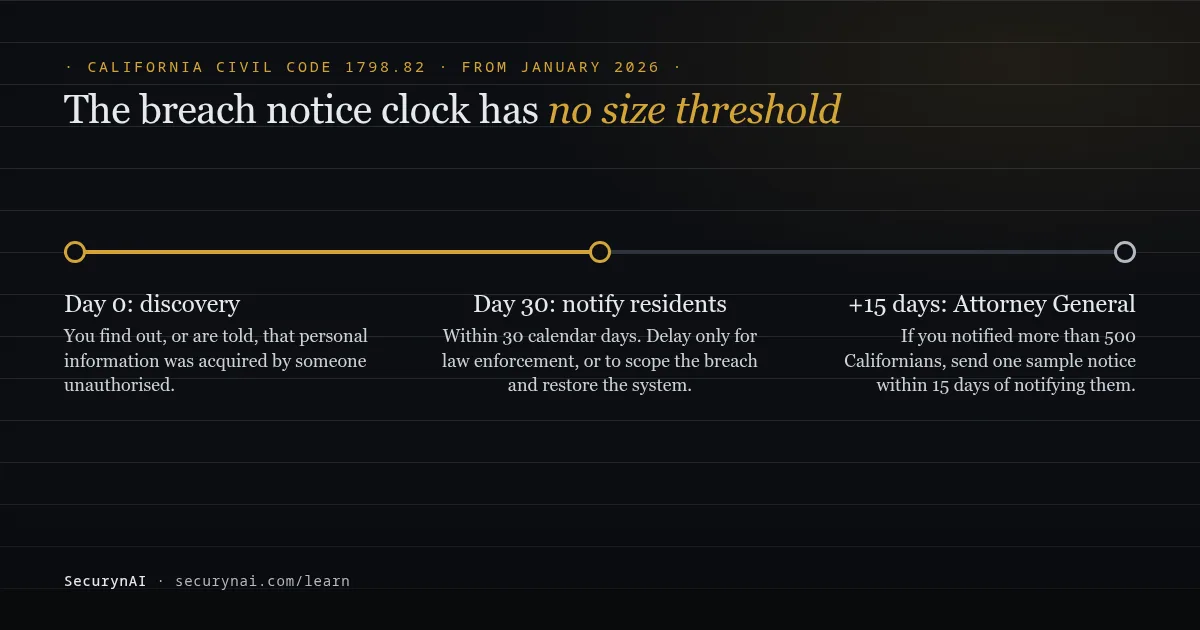
Delay is allowed only for a law enforcement request, or as needed to work out the scope of the breach and restore the system. If you notify more than 500 California residents, a sample copy goes to the Attorney General within 15 calendar days of notifying them. The Attorney General's breach page takes the submissions.
"Personal information" here is narrower than in the CCPA: a name plus something like a Social Security number, a card number with its access code, or medical information. It also includes a username or email address with a password or security question that would let someone into an online account. Your WooCommerce customer accounts sit in that last category.
Other states have their own versions with different deadlines. Our guide to US state data breach notification laws covers the common rules, and the GDPR breach guide covers EU and UK customers.
If you are covered: the private lawsuit risk
For CCPA-covered businesses, section 1798.150 lets consumers sue when certain unencrypted personal information is stolen because of a failure to keep reasonable security. Damages are $107 to $799 per consumer per incident, or actual damages if higher, under the 2025 adjustment. Adding security after the breach doesn't count as a cure. Evidence of what you did before the breach matters.
If CCPA does apply, what changes on a WordPress or WooCommerce site?
Covered businesses have to give California residents a set of rights and answer requests on a clock. Under the statute, residents can ask to know what you hold, delete it, correct it, opt out of its sale or sharing, and limit how you use sensitive information. You can't treat them worse for asking.
The CCPA regulations (effective 1 January 2026) set the clock in section 7021: confirm a request to know, delete or correct within 10 business days, and answer within 45 calendar days (extendable once by 45 if you explain why). If you sell or share data, section 7025 also requires honouring opt-out signals such as Global Privacy Control.
Your WordPress tools for requests
WordPress has had privacy tools since version 4.9.6. Tools › Export Personal Data sends the person a confirmation email, then builds a ZIP of their data. Tools › Erase Personal Data works the same way. WordPress's own documentation warns that it only gathers data from WordPress and participating plugins.
WooCommerce joins in. Under WooCommerce › Settings › Accounts & Privacy, you'll find "Remove personal data from orders on request" and retention settings for inactive accounts and old orders. Contact forms, newsletter tools, analytics and backups usually sit outside these tools, so map them separately.
Site owners have asked about this for years. In a Contact Form 7 support thread, one asked "How does Contact Form 7 comply with CCPA" and whether form data could be deleted. The author pointed to privacy guidance, but the deletion question got no direct answer. That's normal: only you know where your form data ends up.
Plugins don't make a business compliant
"Is this plugin CCPA compliant?" is one of the most common forum questions. In one cookie notice plugin thread, the question sat unanswered until the thread closed. In a consent banner thread, a consultant reported the California setting offered only an "accept" button, and support passed it to developers.
The regulator agrees. In May 2025 the agency fined clothing retailer Todd Snyder $345,178, partly because its misconfigured privacy portal didn't process opt-out requests for 40 days. The agency's enforcement head said: "Using a consent management platform doesn't get you off the hook for compliance." Test your opt-out link yourself, then test it again after updates.
Cybersecurity audits are for the bigger businesses
Yearly independent cybersecurity audits (section 7120) apply only to businesses that make half their revenue from selling or sharing data, or that cross the revenue threshold and processed personal information of 250,000+ consumers or sensitive information of 50,000+ in the previous year.
First audit reports are due on 1 April 2028, 2029 or 2030, depending on revenue. The audit's scope (section 7123) reads like a security checklist: multi-factor authentication, patch management, vulnerability scans, audit-log management, login-attempt detection and antimalware.
What personal data does a security plugin keep?
Every security plugin stores some personal information, so it belongs in your privacy policy and your data map. We at SecurynAI think you should know exactly what ours keeps, so here it is. All of it stays in your WordPress database. The free plugin has no SecurynAI server in the loop.
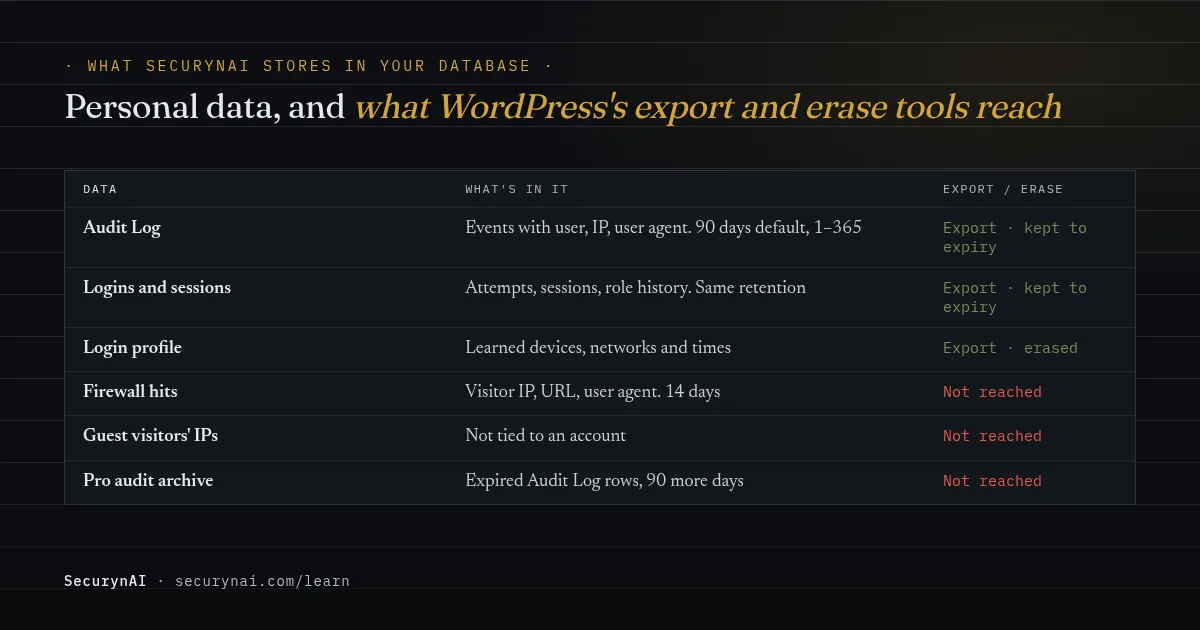
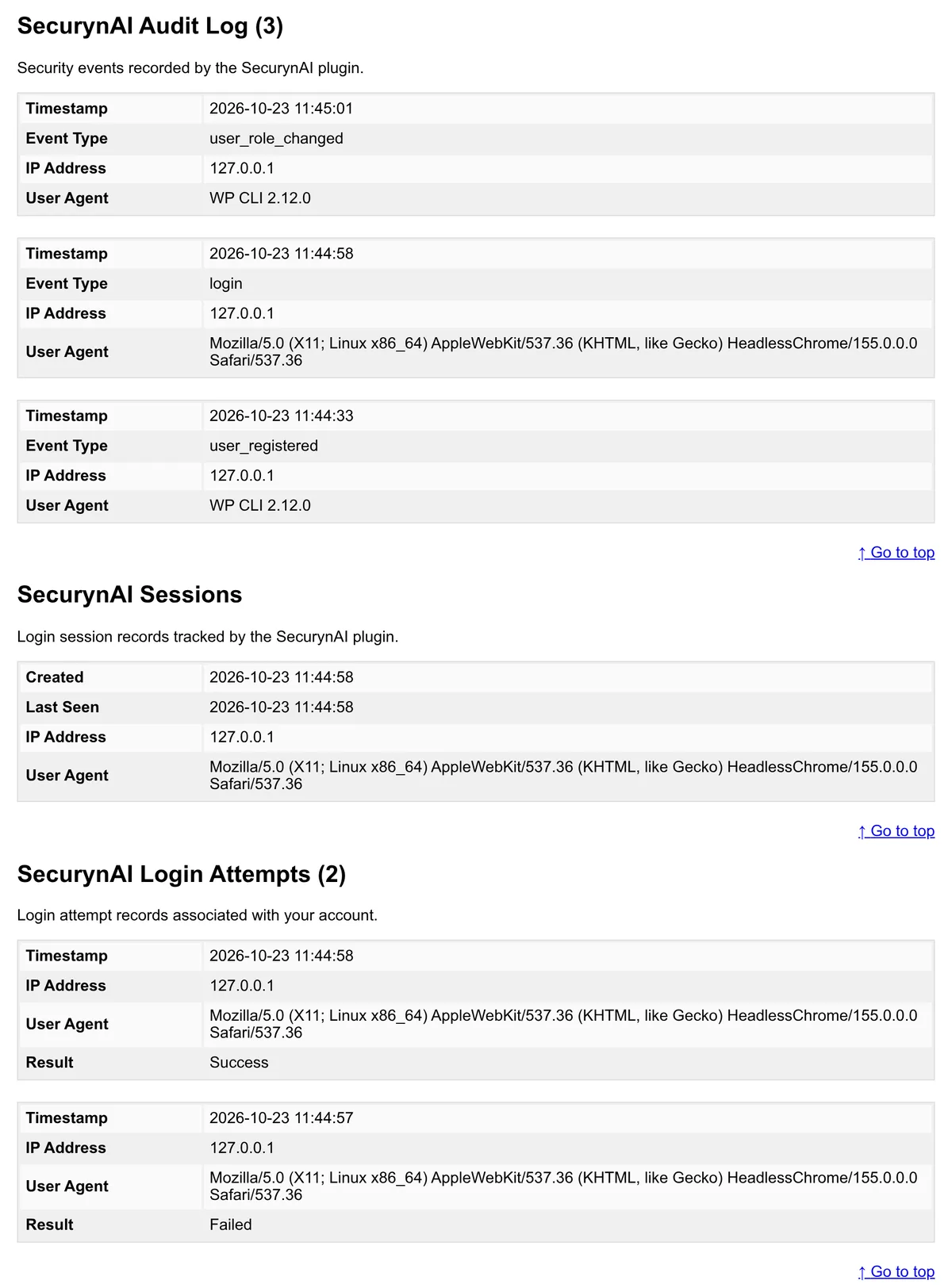
- Account activity: Audit Log events, login attempts, sessions and role history, with usernames, IP addresses and user agents. They're deleted after the retention period: 90 days by default, adjustable from 1 to 365 under Settings › General. Each account's latest successful login and current roles stay while the account exists.
- Login profiles: learned devices, networks and times, used to spot unusual logins.
- Firewall hits: visitor IP, request URL, user agent and up to 512 characters of matched request text, deleted after 14 days.
SecurynAI adds itself to WordPress's export and erase tools. Export gives a registered user their account activity and login profile. Erase removes the login profile but keeps security records until they expire, and says so in the request's result: they're needed to investigate attacks. Firewall hits and guest visitors' IPs aren't tied to an account, so neither tool reaches them.
That erase behaviour leans on the CCPA's exception for information "reasonably necessary and proportionate" to help ensure security and integrity (section 1798.105(d)). Whether it fits your site is a question for your lawyer. The plugin's suggested text under Settings › Privacy describes all of this.
If you turn on AI explanations
AI explanations are optional and use your own OpenAI, Anthropic or Google Gemini key, which sends finding details to that provider. Emails and secrets are masked first, but usernames and IP addresses are still sent. List the provider in your privacy policy and check its data terms (see our AI key checklist).
Where SecurynAI helps with CCPA security duties, and where it doesn't
We built SecurynAI for the security side of this, not the privacy-request side. No plugin decides whether CCPA applies, answers consumer requests or sends breach notices, and ours doesn't either. What it can do is help with "reasonable security" and give you a record of what happened.
On the free plugin
- Detection: a daily file scan checks every PHP file under wp-content against 13 bundled malware signatures and flags high-confidence obfuscation, such as a decoder fed into eval. It detects only, with no cleanup and no live feed, alongside checksum checks of core and WordPress.org plugin files.
- Patching: installed plugins, themes and core are checked against the wpvulnerability.net feed.
- Accounts: new admins and role changes are flagged, and admins without a known two-factor plugin get a finding. SecurynAI doesn't provide two-factor itself. Repeated failed logins lock out the IP.
- Firewall: it starts in Monitor mode, logging attacks without blocking until you switch it to Block. Login lockout works in either mode.
- Evidence: the Audit Log, with CSV export, plus opt-in email alerts for critical and high findings (off by default). That helps you date when a breach was discovered, which starts the 30-day clock.
On Pro ($79 per site per year)
Pro keeps expiring Audit Log entries in a tamper-evident archive for 90 more days, out of the WordPress tools' reach. It sends staff login IPs to ip-api.com for location checks (switchable), and suggests privacy-policy text for both.
Its compliance export builds an evidence ZIP mapped to SOC 2, GDPR, PCI DSS or ISO 27001. There's no CCPA mapping, and the export says it isn't a certification. See what Pro adds.
What stays with you
Deciding whether you're covered, your privacy policy, the opt-out link and Global Privacy Control, consumer requests, contracts with vendors, and breach notices. SecurynAI also doesn't watch which tracking scripts load on your pages. If a breach does happen, our guides on restoring from a backup and explaining a hack to a client help with the next steps.
Your CCPA WordPress compliance checklist
Work down the table once. The "Everyone" rows apply to almost anyone selling to Californians.
| Who | Check |
|---|---|
| Everyone | Write down where Californians' data lives: users, orders, forms, email tools, analytics, backups. |
| Everyone | Keep the security basics current: updates, admin accounts, two-factor, monitoring and tested backups. |
| Everyone | Draft a breach plan with the 30-day notice deadline and who decides whether to notify. |
| Everyone | Check against the three thresholds once a year, including ad pixels and any parent company. |
| Covered | Publish a privacy policy that matches what your plugins actually collect. |
| Covered | Run a test export and erase in Tools, and note what they miss. |
| Covered, if selling or sharing | Add the opt-out link, honour Global Privacy Control, and test both after updates. |
| Covered | Check whether section 7120's cybersecurity audit applies and which deadline is yours. |
Customer records outside card data are covered in securing WooCommerce customer data. If you take cards, see PCI DSS for WooCommerce as well.
CCPA and WordPress: FAQ
Does CCPA apply to a small WooCommerce store?
Usually not. A store is only covered if it does business in California and its business has more than $26,625,000 in yearly revenue, buys, sells or shares the personal information of 100,000 or more California consumers or households, or makes half its revenue from selling or sharing it. California's reasonable-security and breach-notice rules still apply to it.
Is there a plugin that makes my WordPress site CCPA compliant?
No. CCPA duties fall on the business, not the software. Consent and request plugins can help with parts of the work, but California's enforcement agency has said that using a consent management platform doesn't get a business off the hook.
Do I have to notify Californians after a breach if CCPA doesn't apply to me?
Possibly, yes. California's breach notice law, Civil Code 1798.82, covers any individual or business that does business in California and owns or licenses computerized personal information, with no revenue threshold. Since January 2026 the notice is due within 30 calendar days of discovery, with limited room for delay.
Are CCPA and CPRA different laws?
No. The CPRA, passed by California voters in 2020, amended the CCPA and created the California Privacy Protection Agency. In practice you're dealing with one law, the CCPA as amended, enforced by both the agency and the California Attorney General.
Whether or not CCPA covers you, "reasonable security" starts with knowing what's happening on your site. The free SecurynAI plugin starts logging admin activity and checking your files from the moment you install it.
Install free →