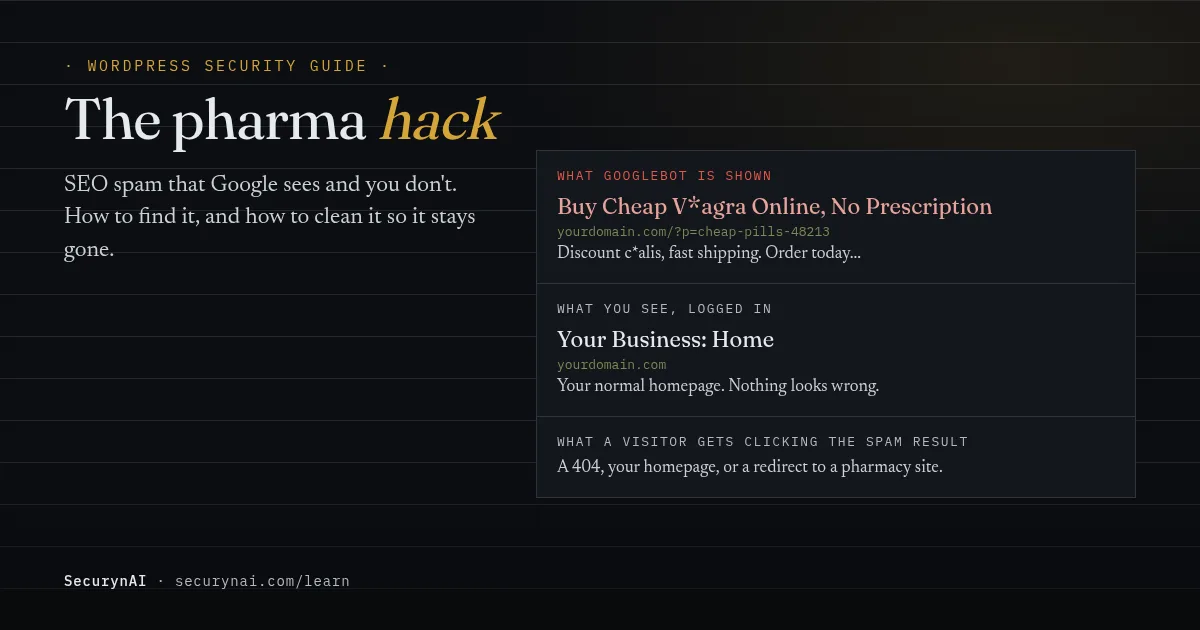
A pharma hack is SEO spam injection: someone breaks into your WordPress site and adds spam pages or hidden text, then uses cloaking so search engines see the spam and you don't. The name comes from the pill keywords it first pushed. Casino, replica and Japanese-language spam work the same way.
If you've just spotted it, don't delete anything yet. Take a full backup of files and database first, spam included, so you have evidence and an undo button. Then work through the checks below. They only read, so they can't make things worse.
Why Google sees the pharma spam and you don't
Google's own spam policies define cloaking as "presenting different content to users and search engines." The injected code checks who is asking before it decides what to show. A crawler gets spam. You get your normal page.
The check can look at a few things. Common ones are the browser's user agent (does it say Googlebot?), whether you're logged in to WordPress, and whether the visitor arrived from a search result. Some versions send search visitors on to a pharmacy site instead, which overlaps with a site redirecting to another URL.
Google's same policy page splits hacked content into three kinds, and you'll often see more than one at once:
- Page injection: new spam pages added to your site.
- Content injection: spam text or links added to pages you already have, often hidden from people.
- Code injection: code added to existing files that does the cloaking or redirecting.
This is why owners find out late. One site owner on the WordPress.org forums described search results where "all the link is contain (viagra, cialis etc)" and clicks that redirected elsewhere, in a thread titled WordPress hacked by pharma website.
How to check for a pharma hack in 15 minutes
Do these in order. None of them change your site, so they're safe to run right now.
1. Search Google for your own domain
Search site:yourdomain.com and read the titles and snippets, not just the count. Then add spam words, for example site:yourdomain.com viagra or site:yourdomain.com casino. Google's guide to the cloaked keywords hack starts with this exact search.
2. Ask Google what it actually sees
In Google Search Console, paste one of the spam URLs into URL Inspection and view the crawled page. Google warns that hacked pages may show you a "not found" error to make you think they're gone. URL Inspection is the reliable test, because it's the real Googlebot asking. Check the Security Issues report while you're there.
3. Compare what a "bot" gets from your server
If you're comfortable with a terminal, ask for the same page twice, once as a normal browser and once claiming to be Googlebot, and look for spam words in the second. It only reads the page.
curl -s -A "Googlebot" https://yourdomain.com/ | grep -i -E "viagra|cialis|casino"A clean result here doesn't prove much. Google tells site owners to verify Googlebot by IP address because user agents are easy to fake, and some cloaking code does the same check. Trust URL Inspection over this.
4. Check who owns your Search Console property
Open Settings > Users and permissions. Every owner and user there should be someone you can name. To remove a verified owner, Google says you must also delete their verification token from the site, or "a deleted owner can re-verify ownership."
5. Search the database, if you have WP-CLI
Spam pages often live as posts, and the code that serves them can sit in the options table. WP-CLI's db search finds a word across tables without changing anything.
wp db search viagra --stats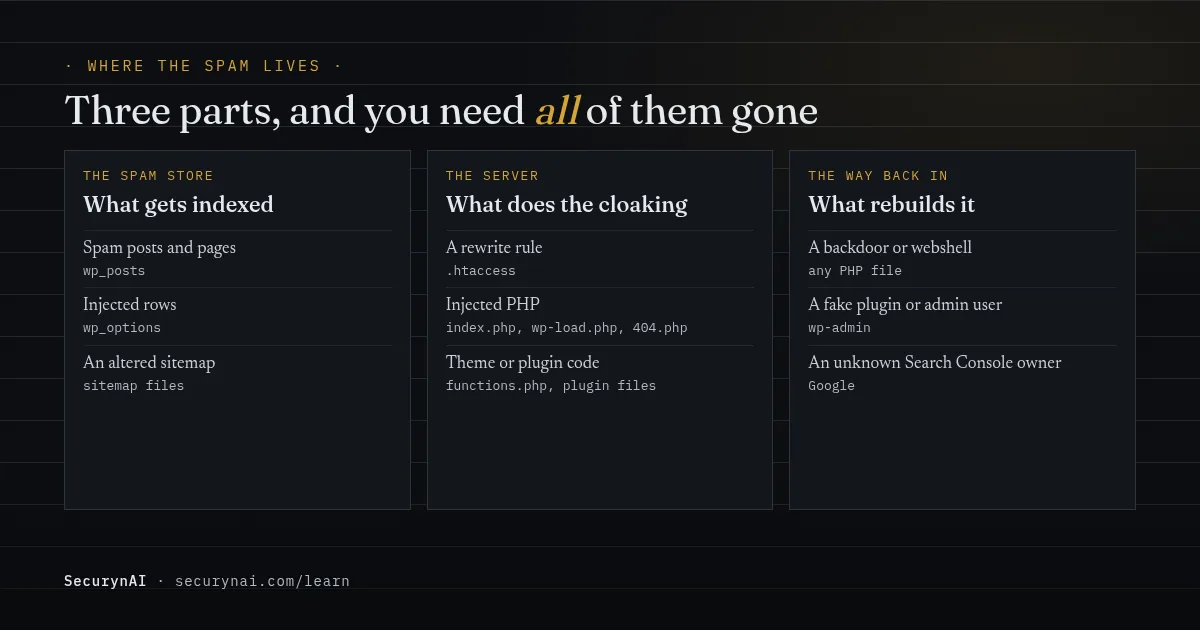
Where SEO spam injection hides, and why it comes back
A pharma hack is rarely one file. It's usually a spam store, a piece of code that serves it, and a way back in. Remove one and the others rebuild it.
Files and the database both matter. In Sucuri's 2023 Hacked Website & Malware Threat Report, its team cleaned 4,131,724 spam instances from files and 430,934 spam entries from databases. The same report found at least one backdoor on 49.21% of compromised sites at cleanup.
The usual hiding places, all named in Google's or Sucuri's write-ups:
.htaccess: a rewrite rule that quietly routes spam URLs to an injected PHP file.- PHP files: Google lists
index.php,wp-load.phpand404.phpas common targets for the injected code. - The database: spam posts in
wp_posts, and settings inwp_options. - A fake plugin: in a June 2025 case, Sucuri found two malicious plugins hiding spam pages from wp-admin and keeping admin access open.
- Your sitemap: an altered sitemap can get spam URLs indexed, as one owner below found.
Owners see the "comes back" part first-hand. In an old but still typical WordPress.org pharma hack thread, the poster wrote that "the rogue plugin files and database entries keep appearing," with three rows in the options table returning "no matter how many times I delete them."
It's the same in recent threads. A 2024 owner fighting the Japanese keyword hack said "my original sitemap has been altered, and new spammy URLs have been indexed by Google," and that "the malware seems to keep reappearing" after clearing .htaccess and running a scanner.
How to clean up a pharma hack so it stays gone
Treat this as a full compromise, not a content problem. Deleting the spam pages is the last step, not the first. Our step-by-step malware removal guide covers the full order. Here's the short version, with the pharma-specific parts.
- Back up first, including the infected state. Files and database. If you restore a clean backup instead of cleaning, read restoring from backup after a hack before you start.
- Lock the doors. Change WordPress admin, hosting, SFTP and database passwords, and remove any admin user you didn't create.
- Clean the files. Replace
.htaccesswith a clean default, reinstall core, plugins and themes from fresh copies, and look for a webshell in odd places. - Clean the database. Remove spam posts and injected option rows you found in check 5. Back up again just before you delete rows.
- Fix Search Console. Remove owners you don't know, with their tokens, and resubmit your real sitemap.
- Close the way in. Update everything, and remove plugins you don't use.
- Then ask Google to look again. If the Security Issues report lists a problem, use Request Review once you're sure it's fixed.
Don't rush that last step. Google's Security Issues help page warns that asking before the issue is fixed "can cause longer turnaround time." And its review guide says sites hacked with spam "can require up to several weeks to process."
If the way in was a plugin, you're in large company. Patchstack's State of WordPress Security in 2026 counted 11,334 new WordPress vulnerabilities in 2025. 91% were in plugins, and 46% had no fix ready when they were made public, so removing plugins you don't need matters as much as updating.
Looking after this site for a client? Our playbook on explaining a hack to a client has wording you can send the same day.
What SecurynAI catches in a pharma hack, and what it can't
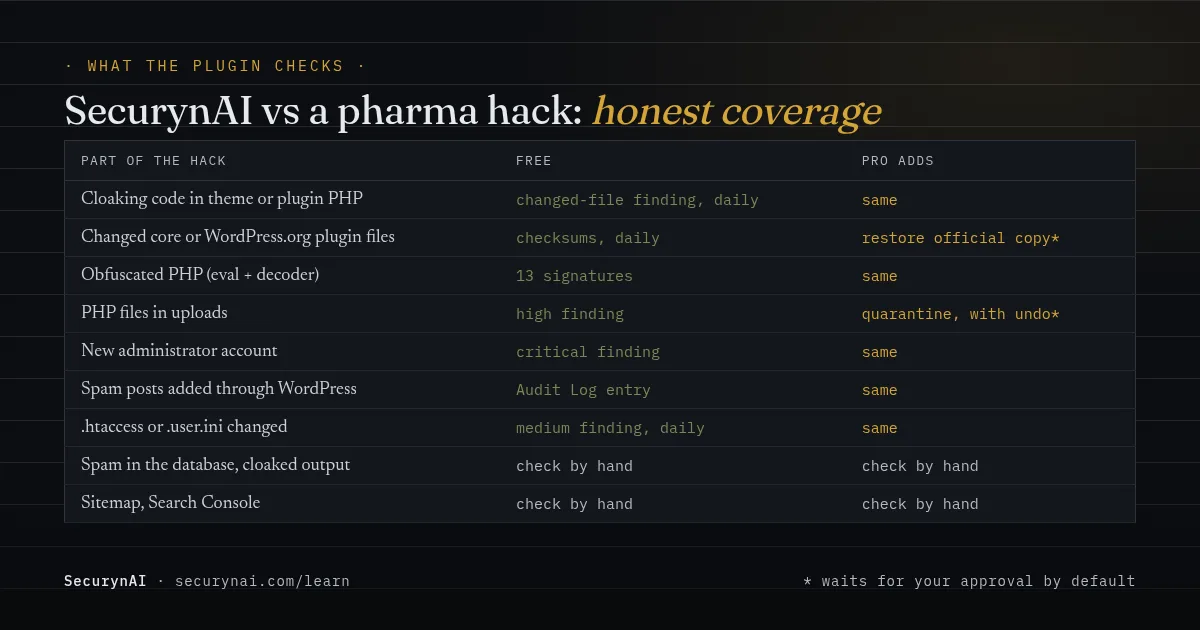
We at SecurynAI want to be straight about this one. The free plugin is good at the code side of a pharma hack and blind to the spam itself. Here's the split, based on what the plugin does today.
What the free plugin flags
- Changed theme or plugin PHP: cloaking code added to a file in a plugin or theme that wasn't updated is a high "File hash drift detected" finding. So is a new PHP file in a plugin or theme whose version didn't change.
- Changed or extra core files: a daily checksum check covers every WordPress core file, including
index.phpandwp-load.php, and every file in WordPress.org plugins. The same high finding lists PHP files in the site root, wp-admin or wp-includes that WordPress didn't ship. - Config file changes: each daily scan compares
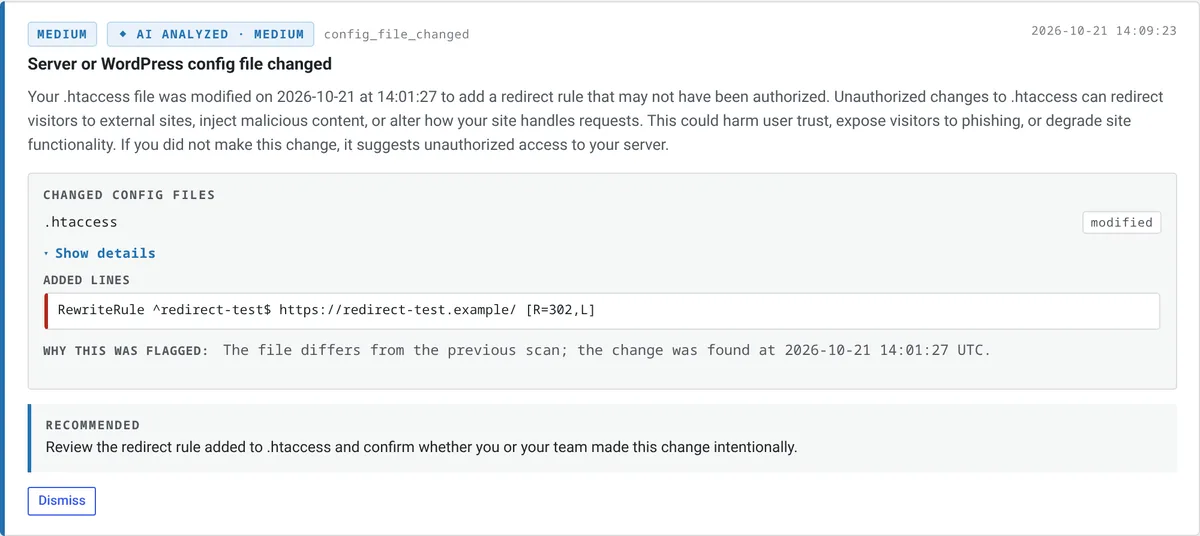
.htaccess(root, wp-content and uploads),.user.ini,php.iniandwp-config.phpwith the last scan. A change is a medium finding that shows the added lines, so a new rewrite rule pointing at an injected PHP file is visible. Medium findings don't trigger the alert email. - Malware signatures, sometimes: 13 bundled signatures, plus a check for obfuscation like a decoder fed into eval. Cloaking code written in plain PHP won't match.
- PHP in uploads, new admins and site address changes: high, critical and high findings.
The drift and config checks only know what changed since SecurynAI's first scan. If the site was already infected when you installed it, the infected file is the baseline. Core and WordPress.org plugin files are different, because they're compared with the official copies.
What the Audit Log records
The free Audit Log notes posts, pages, theme templates, reusable blocks and public custom post types created, updated or deleted through WordPress. It also logs plugin activations, text and HTML widget edits, and changes to the site title, tagline, homepage and search-engine visibility. Spam written straight into the database with SQL skips WordPress, so it leaves no entry.
What neither version sees
SecurynAI doesn't read your database for spam, doesn't fetch your pages as Googlebot, and doesn't check your sitemap, Search Console or Google's blocklists. Spam stored only in posts or options, and plain PHP cloaking in a file it took as its baseline, are invisible to it. Checks 1 to 5 above stay manual, plugin or no plugin.
On Pro ($79 per site per year), PHP files flagged in uploads can be quarantined, with undo, and changed core and WordPress.org plugin files can be restored from the official copy. Both wait for your approval by default. Cloaking code in a theme's functions.php or a premium plugin is still yours to fix by hand.
With your own AI key, the explanation for a flagged file can name its likely type, "an SEO spam injector" among them. None of this replaces backups, updates or a good host.
Quick check: would you notice a pharma hack this month?
- Have you read your
site:search results in the last three months? - Can you name every owner of your Search Console property?
- Would someone tell you within a day if a theme or plugin file changed?
- Are your plugins updated within a couple of weeks of a release?
- Do you have a backup you've actually restored from?
Five yeses means you'd likely catch it early. Two to four is common and quick to fix. Our signs of WordPress malware guide and the WordPress hardening checklist are good next steps.
Pharma hack and SEO spam: FAQ
Why does the spam result show my normal page or a 404 when I click it?
That's the cloaking working as designed. The injected code shows spam to search crawlers and something harmless to people, and Google notes that hacked pages can show a "not found" error to make you think they're gone. Use URL Inspection in Search Console to see what Googlebot actually gets.
Can I just delete the spam pages?
Not on their own. The pages are the symptom. If the code or database rows that create them, or the backdoor that put them there, are still on the site, the spam comes back. Clean the whole site, then delete what's left.
How long until the spam disappears from Google?
Longer than you'd like. If Google has flagged the site, it says reviews for sites hacked with spam can take up to several weeks. Its cleanup guide says the spam URLs should return "Not Found" once you're done, so leave them as 404s rather than redirecting them to your homepage.
Is the Japanese keyword hack the same thing as the pharma hack?
It's the same family. Both inject spam pages or text to borrow your site's search ranking, often with cloaking. Only the spam topic and language differ, so the checks and the cleanup in this guide apply to both.
Cleaned up and want to know if the cloaking code comes back? The free SecurynAI plugin checks your core, plugin and theme files and your .htaccess every day, and flags changes you didn't make through an update.
Install free →