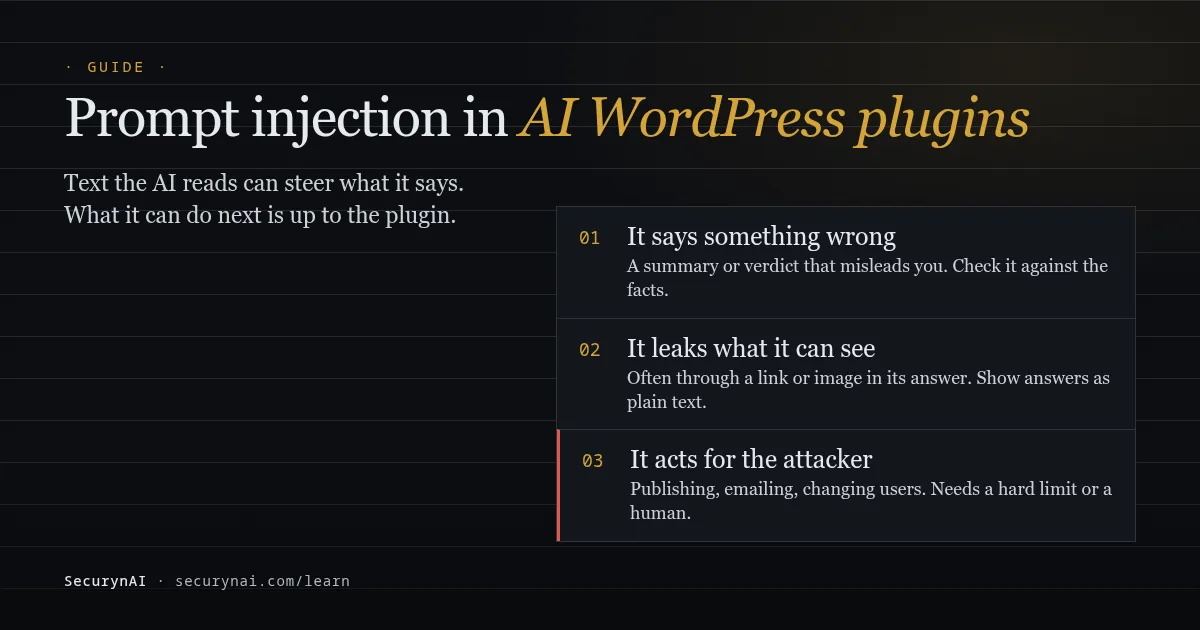
Prompt injection is when text an AI model reads changes what the model does, because the model can't reliably tell its instructions apart from the content it was asked to process.
In AI WordPress plugins, the usual form is indirect prompt injection: instructions hidden in a comment, a form entry, a username or a file that the plugin later hands to the AI.
If you run a chatbot, an AI writer, an AI SEO tool or an AI security plugin, you can't fully stop this. You can limit what it achieves. We build SecurynAI, which sends security findings to an AI model, so near the end we show exactly where our own plugin reads text an attacker could write.
What is prompt injection, in plain English?
An AI plugin builds one block of text: its own instructions, plus whatever content it wants the model to work on. The model reads it all as words. If the content says "ignore the above and do this instead," the model may follow it.
OWASP ranks it first in its Top 10 for LLM Applications (2025), as LLM01. It splits the problem in two:
- Direct prompt injection: someone types the instructions straight into the AI, for example into a chatbot on your site.
- Indirect prompt injection: the instructions arrive inside content the AI processes for someone else, which OWASP describes as input "from external sources, such as websites or files."
For most WordPress sites, indirect is the one that matters. The attacker never touches the AI. They leave a comment and wait for your plugin to read it.
Why it isn't fixed like SQL injection
SQL injection has a real fix: keep data and commands apart, so input is never run as code. Our SQL injection guide covers it. Prompt injection has no equivalent yet.
The UK's National Cyber Security Centre put it bluntly in December 2025: language models "simply do not enforce a security boundary between instructions and data inside a prompt," so prompt injection "may never be totally mitigated" the way SQL injection can be. OWASP agrees: "it is unclear if there are fool-proof methods of prevention."
So the useful question isn't "can this AI be tricked?" It's "what happens when it is?"
Where attacker text gets into an AI WordPress plugin
Anywhere a visitor, customer or low-level account can write text, and an AI feature later reads it. On a typical WordPress site, that's more places than you'd think.
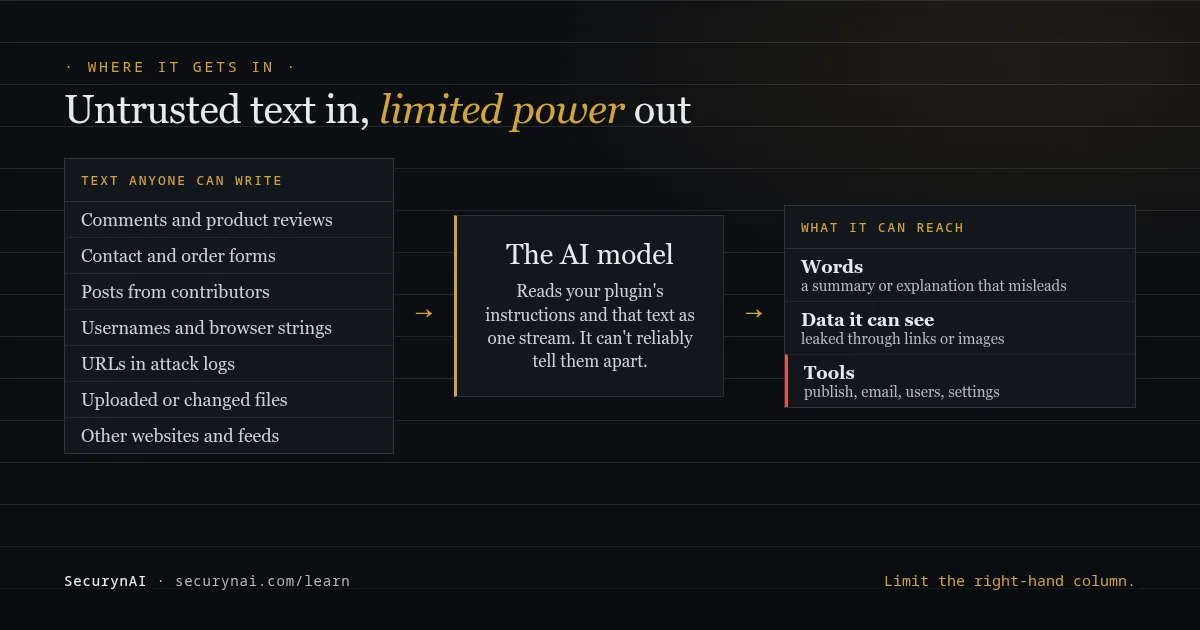
| Where the text comes from | Who can write it | AI features that might read it |
|---|---|---|
| Comments, reviews, forum posts | Any visitor | Comment summaries, moderation helpers, reply writers |
| Contact and order forms | Any visitor or customer | Inbox summaries, support assistants, CRM helpers |
| Post content and titles | Contributors, authors, imported content | AI editors, SEO tools, site-search chatbots |
| Usernames, browser strings, URLs | Anyone who visits or tries to log in | Security and log-analysis features |
| Uploaded or changed files | Users with upload rights, or an attacker already inside | File and malware analysis |
| Other websites and feeds | Whoever runs that site | Content importers, research and browsing agents |
The list keeps growing as AI plugins gain tools. On the WordPress.org forums, one site owner connecting an AI agent to their site asked: "Can Claude control other plugins and operation in WordPress with your MCP connection?" That's the right question to ask before connecting anything.
What can a prompt injection actually do to your site?
The damage is capped by what the AI is allowed to do, not by how clever the injected text is. There are three levels, and each needs a different limit.
1. It makes the AI say something wrong
This is the floor. A summary calls a spam comment a genuine enquiry, or a security explanation calls a suspicious file normal. Nothing changes on the site, but you might act on bad advice. Keep the facts next to the AI's words: our guide to fact-checking AI security explanations shows how.
2. It leaks what the AI can see
If the AI can read private data, injected text can ask it to repeat that data somewhere the attacker can collect it. The common trick is a link or image in the AI's answer, with the data tucked into the web address.
That's how EchoLeak worked, a flaw in Microsoft 365 Copilot tracked as CVE-2025-32711 (published June 2025, CVSS 9.3, now fixed). In the Hacker News discussion, one commenter summed up the delivery: "The browser automatically retrieves the link for you." An email was the injection; an image link was the leak.
3. It acts for the attacker
This is the level that can hurt. If the AI can call tools, such as publishing posts, sending email or editing users, injected text can try to call them.
In AI Engine versions 2.8.0 to 2.8.3, a missing permission check (CVE-2025-5071, CVSS 8.8) let any logged-in subscriber use the plugin's AI tool connection, with commands like wp_create_user and wp_update_option. That was an access-control bug, not prompt injection, but it shows how much an AI agent's tools can reach on WordPress.
How often does it work?
More often than you'd hope, even with defences. Anthropic tested its Chrome browsing agent against 123 test cases representing 29 attack scenarios in August 2025. Without its safety measures, 23.6% of attacks succeeded. With them, 11.2% still did, roughly one in nine.
And access control is often the missing piece. IBM's Cost of a Data Breach Report 2025 found that 13% of organisations reported breaches of AI models or applications. Of those, 97% said they had no AI access controls in place.
How to check an AI plugin for prompt injection risk
You don't need to test prompts yourself. You need to know what each AI plugin reads, and what it's allowed to do with the answer. A Hacker News discussion of agent design patterns landed on the same rule: risky actions "should always require human oversight."
Run through these for every AI plugin on your site, or on each client site:
- What text does it send to the AI? Comments, form entries, orders, files? If the docs don't say, ask the developer.
- Can the AI's answer change anything on its own? Publishing, emailing customers, changing users, roles or settings, running code. Each one should need your click, or have a hard limit you can see.
- Who can talk to it? A chatbot open to visitors is direct injection by design. Keep it away from orders, accounts and admin tools.
- How is the AI's answer shown? Plain text is safest. Clickable links and loaded images are how data leaks.
- Can you see what it sent and did? A log of AI calls and actions makes an odd result easy to trace.
- Whose key, and is there a spend cap? Injected text can also run up your bill. Our AI API key checklist covers limits and rotation.
- Is it kept updated? Many AI plugin flaws are ordinary bugs, like the access-control one above.
If an AI plugin can act without asking you, treat every text box on your site as a way to talk to it.
Where SecurynAI's own AI reads attacker-written text
At SecurynAI, we send security findings to an AI model to explain them, and some of those findings contain text an attacker chose. Here's what reaches the model in the free plugin, once you've added a key:
- Risky logins: the username, IP address and the browser's user-agent string, which the visitor sets.
- Sustained attacks: the web addresses an attacking IP requested, as logged by the firewall.
- Daily incident grouping: recent findings and Audit Log events, including post titles and new admin usernames.
- Malware checks: the start and end of a flagged file, plus the code that matched a signature.
- Persistence review: admin usernames, scheduled task names and must-use plugin file names.
Comment text and post bodies aren't sent. Nothing is sent at all without a key or WordPress's own AI connection.
How we keep injected text in its place
Our instructions go to the provider as a separate system message, and the finding data goes as the user message. The instructions also tell the model that the data may contain attacker-written text, to treat it only as evidence, and never to follow instructions inside it. That lowers the odds of a steered answer; it doesn't guarantee one can't happen.
The answer must come back in a fixed format. If it doesn't, we throw it away and show built-in text instead.
Before sending, emails become [email] and things that look like API keys or wp-config passwords become [secret]. That protects your data, but it isn't an injection defence. AI answers are shown as plain text, so they can't load an image or give you a clickable link.
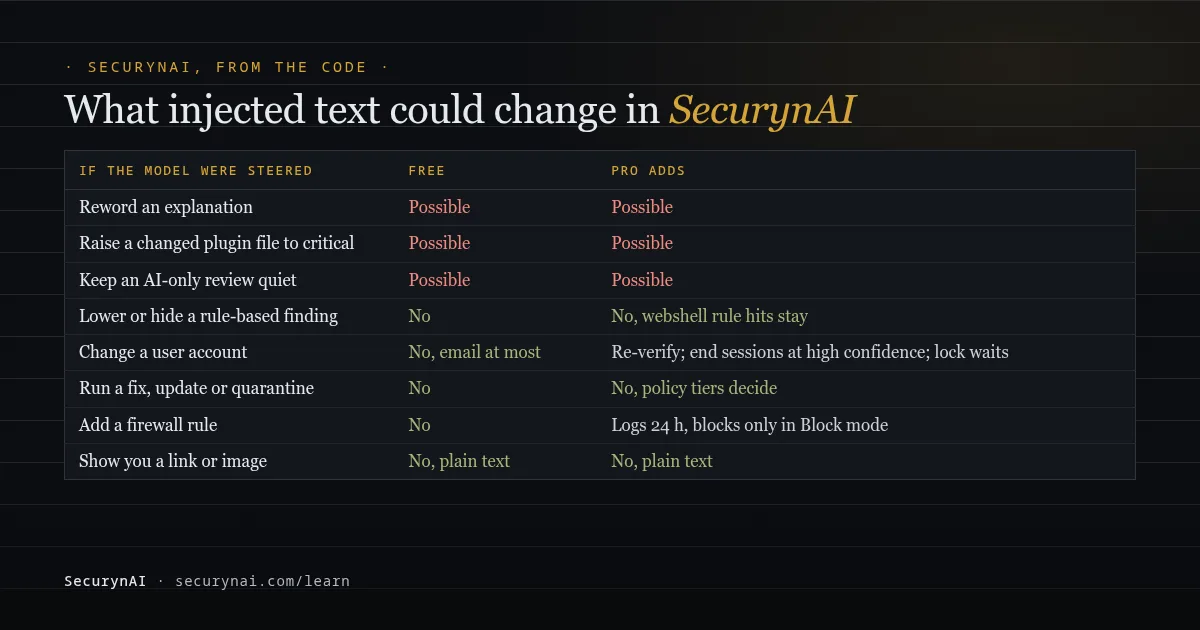
What an injected model could change in the free plugin
Being honest about it, a steered model could:
- Reword an explanation so it misleads you. The finding's title, severity and details next to it still come from rules.
- Raise a changed WordPress.org plugin file to critical. It can't lower one. A "looks harmless" verdict is shown, but the finding stays high and the alert email still goes out.
- Suggest a different response to a risky login. The free plugin runs a notify-admin email at most. Anything stronger waits for you on the Identity page.
- Keep an AI-only check quiet. Incident grouping and the persistence review only run with AI, so they could miss something.
In the free plugin, injected text can mislead you, but it can't hide a rule-based finding or change your site. Firewall matches, checksums, malware signatures and vulnerability matches never ask the AI. The firewall starts in Monitor mode, logging matches until you switch it to Block.
What SecurynAI Pro adds against prompt injection, and its limits
Pro has more AI features, so it has more to guard. Its AI Workflow Security module, on the Modules tab, adds a filter for injected text and limits on what an AI can ask for. Pro's own AI checks, such as webshell, malware and behaviour scoring, carry the same "treat this as evidence" instruction as the free plugin's.
A filter for known injection phrases
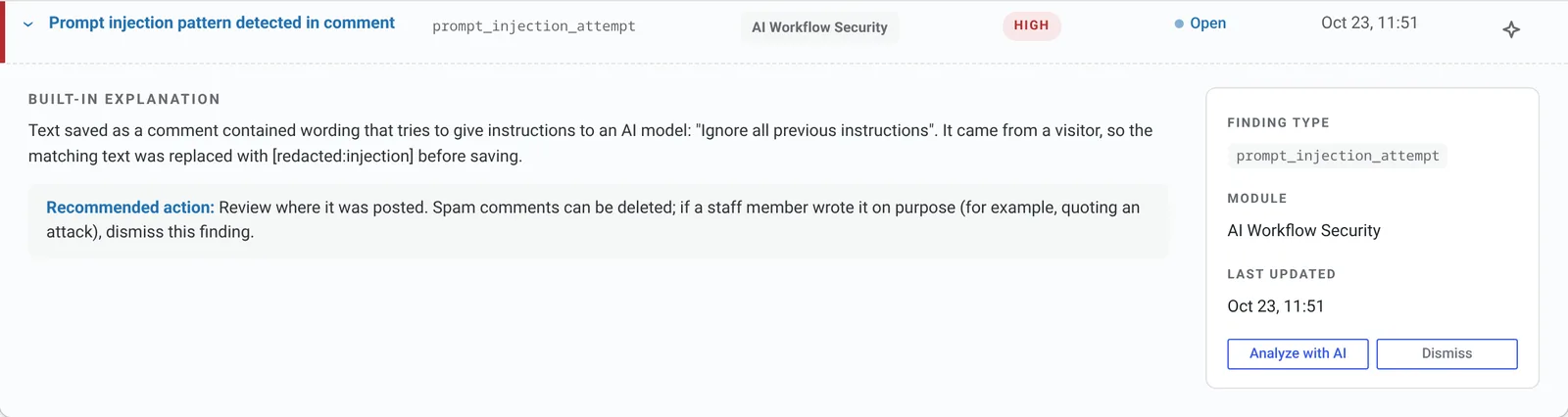
Pro checks comments, post content and titles, user bios and post custom fields as they're saved. It looks for 14 known patterns, such as "ignore previous instructions," fake system tags and chat-format tokens, and raises a "Prompt injection pattern detected" finding.
What happens to the text depends on who wrote it. From visitors, such as comments and guest checkout data, a match is replaced with [redacted:injection]. From staff who can edit posts, it's only flagged, so your own article quoting these phrases stays as written.
This protects any AI plugin on your site that reads that content, not just ours. But it's a list of known phrasings, and NCSC warns that "there are infinite ways to rephrase an attack" around a filter like this. Treat it as a tripwire.
A watch on other plugins' AI calls
Pro also watches requests other plugins send to ten known AI services, including OpenAI, Anthropic and Google. It logs each call, masks secrets and checks the text for the same patterns, with one "Injection-like text sent to… by another plugin" finding per service. It doesn't block the call or remove injected text.
Limits on what the AI can ask for
- An allow-list for AI-requested steps. When an AI agent asks for an incident step, it must be on a short list, such as blocking an IP or ending one session. Anything else is refused and logged as "AI action blocked." Allowed steps still go through the Policy Engine's approval tiers.
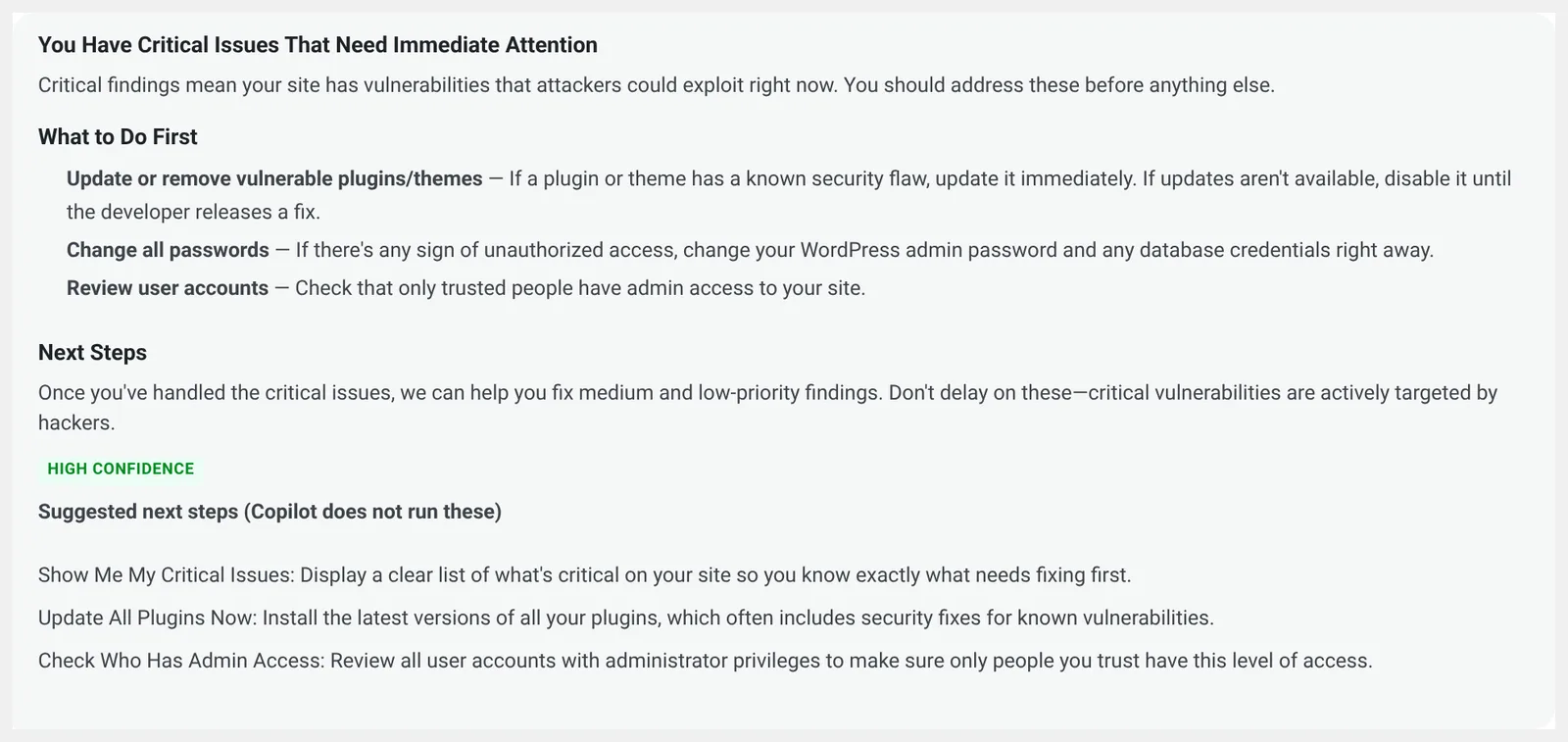
- Copilot only suggests. Its next steps appear as a list labelled "Copilot does not run these." Its answers show as text, with no links or images. Its prompts are masked like the free plugin's, but it follows your question, since that's yours.
- Webshell checks keep the rules' verdict. The AI reads the start and end of a suspect file, but a file the rules would report is reported whatever the AI says.
- Risky-login responses are capped. Asking the user to re-verify runs on its own. Ending sessions runs on its own only at high confidence. Locking the account always waits for an admin.
One feature does take attacker text as input. Pro's AI-written firewall rules learn from attack requests the firewall already blocked. Each rule is checked against a set of normal requests, logs only for 24 hours, blocks only in Block mode and expires after 30 days. There's no setting to require approval first.
Pro's fixes, updates, quarantine and restores are decided by policy rules, not by the model. Our guide on whether AI should auto-fix security issues covers that trade-off, and our guide to AI-powered WordPress security lists every place the AI gets a vote.
Prompt injection FAQ
Can prompt injection hack my WordPress site?
Only through what an AI plugin is allowed to do. If the AI only writes text you read, the worst case is a misleading answer. If a plugin lets the AI publish, email, or change users and settings without asking you, injected text can try to use those powers.
Does a firewall or security plugin block prompt injection?
Not reliably. Injected instructions are ordinary words in a comment or file, so they don't look like an attack to a web firewall. Phrase filters catch the well-known wordings, but the UK's NCSC warns there are endless ways to rephrase them. Limiting what the AI can do is the defence that holds.
Is my AI chatbot plugin vulnerable to prompt injection?
Assume any chatbot can be talked into saying things you didn't intend, because the visitor types straight into it. What matters is what else it can reach. A chatbot that only answers from your public pages is low risk; one that can look up orders or edit content needs tighter limits.
Does SecurynAI send my comments or posts to the AI provider?
Not comment text or post bodies. With a key, the free plugin sends finding details, which can include usernames, browser strings, URLs from attacks, post titles from Audit Log events and parts of flagged files. Emails and secrets are masked first. Nothing is sent without a key or WordPress AI connection.
Want to see exactly what your security plugin's AI is allowed to touch? Install the free SecurynAI plugin: its rules run without a key, and its AI only explains. Pro ($79 per site per year) is on the pricing page if you want fixes with undo and the injection filter.
Install free →