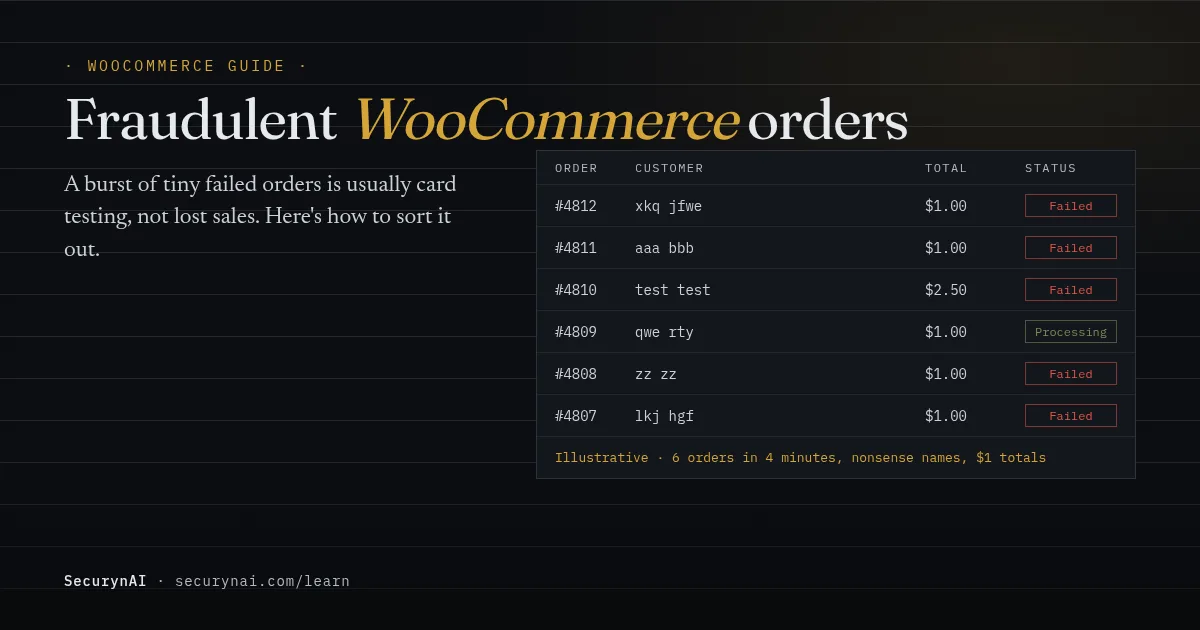
A fraudulent WooCommerce order is an order placed with a stolen card, or by a buyer who plans to dispute it, rather than by a genuine customer paying in good faith. The most common kind is card testing: a bot running stolen card numbers through your checkout to see which ones still work.
Maybe you opened WooCommerce › Orders this morning and found hundreds of failed orders for a dollar or two. Don't delete anything yet. First, check whether any of those charges went through. If they did, refund them today. That one step heads off most of the chargebacks that follow.
Which kind of fraudulent order are you looking at?
Order fraud comes in a few distinct shapes, and the fix depends on which one you have. Card testing and chargeback fraud need completely different responses, so name it before you act.
| What you see | What it probably is | First move |
|---|---|---|
| A burst of small orders, mostly Failed, random names and emails | Card testing | Refund any that succeeded, then slow checkout down |
| One large order, rushed shipping, billing and shipping addresses far apart | A purchase with a stolen card | Put it on hold and check before you ship |
| A chargeback weeks after a delivered order | Friendly fraud (first-party misuse) | Gather your evidence and contact the customer |
| Dozens of coupon codes tried, or refunds minutes after ordering | Coupon or refund abuse | Review the account and the codes involved |
These aren't rare. The 2026 Global eCommerce Payments & Fraud Report from the Merchant Risk Council, Visa Acceptance Solutions and Verifi surveyed over 1,200 merchants. It found five fraud types hitting at least a third of them, including card testing, first-party misuse and refund or policy abuse.
Is a wave of failed WooCommerce orders serious?
It's not a break-in, but it isn't harmless either. WooCommerce's guide on preventing and responding to card testing is reassuring on one point: "These orders do not represent missed sales, nor are they caused by issues with your checkout."
The cost shows up later. Stripe's card testing documentation lists what follows: disputes on the charges that succeed, extra fees, and a high decline rate that "might damage the reputation of your business with card issuers." That can mean more of your genuine customers' cards get declined, even after the attack stops.
It also hits the store itself. Every attempt is a real checkout request, so a big run can slow the site. And some owners feel cornered. In a WordPress.org thread about failed orders, one store owner concluded: "Only way to stop them is turning off Paypal Payments." You usually don't have to go that far.
What to do in the first hour of a card testing attack
Slow the bot down first, then clean up. Work through these in order. None of them deletes anything, so they're safe to start on now.
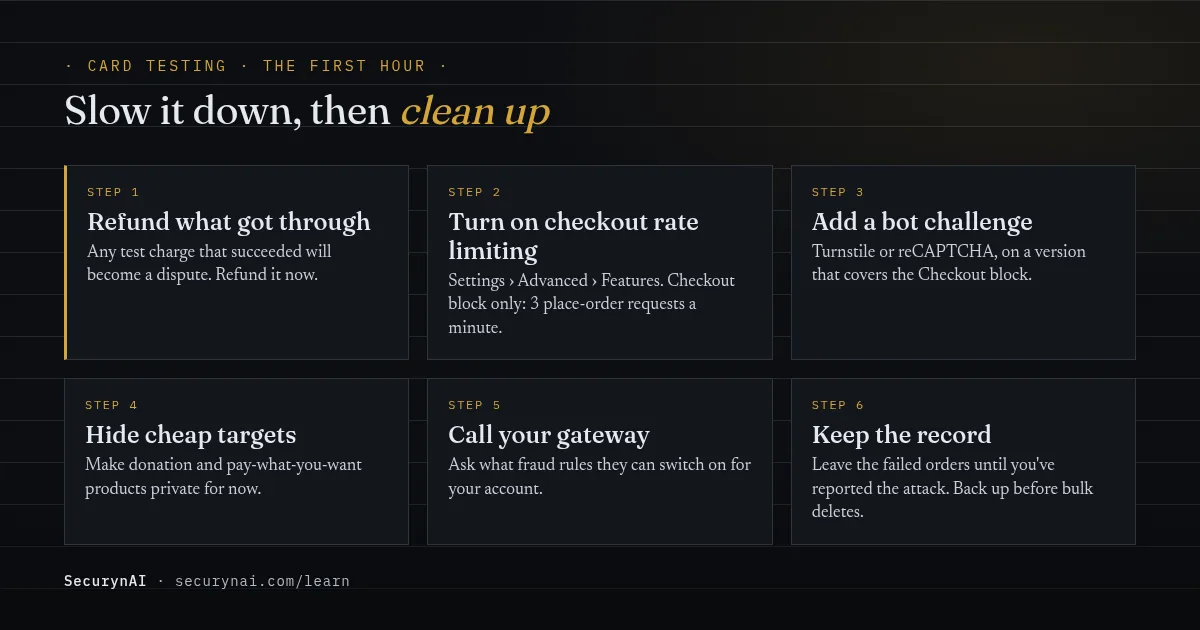
- Refund anything that succeeded. WooCommerce calls this the most important step: "Review all transactions and refund any transactions that you believe to be fraudulent." A refund now beats a dispute fee later.
- Turn on checkout rate limiting. Go to WooCommerce › Settings › Advanced › Features and enable "Rate limiting Checkout block and Store API". Per the Store API rate limiting docs, that caps place-order requests at "a maximum of 3 requests per 60 seconds". It only covers the Checkout block, not the older shortcode checkout.
- Add a bot challenge to checkout. Cloudflare Turnstile or reCAPTCHA both work. Use a current version: WooCommerce's developers found in December 2024 that several popular captcha plugins weren't protecting the Checkout block, and those plugins were patched.
- Hide your cheapest targets. Make donation and pay-what-you-want products private for now. Bots love products with no minimum price.
- Talk to your payment provider. Ask what fraud rules they can switch on for your account. If you offer saved cards, WooCommerce suggests turning that option off for now.
- Keep the failed orders for now. They're your record of the attack. Once you've reported it, back up the database before you delete them in bulk.
Rate limits slow a bot but rarely stop it alone. One owner in a WordPress.org card-testing thread wrote that "the attack rotates IPs and User-Agents", and a honeypot was "bypassed, since the bot posts directly to AJAX." What helped them was a challenge at checkout itself: "I have installed Cloudflare Turnstile. It seems to be working."
How to stop card testing coming back
Once the attack is over, put layers in place so the next one fizzles. The controls that matter most live at checkout and at your payment gateway, not in a security plugin.
- Keep the bot challenge on checkout. Stripe's own advice is to make sure "the CAPTCHA requires validation on all requests" that can take a payment, and that it's checked on the server.
- Use your gateway's fraud rules. If you're on Stripe, Radar has built-in rules to block payments that fail the card's CVC or postal code check. Stripe's Radar rules page explains why: an issuer "might still consider a payment that fails CVC or postal code verification legitimate", and approve it anyway. PayPal and other gateways offer their own filters.
- Think about guest checkout. Stripe notes that easy access to the payment form, "for example, using guest checkout", makes testing easier. Requiring an account costs some sales, so it's a trade-off, not a default.
- Don't rely on IP blocks. Stripe says filters "based on a single heuristic such as IP addresses are usually not sufficient" to stop card testing. Blocking IPs helps, but only alongside the steps above.
If your store also takes orders through the REST API or a mobile app, read our guide to WooCommerce REST API security. Keys with write access are another way to create orders you didn't expect.
Friendly fraud and chargebacks: what actually wins a dispute
Friendly fraud is when a real customer gets the goods, then tells their bank they didn't. The industry now calls it first-party misuse. Your store settings can't prevent it, but the records you keep decide whether you get the money back.
It's growing. In the same 2026 MRC report, 64% of merchants said first-party misuse was rising, and their average cost to resolve each such dispute passed $80 for the first time.
Fraud costs more than the order, too. LexisNexis Risk Solutions' 2025 True Cost of Fraud study found US retail and ecommerce merchants paid an average of $4.61 for every $1 of fraud.
WooCommerce's guide to managing payment disputes lists the evidence that helps. Start keeping it now, before you need it:
- The order receipt, showing what was bought, the amount and your refund policy.
- Proof the buyer agreed to your terms at checkout.
- Tracking and carrier delivery confirmation for physical goods.
- Download or login records, with IP addresses and times, for digital goods.
- A PDF of your refund policy as the customer saw it. The issuer won't click links.
Contact the customer before you fight it. People do dispute charges they've forgotten. And keep expectations realistic: as a WooPayments support reply put it in a WordPress.org review thread, "when a customer initiates a chargeback, the resolution is handled by the card issuer". You can only make your case.
Which WooCommerce orders deserve a manual review?
For the stolen-card purchase that does go through, a quick human look is cheap insurance. No single signal proves fraud, but two or three together are worth ten minutes before you ship. Plenty of real gift orders look odd too.
- Billing and shipping addresses in different cities or countries.
- A brand-new account, a large order and the fastest shipping option.
- Several orders or failed payments from the same IP address in a few minutes.
- Many units of the same product in one order.
- An email address or name that doesn't look like a person.
To hold an order, set it to On hold. WooCommerce defines that as "awaiting payment confirmation", and stock is still reserved. If it checks out, move it to Processing. If not, refund it and cancel before anything ships.
What SecurynAI does, and doesn't do, for WooCommerce fraud
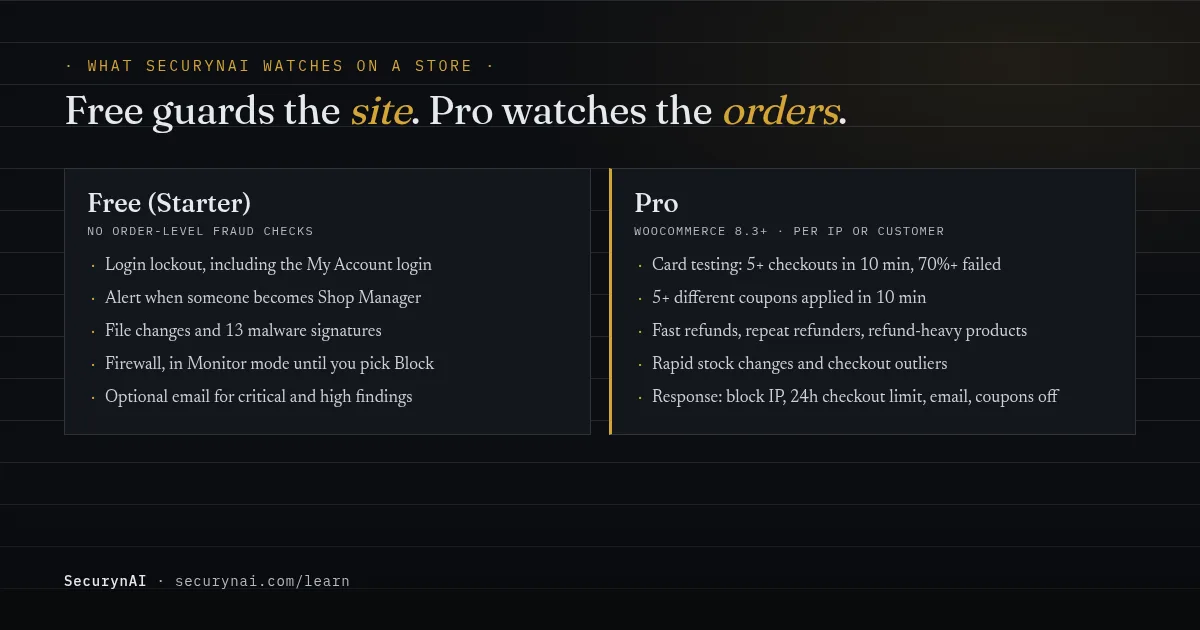
We at SecurynAI want to be straight about this: the free plugin has no order-level fraud checks. It protects the WordPress site your store runs on. Order fraud detection is part of Pro, and even there it works alongside your gateway's tools, not instead of them.
Free: the site around the store
The free plugin locks out repeated failed logins, and that check runs on WordPress's own login, which the My Account form uses too. It flags a promotion to Shop Manager as high severity, scans files for changes and known malware, and can email you critical and high findings.
The firewall starts in Monitor mode: it logs attacks and blocks nothing until you switch it to Block. Login lockout works in either mode.
That site-side cover matters for stores. A card skimmer is a file change, not an order pattern, and our guide to Magecart-style skimmers in WooCommerce explains how they hide.
Pro: the orders themselves
On Pro ($79 per site per year), the E-Commerce & Transaction Security module switches on when WooCommerce 8.3 or later is active.
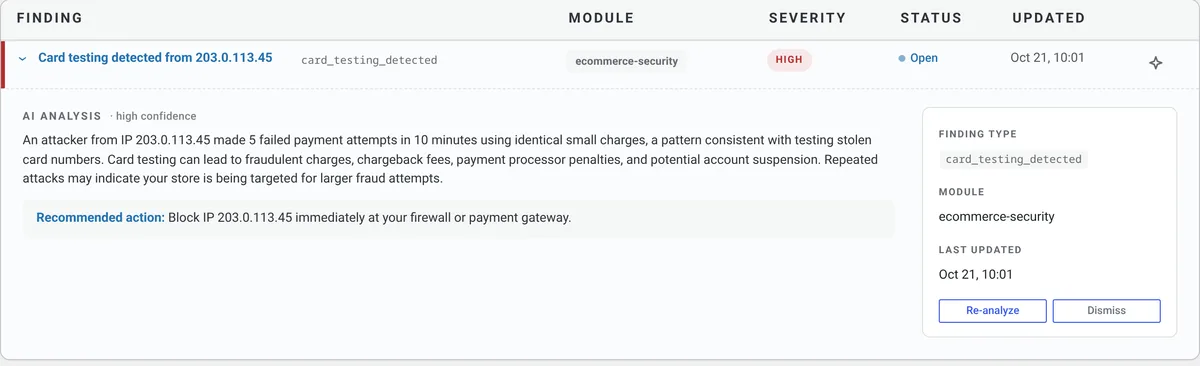
It flags card testing when one IP makes at least five checkout attempts in ten minutes and 70% or more end as Failed orders. Fifteen or more attempts, or mostly orders of 5 or less in your store's currency, makes it critical.
It also watches for one visitor applying five or more different coupon codes in ten minutes, refunds within five minutes of the order, five or more refunds for one customer in 30 days, a product refunded on 20% or more of its orders in a week, rapid stock changes, and unusual checkout activity.
Serious matches can open an incident with a response plan. It can block the IP and, for 24 hours, refuse checkout to any IP with three or more attempts in ten minutes. It emails your alert address with the order numbers to review, and for coupon abuse it can disable the codes.
Know the limits. Detection is per IP, so a bot that rotates addresses can slip under it. A declined payment only counts once the order moves to Failed, and invalid coupon guesses aren't counted. A Pro IP block is only enforced once your firewall is in Block mode. None of this replaces backups, updates or your gateway's fraud screening.
Quick check: is your store ready for the next card-testing run?
- Is "Rate limiting Checkout block and Store API" switched on?
- Does your checkout have a bot challenge that covers the Checkout block?
- Have you turned on your gateway's CVC or postal code rules?
- Do you have any products with no minimum price that a bot could use?
- Would you know within a day if failed orders spiked?
Yes to 1, 2, 3 and 5, and no to 4, means you're in good shape. Missing one or two is common and quick to fix this week. For the wider picture, work through our WooCommerce security checklist and the guide to securing WooCommerce customer data.
WooCommerce fraudulent orders FAQ
Why am I getting lots of failed orders in WooCommerce?
A sudden pile of small failed orders with odd names is almost always card testing: a bot checking stolen card numbers against your checkout. WooCommerce's own guidance says these orders aren't missed sales and aren't caused by a problem with your checkout. Refund anything that went through, then slow the bot down.
Should I delete failed card-testing orders?
Not straight away. Keep them until you've refunded any successful charges and told your payment provider, because they're your record of the attack. After that, back up the database and clear them in bulk if they clutter your reports.
Does a security plugin stop card testing?
Only partly. A security plugin can spot the pattern and block an IP, but card-testing bots rotate addresses, and Stripe notes that a single signal like the IP address is usually not enough on its own. The controls that do the most sit at checkout and at your payment gateway.
Can I win a friendly fraud chargeback?
Sometimes. The card issuer decides, not WooCommerce or your plugin, so your odds depend on the evidence you send: the receipt, proof of delivery or download, and the policy the customer agreed to. Contacting the customer first can also get the dispute withdrawn.
Running a WooCommerce store and want to know when the site around it changes? The free SecurynAI plugin watches logins, admin roles and files from the moment you install it.
Install free →