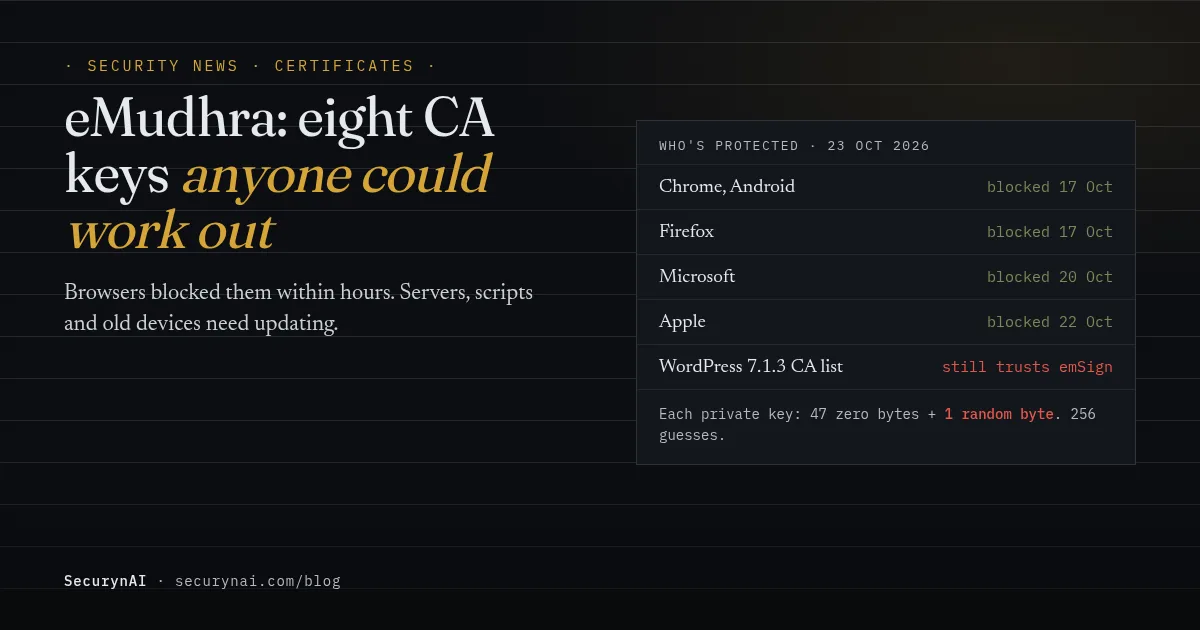
The eMudhra certificate compromise is a security failure at eMudhra, an Indian certificate authority, whose private keys for eight intermediate CA certificates were so weak anyone could work them out. With those keys, someone could create a trusted-looking certificate for any website. Browsers blocked them within hours of the report on 17 October 2026.
First we'll explain it simply: what a certificate authority does, whether your website is affected, and what to do. Then, for developers and server admins, the technical details: how the keys were broken, why browsers are safe but other software isn't, and what to update.
What happened at eMudhra, and why does it matter?
A certificate authority is like a passport office for websites. When you visit a site over HTTPS, your browser checks its certificate, a kind of ID card. The browser trusts that ID because a certificate authority it already trusts vouched for it.
Certificate authorities sign those ID cards with secret keys. eMudhra created eight intermediate certificates in April 2025, six for websites and two for signing software. Because of a mistake when the keys were made, each secret key was effectively one byte long. A secret with only 256 possible values isn't a secret.
Anyone holding those keys could have issued a trusted-looking certificate for any website, or signed malware so it looks legitimate. To use a fake website certificate, an attacker still has to get between you and the real site, for example on public Wi-Fi or inside a network. The certificate makes the fake look genuine.
Is my website affected by the eMudhra compromise?
There are three separate questions here, and the answers are different.
| Question | Short answer |
|---|---|
| Are my visitors at risk in their browser? | No, if their browser is up to date. Chrome, Firefox, Microsoft and Apple have all blocked the eight certificates. |
| Is my site's own SSL certificate affected? | Only if it comes from eMudhra's emSign ECC Root CA - G3. Chrome stops trusting that root on 27 October 2026. |
| Is my server's outgoing HTTPS affected? | Possibly, until it's updated. WordPress and server software use their own certificate lists, which may still trust eMudhra. |
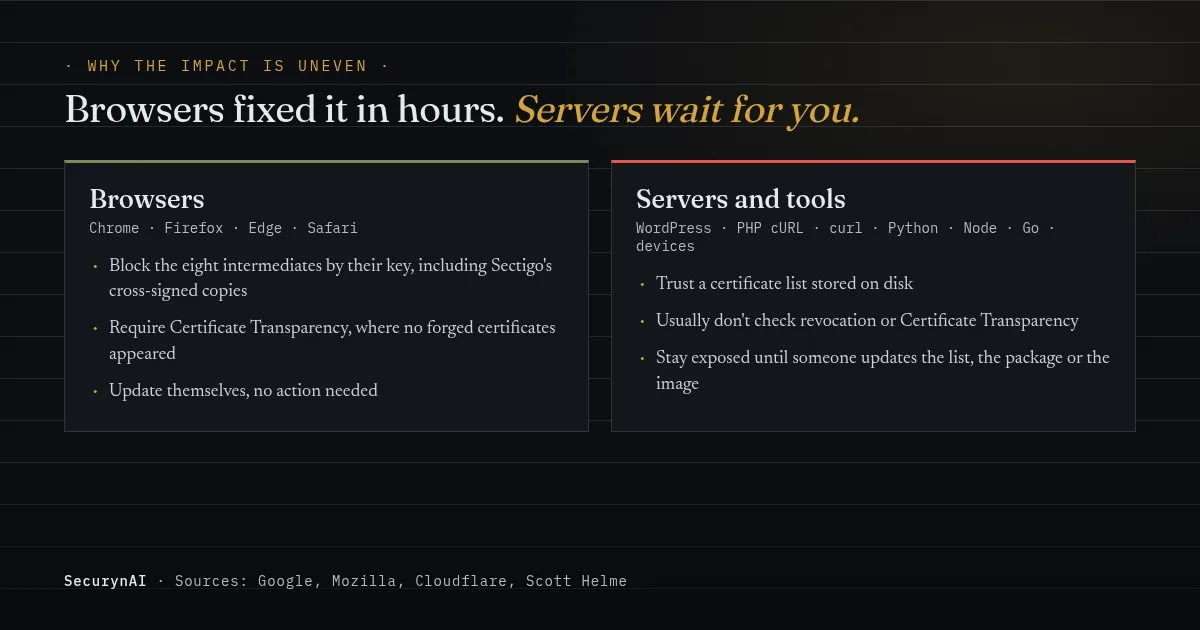
Your visitors: already protected
Browsers were fixed within hours, without anyone updating anything. Google says the Chrome Root Program got the report at 18:05 UTC on 17 October and blocked the certificates by 19:45 UTC. Mozilla's block was out to Firefox users by 22:59 UTC the same evening.
Your own SSL certificate: probably not, but check
A certificate from Let's Encrypt, DigiCert or your host's free SSL isn't affected. eMudhra says "there were no end entity certificates issued out of the affected CA's", so no ordinary website certificate came from the eight bad intermediates.
The catch is Chrome's next step. It is removing the root above them, emSign ECC Root CA - G3, on 27 October 2026, and Google says some legitimate sites using that root will stop working in Chrome. To check yours, click the padlock in your browser, open the certificate details and look at the top of the chain.
Your server's outgoing connections: update when you can
WordPress itself makes HTTPS connections, and it brings its own list of trusted certificate authorities to do it. Updates, payment gateways and plugin APIs all go through that list, the file wp-includes/certificates/ca-bundle.crt. We checked WordPress 7.1.3, the newest release: its list still includes the eMudhra roots.
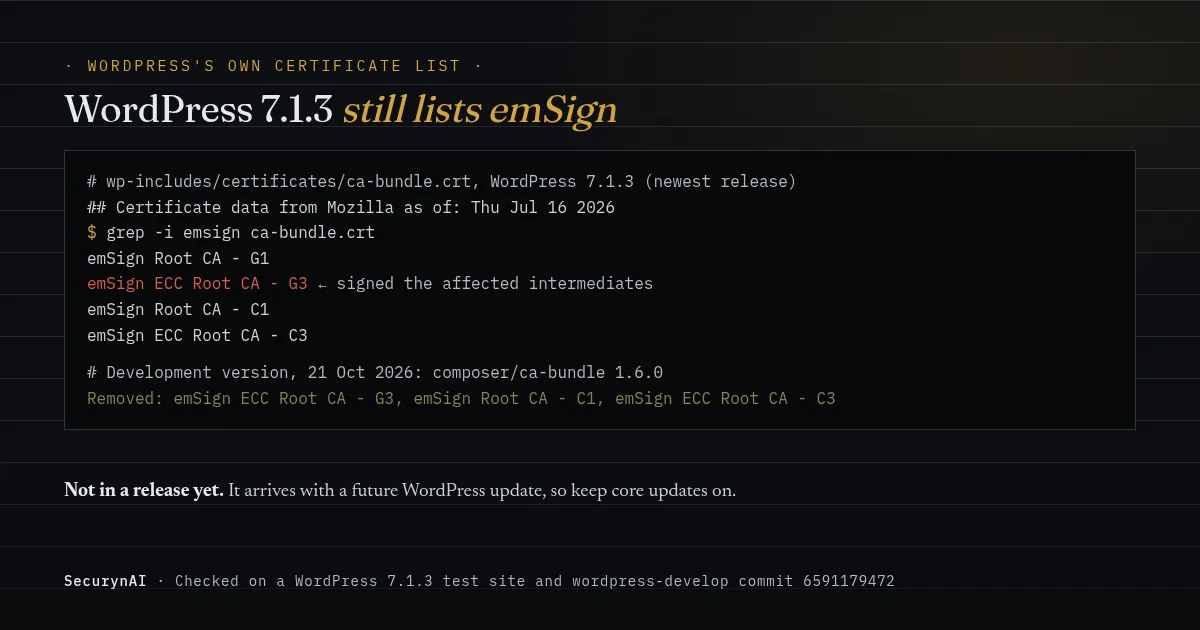
WordPress has already fixed this in its development version. A commit on 21 October updated the list and removed three emSign roots. It will reach your site with a future WordPress release, so keep core updates on. Our automatic updates guide shows how to check they are.
What should I do about the eMudhra compromise today?
For most site owners, this is a five-minute check, not an emergency. Here's the order we'd do it in:
- Check your SSL certificate's issuer using the padlock. If it mentions emSign or eMudhra, contact your provider and replace it before 27 October. eMudhra says it will replace affected certificates free of charge.
- Keep WordPress updated. The next release should carry the new certificate list. If you've switched core updates off, plan to apply it.
- Ask your host to update the server's certificate store (the
ca-certificatespackage on Linux). Plenty of plugins and tools use that list rather than WordPress's. - Update the browsers and devices you use to manage the site. Restarting picks up the update on most phones and laptops.
If you look after client sites, check certificates in bulk. A client who bought SSL directly from an Indian reseller is the likeliest to be on an emSign certificate. Everyone else on host-provided SSL can usually be ticked off quickly. Our playbook on managing 30+ client sites covers keeping this kind of check routine.
Should I panic about the eMudhra keys?
No. For a typical website, the practical risk is low. No misuse has been confirmed, browsers are protected, and using a fake certificate still requires an attacker on the network path. Google says no website certificates from the six affected intermediates appeared in Certificate Transparency logs, the public record browsers check.
The uncomfortable part is the time window. The researchers who disclosed it note the keys could have been recoverable since April 2025, about 17 months, and "We do not know if attackers exploited the flawed key generation". Software that doesn't check Certificate Transparency wouldn't have noticed a forged certificate.
Developers on Hacker News put it well: "The impact of this incident is very unevenly spread." Browsers got a fix in hours. Servers, scripts, containers and old devices need someone to update them, and some never will be. That uneven tail is where the real exposure sits.
eMudhra compromise: technical details for developers
This section is for developers and server admins. Facts come from Google, Mozilla, Cloudflare, Scott Helme's analysis and the disclosure site unless another source is named.
How weak were the keys?
The private keys were P-384 elliptic-curve keys with effectively one byte of randomness. In Scott Helme's analysis, each key was 47 zero bytes followed by one byte, so recovering it means computing n×G for n up to 255 and matching the public key. He recovered all of them in under a second on a laptop.
According to eMudhra's account on the Mozilla bug, a script in the April 2025 key ceremony created a second, weak key pair on the HSM, and the wrong key was picked for the certificate signing request because the names were similar. The researcher, Wayne, proved control by signing "We have a problem here - Wayne" with each key.
Why removing one root isn't enough
The eight intermediates also exist as copies cross-signed by Sectigo, which chain to a different and widely trusted root, AAA Certificate Services. So dropping emSign ECC Root CA - G3 from a trust store doesn't stop those copies. Browsers block the intermediates by key, which covers both.
Other software needs the same kind of fix. Go 1.26.10 and 1.27.3 add a denylist for these keys to crypto/x509 (CVE-2026-111943), and Go programs only get it once rebuilt. Python's advice is pip 26.2.2 or later and certifi 2026.10.19, because older pip always loads its own bundled certificate list. Cloudflare's guidance adds cloudflared, mutual TLS trust stores and container images.
What still trusts the keys by default
Anything that reads a CA bundle from disk and doesn't check revocation or Certificate Transparency. Scott Helme's test had curl, Python and Node accepting a forged certificate on Linux and macOS. On Windows, CryptoAPI accepted it unless revocation checking was on. He flags curl | sh installers, CI pipelines, server-to-server APIs and IoT devices with frozen trust stores.
On a WordPress server, that means the WordPress HTTP API (its bundled list), PHP's own cURL and OpenSSL (the system store), and any plugin that ships its own bundle. In the Python.org discussion, one maintainer noted that upgrading pip in every new virtual environment is "probably easy to forget". The same is true of old containers.
How to check and fix a server
Update first, then confirm what your site actually serves. To see whether your own certificate chains to the emSign root, OpenSSL can show the chain:
# Look for "emSign" in your site's certificate chain
openssl s_client -connect example.com:443 -servername example.com -showcerts </dev/null | grep -i "emsign"

# Debian / Ubuntu: refresh the system certificate store
sudo apt update && sudo apt install --only-upgrade ca-certificates
No output from the first command means emSign isn't in the chain. After updating, restart PHP-FPM and other long-running services so they reload the store, and rebuild container images. Never "fix" a resulting certificate error by turning verification off; Cloudflare calls out exactly that as the dangerous workaround.
How the eMudhra compromise unfolded
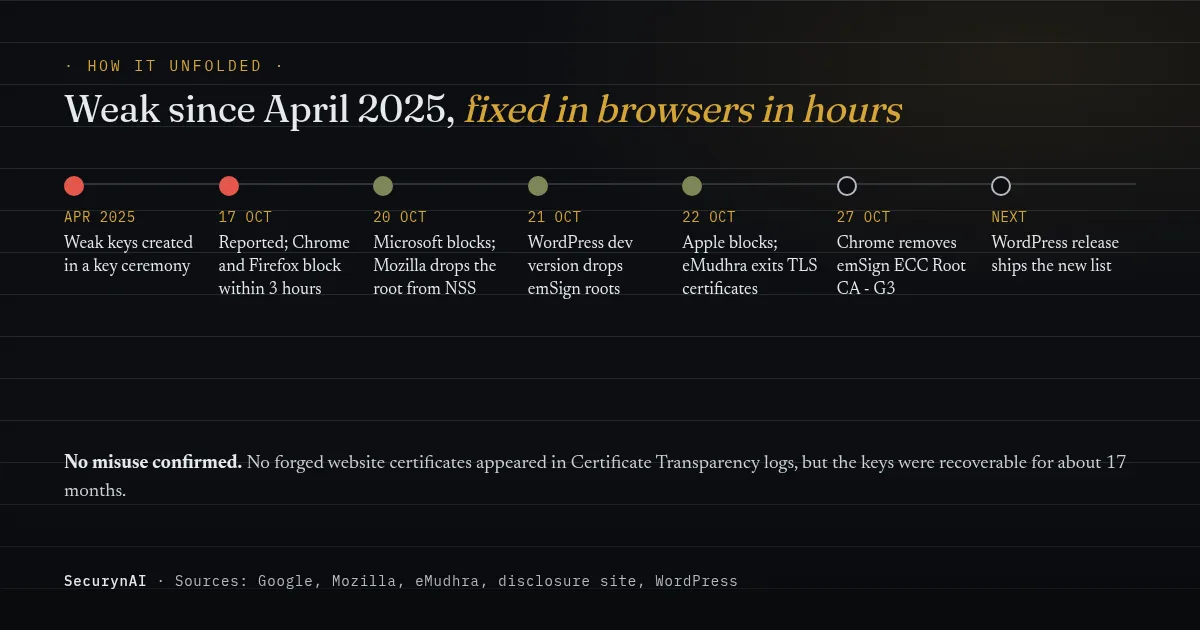
The fix took hours in browsers and will take months everywhere else. On 22 October, eMudhra said it will voluntarily withdraw from the global SSL/TLS certificate business, while its other roots keep serving existing customers during the transition.
eMudhra certificate compromise FAQ
Is my website's SSL certificate affected by the eMudhra compromise?
Almost certainly not, unless you bought it from eMudhra or a reseller using eMudhra's emSign certificates. eMudhra says no website certificates were issued from the eight affected intermediates. If your certificate chains to emSign ECC Root CA - G3, Chrome stops trusting it on 27 October 2026, so replace it now.
I use Let's Encrypt or my host's free SSL. Do I need to do anything?
Not for your own certificate: Let's Encrypt is a separate certificate authority and isn't affected. The only thing worth doing is keeping WordPress and your server's certificate list up to date, which you'd want anyway.
Were any websites attacked using the eMudhra keys?
No misuse has been confirmed. Google says no website certificates from the six affected website intermediates appeared in Certificate Transparency logs before Chrome blocked them. Because the keys were recoverable for about 17 months, though, nobody can fully rule out quiet use against software that doesn't check those logs.
Should I turn off SSL verification to fix certificate errors?
No. If an update makes a connection fail, the fix is to update the software or replace the certificate, not to switch verification off. Turning it off removes the protection this whole clean-up is about. If you're unsure whether something on your site was tampered with, our guide to the signs of malware is a calm place to start.
We'll update this post as WordPress ships the new certificate list and more vendors respond. If you only do one thing, click the padlock on your site and check who issued the certificate.